Zip Code, State, or Country? How to Structure Salesforce Account Hierarchies for Geo-Based Reporting
The most common geo-reporting failure in Salesforce isn't a broken report — it's a hierarchy that was never designed to support reporting in the first place. Most orgs default to whatever felt logical at implementation time: a country-level parent account, a state-level grouping, or no grouping at all. Then, two years later, a sales leader asks for pipeline by region and the data is a mess.
The right answer — zip code, state, or country — depends on how your sales team actually operates, what decisions those reports need to drive, and how clean your account data is today.
Quick Answer: For most mid-market B2B companies operating across multiple U.S. states, a state-level account hierarchy with a custom region field is the right default. Zip code hierarchies are valuable for field sales and high-density markets. Country-level hierarchies are essential for any org with international accounts. The three are not mutually exclusive — but you can only optimise for one primary reporting dimension without adding complexity.
Key Takeaways:
The geo granularity of your account hierarchy should match the geographic scope your sales team is measured by — not the physical location of accounts.
Salesforce's native Parent Account field powers the hierarchy, but it only reflects one dimension of geography at a time.
Zip code is the most granular, state is the most practical for domestic B2B, and country is non-negotiable for global orgs.
Sales Territories (formerly Enterprise Territory Management) is a separate, parallel mechanism — not a replacement for a clean account hierarchy.
Dirty geo data is the root cause of most geo-reporting failures: inconsistent state abbreviations and missing postal codes corrupt dashboards before anyone touches the hierarchy.
Why the Geo Hierarchy Decision Matters More Than You Think
Your account hierarchy is the backbone of every geographic report, rollup, and territory view you'll ever run. Get it wrong at design time, and you'll spend years compensating with custom fields, messy formulas, and dashboard filters that nobody trusts.
Salesforce's native account hierarchy is built around a single Parent Account field — a lookup that relates one account to another, creating a parent-child tree. Salesforce Ben describes it this way: the Parent Account field "dictates the hierarchy, established at each Account's level," while the Account Site field helps identify the type of entity — such as a Branch or Headquarters.
The hierarchy view can display the full tree visually, but SP Tech notes that the native view can show up to 2,000 accounts — and Salesforce updates the list dynamically as you scroll. That's more than enough for most orgs, but it reinforces the point: this structure needs to be intentional. Once you have thousands of accounts, a poorly designed hierarchy is nearly impossible to fix without a data migration.
The core design decision is: which geographic level becomes a real Account record in your hierarchy, and which geo attributes live as fields on existing records?
Zip Code Hierarchies: When Granularity Pays Off
Zip code-level account hierarchies are the right call in a narrow but important set of scenarios:
Field sales organisations where reps own specific postal zones and need rollup performance by zip
High-density urban markets where a single state would contain hundreds of accounts with meaningfully different characteristics
Retail or franchise networks where a physical location at a specific postal code is the unit of business
Kubaru outlines the approach well: territory indicators on account records — including Postal Code — act as the criteria that power assignment rules, since Salesforce won't pull geo data into routing on its own.
The operational challenge with zip code hierarchies is maintenance. In the U.S. alone, there are over 41,000 active zip codes. Creating a parent Account record for each zip you operate in is rarely practical at scale. The more sustainable approach is to use zip code as a field-level attribute on your account records and build territory assignment rules on top of it, rather than making zip the structural node in the Parent Account hierarchy.
Salesforce AppExchange offers purpose-built solutions that ground account records with deep geo-context — including zip code, county, state, MSA, and territory — without requiring you to manually build that lookup structure. For orgs with genuine zip-level reporting requirements, that's the more scalable path.
State-Level Hierarchies: The Right Default for Domestic B2B
For most mid-market B2B companies operating within a single country, state-level account hierarchies strike the right balance between granularity and manageability.
The structure is straightforward: a top-level Account record for each state (or region, if you prefer to group states) acts as a parent. All accounts physically located in that state are child accounts. Reports can then be run at the state level, rolled up to region, and filtered cleanly.
Salesforce Ben notes that you can implement geographic locations rapidly using a combination of the Parent Account field and the Account Site field — the latter being a free-text field each organisation can use independently to label the entity type.
The critical gotcha with state-level hierarchies is data consistency. Salesforce Trailhead uses a vivid example of what goes wrong without it: a single state like California appearing in your data as "CA," "Calif," "Cali," and variations in between — resulting in reports that show customers in 87 "states" when there are only 50. That's not a reporting problem. That's a data entry problem that corrupts every geo report you run.
Before you build a state-level hierarchy, run a data audit:
1. Export all Account Billing State/Province values
2. Identify every non-standard entry
3. Enable Salesforce's State and Country/Territory Picklists in Setup — this enforces standardised values at the field level going forward
4. Run a one-time data cleanse on historical records
Only after that foundation is clean should you build the hierarchy structure on top of it.
Country-Level Hierarchies: Non-Negotiable for Global Orgs
If your org has accounts in more than one country, a country-level structure isn't optional — it's the minimum viable hierarchy for any geo-based reporting to function.
GeeksforGeeks captures the flexibility well: the Account Hierarchy feature is designed to let you group accounts by various criteria such as country, state, division, or business function, making it easier to manage complex organisational data.
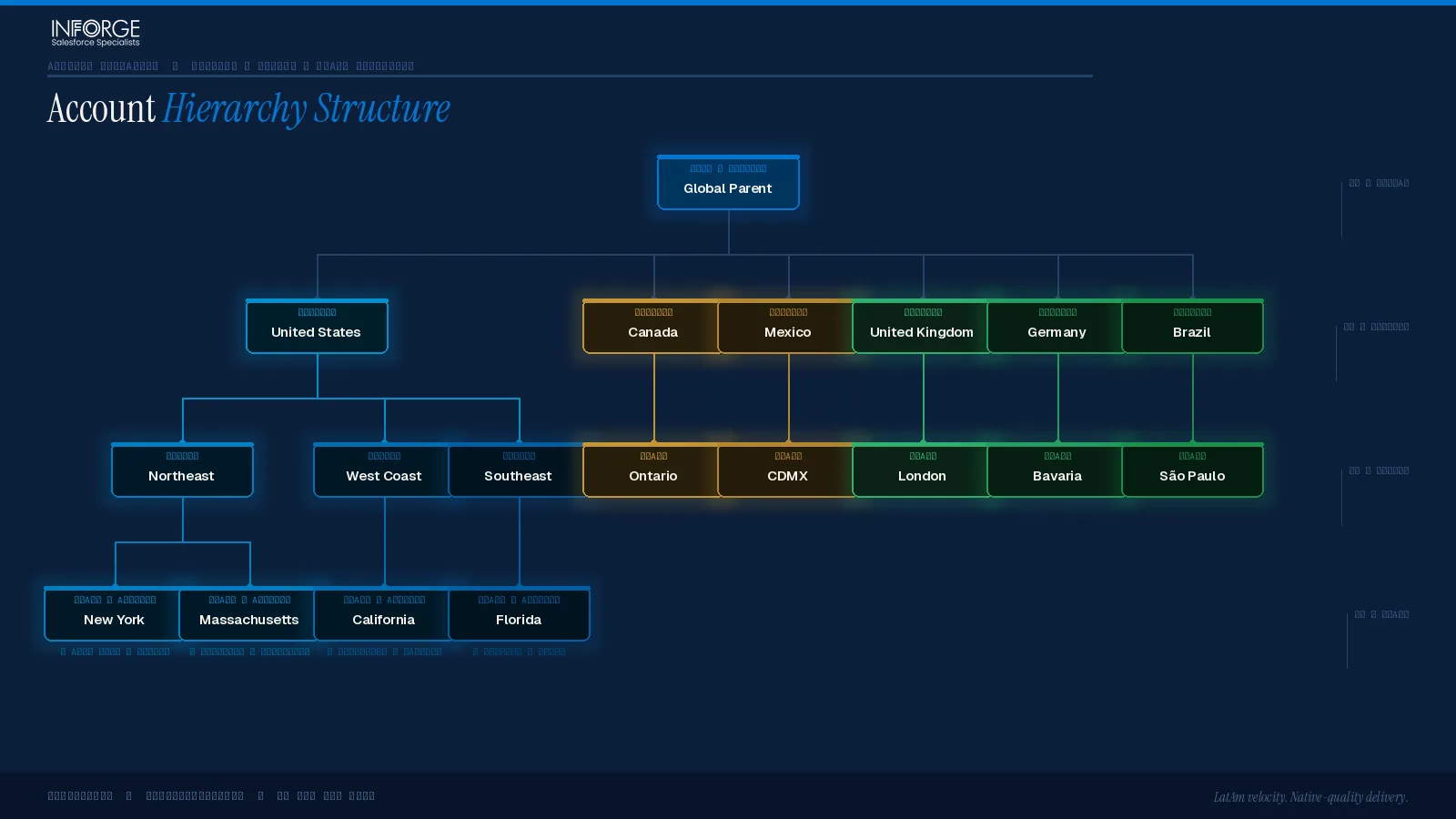
For global orgs, the practical structure looks like this:
Level 1 (Root): A single global parent account (often the ultimate parent company)
Level 2: Country-level accounts (e.g., "Acme — United Kingdom," "Acme — Germany")
Level 3: State/region accounts within each country (where relevant)
Level 4: Individual location or subsidiary accounts
This structure lets you answer both "how are we performing in EMEA?" and "how are we performing in Germany specifically?" — without needing separate reports for each.
One Salesforce platform constraint worth knowing: Salesforce Ben confirms that Person Accounts cannot be included in Account Hierarchies. If you're running a hybrid model with both Person Accounts and Business Accounts, your geo hierarchy applies only to the Business Account side.
For territory access and record-level sharing, Sales Territories (formerly Enterprise Territory Management, renamed in Summer '24) operates as a parallel mechanism. As Salesforce Ben explains, Sales Territories is classified as a sharing mechanism that controls who has access to accounts, opportunities, cases, and leads based on territory rules — distinct from the Parent Account hierarchy used for reporting. The two systems complement each other but serve different purposes.
The Hybrid Approach: When One Level Isn't Enough
The most robust setup for mid-to-large orgs isn't a choice between zip, state, or country — it's a layered model that uses all three at the right level.
Kubaru summarises the design principle clearly: a clear parent and child structure makes coverage easier to organise and reporting much cleaner — and when your hierarchy reflects how your sales team actually works, it becomes much simpler to adjust as strategy evolves.
A practical hybrid model for a multi-region B2B company:
The Account Hierarchy (structural):
Root: Ultimate Parent (global or national)
Level 2: Country
Level 3: Region (e.g., "Northeast," "DACH")
Level 4: State / Province
Level 5: Individual accounts (with Billing Zip Code as a field)
Supporting layers (non-structural):
Billing Zip/Postal Code as a field on each account — used for territory assignment rules and fine-grained filtering
A custom Region picklist field for cross-country groupings that don't map cleanly to a hierarchy
Sales Territories for access control and assignment, configured to mirror the hierarchy structure
Calendly's territory management guide makes a useful distinction: territory assignment rules consider factors like geographic location, industry, company size, and lead source simultaneously — meaning your territory model can be more nuanced than your account hierarchy without conflicting with it.
At Inforge, we've found that the most common implementation error is conflating territory management with account hierarchy design. They solve adjacent problems. Your hierarchy drives reporting roll-ups; your territory model drives access and assignment. Build them separately, then align them.
The Data Quality Problem Nobody Wants to Talk About
The architecture decisions above are meaningless if the underlying geo data is bad. And in most Salesforce orgs, it is.
According to Gartner research cited by DataGroomr, the average financial impact of poor data quality on organisations is $9.7 million per year. That's not abstract — it maps directly to the revenue impact of misrouted leads, misattributed pipeline, and geo dashboards that sales leaders have quietly stopped trusting.
Forrester, also via DataGroomr, reports that nearly one-third of analysts spend more than 40% of their time vetting and validating analytics data before it can be used for strategic decisions. In a geo-reporting context, that's time spent cleaning state abbreviations and filling in missing postal codes that should have been enforced at data entry.
Three enforcement mechanisms every geo-focused org should have in place:
1. State/Country Picklists: Enable in Setup > Data > State and Country/Territory Picklists. This eliminates free-text state entry and forces standardised ISO values.
2. Validation Rules on Billing Address fields: Require Billing Country and Billing State/Province to be populated before an Account can be saved.
3. Duplicate Management: Accounts duplicated across regions silently inflate your geo numbers. Salesforce notes that duplicate customer profiles in a CRM lead to inefficiencies and inaccurate reporting — and geo reports are especially vulnerable because a duplicate in a different state looks like a new account in that market.
Summary
Geo-based reporting in Salesforce doesn't fail because of bad dashboards — it fails because the account hierarchy wasn't built to support it. The right granularity depends on how your sales team is structured and what decisions your reports need to drive. For most domestic B2B orgs, state-level is the right default with zip code as a field attribute. Global orgs need country at the top of the tree. And everywhere, clean address data is the foundation that everything else depends on.
At Inforge, we design and implement Salesforce account hierarchies as part of our full-org implementations — delivered entirely through our AI-driven delivery model. If your geo reporting is broken, the fix usually starts two steps earlier than where you think it does.
Frequently Asked Questions
Q: Should I create actual Account records for each state or country in my hierarchy?
A: Yes — if you need to roll up metrics to that geographic level in native Salesforce reports. A parent Account record for "California" or "United Kingdom" lets you use standard report groupings and hierarchy views. If you only need filtering (not roll-up), a picklist field on individual accounts may be sufficient and simpler to maintain.
Q: What's the difference between Account Hierarchy and Sales Territories in Salesforce?
A: Account Hierarchy (built on the Parent Account field) is a structural, reporting-oriented feature — it determines how records relate to each other and how data rolls up. Sales Territories (formerly Enterprise Territory Management) is a sharing and access mechanism — it controls which reps can see and work on which accounts. Both can reflect geography, but they serve different functions and should be configured independently.
Q: Can I use zip codes for territory assignment without making zip a node in my Account Hierarchy?
A: Yes, and this is usually the better approach. Store the Billing Zip/Postal Code as a field on each Account record, then build territory assignment rules in Sales Territories that use that field as a criterion. This gives you zip-level routing and filtering without the maintenance burden of creating thousands of parent Account records.
Q: How do I fix geo-reporting when my state/country data is inconsistent?
A: Enable State and Country/Territory Picklists in Salesforce Setup first — this standardises all future data entry. Then run a data cleanse on historical records to normalise existing values. Add validation rules to require Billing State/Province and Billing Country on Account save. Only after that foundation is clean should you rebuild or redesign your hierarchy.
Q: How many levels deep should my geo account hierarchy go?
A: Three to four levels is the practical maximum for most orgs before complexity outweighs value. A common structure is Country > Region > State > Individual Account. Going deeper (e.g., adding City or Zip as structural nodes) usually creates maintenance overhead that isn't offset by reporting gains — use fields and territory rules for that granularity instead.
