Why Is Nobody Using Your Salesforce? 6 Fixes to Boost User Adoption After Go-Live
You went live. Leadership celebrated. The implementation partner sent their final invoice. Then, ninety days later, someone pulled the login reports — and half the team hadn't touched Salesforce in two weeks.
This is not a rare failure. It is the default outcome when adoption is treated as a training problem rather than a systems problem. The good news: every one of the root causes is fixable. The bad news: most organisations only discover that after they've already lost months of clean data and user trust.
Quick Answer: Salesforce user adoption fails after go-live because the platform wasn't configured for daily users, training stopped at launch, executive behaviour didn't reinforce usage, and there was no mechanism to surface or fix resistance. Fix the configuration, rebuild the training cadence, make leadership accountable, activate super users, instrument adoption metrics, and close the feedback loop — in that order.
Key Takeaways:
Low Salesforce user adoption — not platform limitations — is the primary reason CRM projects fail to deliver ROI.
Fewer than 40% of organisations using CRM software achieve end-user adoption rates above 90%, according to CSO Insights.
The average sales rep spends 17% of their day on manual data entry — a direct driver of CRM avoidance.
Six structural fixes applied post-go-live can reverse declining adoption without a re-implementation.
At Inforge, we've found that adoption problems are almost always configuration and change management problems in disguise — not user problems.
Why Salesforce Adoption Collapses After Go-Live
The platform doesn't fail. People don't fail. The handoff fails.
According to Forrester Research, 49% of all CRM projects fail to achieve their planned objectives, with 22% of those failures directly linked to people-related issues including poor user adoption. And according to CSO Insights, fewer than 40% of organisations using CRM software achieve end-user adoption rates above 90%.
That's not a Salesforce problem. That's an implementation and change management problem — and it shows up most acutely in the weeks after go-live, when the implementation partner has left, the admin is flying solo, and users are quietly reverting to whatever worked before.
The reasons are consistent across every org we've worked with at Inforge:
The platform wasn't built for the people using it. Too many required fields, wrong page layouts, irrelevant tabs. That's a configuration problem, not a training problem.
Training ended at launch. A one-time session doesn't create lasting behaviour. Users forget 70% of what they learned within a week.
Leadership approved the budget but disappeared after go-live. If managers don't run meetings from Salesforce dashboards, users correctly read that as optional.
No one is measuring adoption. You can't fix what you're not tracking.
Fix 1: Audit and Simplify Your Configuration
Start here. Before addressing training, culture, or metrics, make Salesforce easier to use.
The most common adoption killer isn't resistance to technology — it's that the system adds friction to daily work instead of removing it. According to a Whatfix survey, 40% of respondents who don't regularly use their CRM said it's because data entry is too time-consuming. Another 35% said they don't feel equipped and need more training. The data entry problem is upstream of the training problem.
Audit your page layouts. Remove fields users never populate. Eliminate required fields that aren't genuinely required for pipeline integrity. Consolidate redundant tabs. Every possible feature being enabled creates cluttered interfaces with dozens of fields users don't understand or need — which pushes reps back to spreadsheets.
For each user persona — sales rep, account manager, service agent, manager — ask: what are the five things this person needs to do in Salesforce every day? Build for that. Strip out everything else.
A sales rep who opens Salesforce and sees their quota attainment, open opportunities, and overdue tasks has a personal reason to check it every morning. Build those dashboards before go-live and walk users through them. A person who sees their own numbers in the platform has a stake in keeping those numbers accurate.
Fix 2: Rebuild Training as a Layered, Role-Specific Programme
Role-based training — built around the actual tasks each user group performs daily — consistently drives higher post-launch adoption than generic platform walkthroughs.
One-time training doesn't work. Generic training — "here's how Opportunities work" — doesn't help a rep who calls them "deals" and has a different process. What works:
Layer 1: Role-specific go-live training, under 45 minutes. Cover only what each role does daily. Sales reps need to log a call, update a stage, and create a task. Nothing else on day one.
Layer 2: A 20-minute team check-in one week after go-live. Real use surfaces real problems. The questions users ask after their first week are far more specific and useful than anything raised in pre-launch training.
Layer 3: Ongoing reinforcement. Processes evolve. New features are released. New employees join. Training must continue after go-live in practical, role-specific ways.
According to Salesforce Trailhead's adoption guidance, training should be tailored to role, delivered close to the moment of use, and supported by self-service learning resources and mobile access.
Provide sandbox or test environments where users can practice real scenarios before going live. When users encounter the system for the first time in a high-pressure live environment, they make errors, lose confidence, and avoid the tool.
Fix 3: Make Executive Behaviour Non-Negotiable
Executive sponsorship increases Salesforce adoption by making CRM usage visible, important, measurable, and connected to business priorities.
This is the fix that requires the least technical work and produces the most immediate results. If managers don't use Salesforce dashboards in review meetings, users quickly understand that Salesforce data is not truly important. If leaders continue accepting spreadsheet reports, teams will continue maintaining spreadsheets.
According to a Really Simple Systems survey, 83% of senior executives say their biggest challenge is getting staff to consistently use CRM software. The irony: they are also the solution.
Here's what effective executive sponsorship looks like after go-live:
Run pipeline reviews exclusively from Salesforce dashboards.
When someone brings a spreadsheet to a review meeting, send them back to pull the data from Salesforce instead.
Ask business questions based on Salesforce data — publicly and consistently.
Recognise teams and individuals who maintain accurate records.
One VP of Sales, cited in Salesforce Trailhead, asked all her directors for pipeline reports after go-live — and if they showed her a spreadsheet, she told them it was too outdated and asked for real-time information in Salesforce. That single behaviour shift changed the adoption trajectory for her entire organisation.
Adoption cannot survive on admin effort alone. It needs visible, consistent leadership reinforcement after go-live.
Fix 4: Build a Super User Network
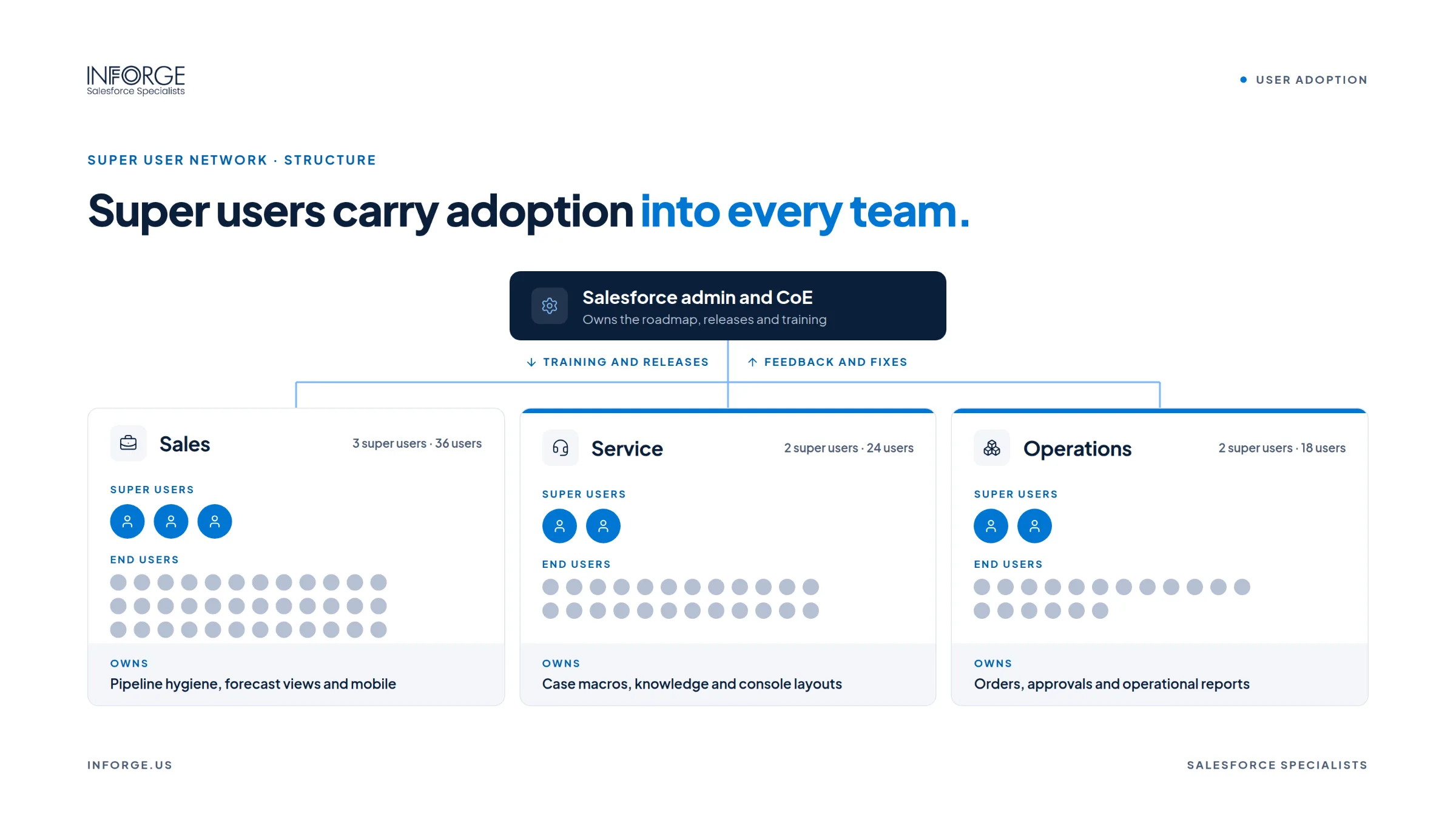
Super users — sometimes called Salesforce Champions — are your most cost-effective adoption lever post-go-live.
Super users are high-performers on each team who genuinely engage with the platform. They're not necessarily the most technical. They're the people their colleagues trust and ask for help. Formally identify them, give them advanced training, and connect them in a dedicated channel (Slack, Teams, or Chatter). They become your Tier 1 support — handling the majority of peer questions before they reach the admin.
This matters because CRM support demand frequently overwhelms sales enablement and operations teams post-launch. Super users absorb that pressure at the team level, where adoption decisions are actually made.
Invest in this group: advanced training access, recognition, and early visibility into upcoming platform changes. Their buy-in creates social proof inside the team. When the highest-performing rep is using Salesforce and telling colleagues why, the resistance calculus changes.
Fix 5: Instrument Adoption — Then Act on What You See
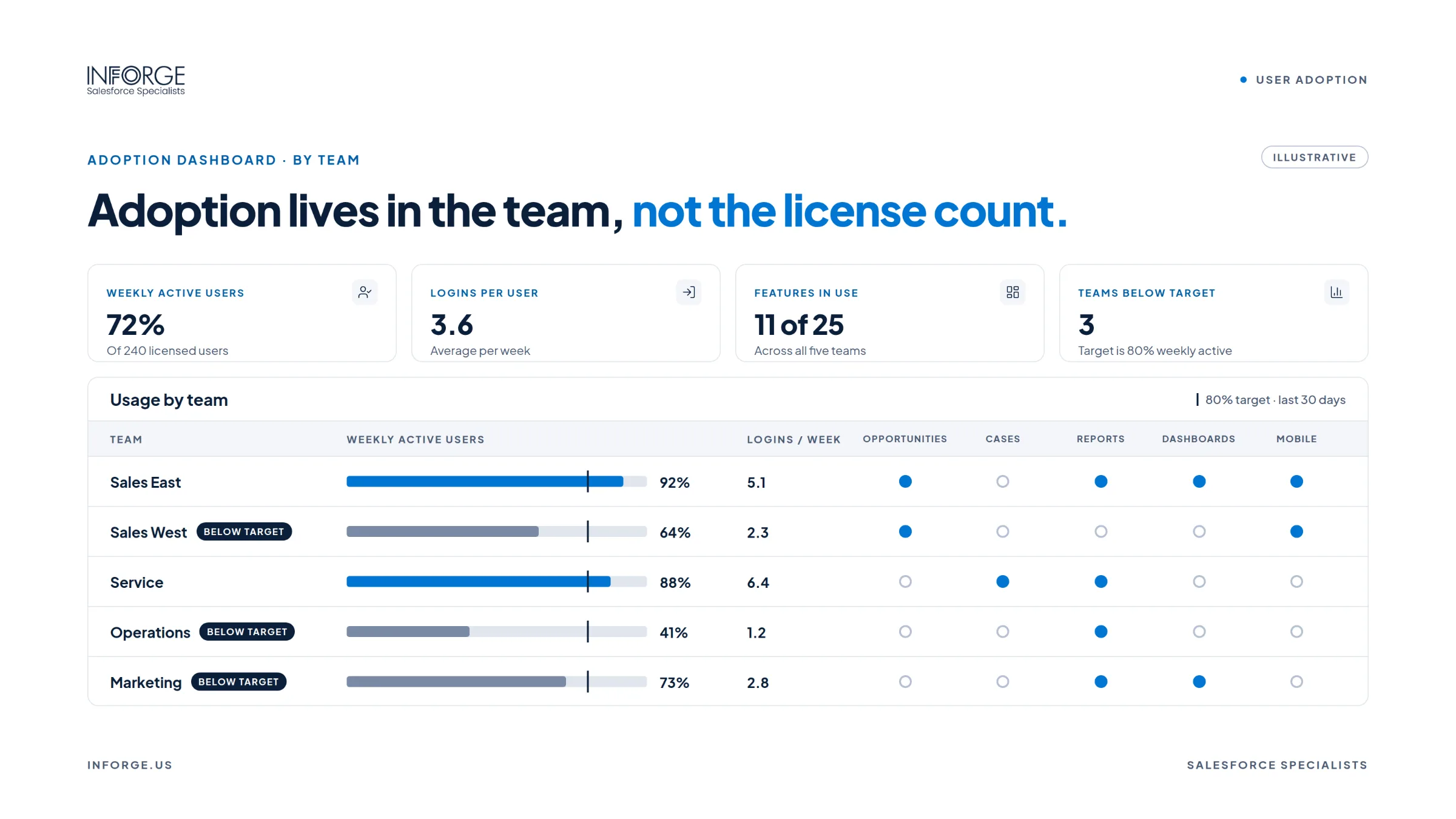
You can't manage what you don't measure. Install the Salesforce Adoption Dashboards from AppExchange and review them weekly.
Adoption dashboards track who is logging in, how often, which features they're using, and which record types they're updating. The data is typically more damning than leadership expects — and more specific than a general complaint that "people aren't using it."
Look at:
Login frequency by user and team. Low-login users are a training or friction problem.
Record creation and update rates. If opportunities aren't being updated, forecasting is fiction.
Feature engagement. Investments in automation, Einstein, or custom flows go underutilised because workflows don't match seller behaviour or enablement is insufficient.
According to Whatfix, poor data quality costs organisations an average of $12.9M annually in lost revenue, rework, and missed opportunities — and poor Salesforce adoption is the upstream cause.
Adoption metrics tell you where the resistance lives. They don't tell you why. Pair the quantitative data with a qualitative feedback loop — short surveys, team check-ins, or direct conversations — to understand whether low adoption is a friction problem, a training problem, or a cultural one. Each has a different fix.
Fix 6: Close the Feedback Loop and Iterate
The biggest post-go-live mistake is treating the implementation as finished. It isn't. Go-live is the beginning of the adoption cycle, not the end of the delivery cycle.
Collect user feedback via regular check-ins and short surveys in the weeks after launch. Identify pain points and enhancement ideas. Implementing a feedback loop for continuous improvement is a core part of post-launch governance — not an optional nice-to-have.
More importantly: act on what you hear. Users who raise friction points and see nothing change learn quickly that their feedback doesn't matter. That silence accelerates avoidance. Users who raise friction points and see a page layout simplified or a required field removed within two weeks learn that their input shapes the tool. That responsiveness builds trust — and trust drives adoption.
Formalize a change request process. Determine how enhancement requests are submitted, who reviews them, and how often you ship small improvements. A monthly release cadence for minor UX fixes keeps the platform evolving alongside the people using it.
At Inforge, we've found that the organisations with the highest long-term adoption rates treat Salesforce as a living system — not a deployment milestone. The ones with the lowest adoption rates are still waiting for the implementation partner to come back.
Summary
Salesforce user adoption failure after go-live is predictable, diagnosable, and fixable. The root causes — misconfigured UX, training that stopped at launch, absent executive reinforcement, no adoption measurement, and no feedback loop — are structural, not cultural. Fix the structure and the culture follows. At Inforge, we work with mid-market Salesforce organisations to diagnose exactly where adoption is breaking down and implement the changes needed to turn the platform into a system people actually use — delivered faster and more consistently than traditional consulting.
Frequently Asked Questions
Q: How long does it take to fix low Salesforce user adoption after go-live?
A: Meaningful improvement is visible within 30–60 days when configuration friction is addressed, training is restarted, and adoption metrics are being monitored weekly. Full behavioural adoption — where Salesforce is the default system of record across teams — typically takes 90 to 120 days with consistent executive reinforcement.
Q: What is a good Salesforce user adoption rate?
A: Most teams should target consistent daily usage from all users required to work in the system. According to CSO Insights, fewer than 40% of organisations achieve end-user adoption rates above 90% — meaning sub-90% adoption is common but not acceptable if you want accurate pipeline data and measurable CRM ROI.
Q: Why do sales reps avoid using Salesforce?
A: Employees don't reject CRMs — they reject extra work. When Salesforce requires manual data entry across too many fields, doesn't reflect their actual sales process, or fails to show them personal value (like their own quota progress), avoidance is rational. Fix the configuration and show reps what's in it for them, and resistance drops significantly.
Q: Should executive sponsorship continue after go-live?
A: Yes — and this is where most implementations fall apart. Executive sponsorship is usually strong before launch and disappears after. Adoption cannot survive on admin effort alone. Leaders need to run reviews from Salesforce, hold teams accountable for data accuracy, and visibly use the platform themselves. That behaviour shift is the highest-leverage action available post-go-live.
Q: What is a Salesforce super user and why does it matter for adoption?
A: A super user is a power user embedded within a team who supports their peers, surfaces friction points to admins, and creates social proof for platform usage. Super users handle peer questions before they reach the admin, reducing support burden and accelerating adoption at the team level — where the actual adoption decision is made.
*Inforge is a Salesforce consultancy and AI implementation partner. We deliver full Salesforce implementations — and post-go-live adoption programmes — entirely through AI agents. Faster timelines. More consistent quality. A fraction of the cost. If your team went live and adoption stalled, contact Inforge to diagnose what's broken and fix it.*