Top Salesforce Integration Mistakes That Break Your Sales Pipeline
Most Salesforce integration failures are not dramatic outages. They are silent data leaks, misfired automations, and broken field maps that quietly drain your pipeline for months before anyone notices. By the time leadership asks why forecast accuracy has been below 60% for three consecutive quarters, the damage is already done.
At Inforge, a Salesforce consultancy that delivers implementations through AI agents rather than traditional headcount, we audit broken orgs regularly. The same mistakes appear every time — and every one of them is preventable.
Quick Answer: The most common Salesforce integration mistakes that break your sales pipeline include poor field mapping, duplicate records from API-driven syncs, broken lead routing logic, ignored API governor limits, and missing error monitoring. Each of these can be fixed with the right architecture decisions made before a single line of code is written.
Key Takeaways:
Between 50% and 70% of CRM projects fail to meet their stated objectives — most failures trace back to integration architecture, not strategy.
An analysis of 12 billion Salesforce records found that 45% were duplicates across organizations, with that rate jumping to 80% for records created via API integrations.
Organizations without lead-to-account matching misroute an estimated 15–25% of leads to the wrong rep or a generic queue.
Salesforce's AI capabilities — Einstein, Agentforce, Data Cloud — are only as good as the data they can access. Broken integrations do not just hurt today's pipeline; they corrupt tomorrow's AI.
Most data problems are people and architecture problems, not technology problems. The tools exist. The discipline usually doesn't.
Mistake #1: Broken Field Mapping That Silently Loses Leads
Field mapping is where integrations most commonly break silently — and where most broken pipelines are born.
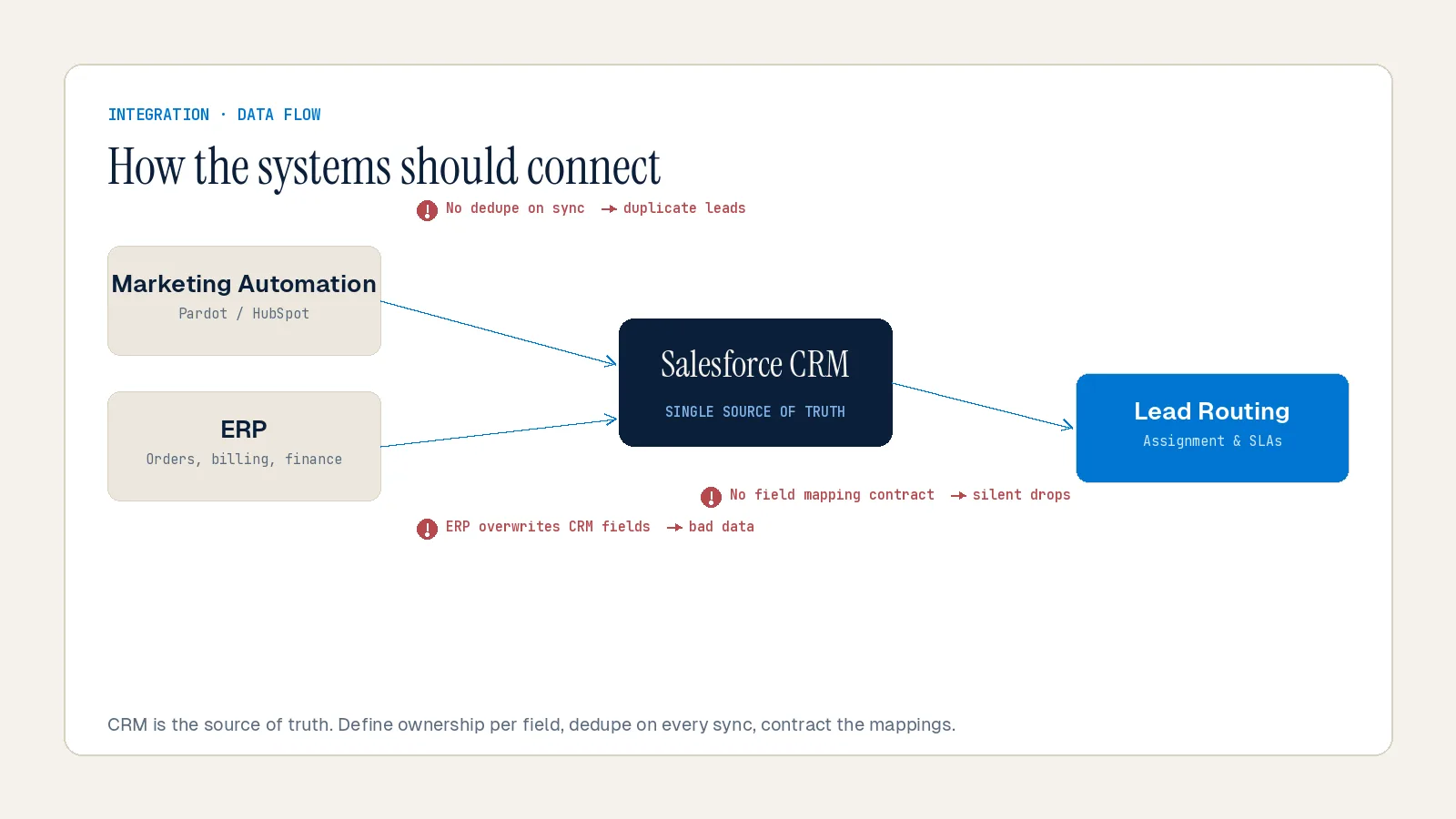
A "Company Name" field in your marketing platform maps to "Account Name" in Salesforce — except one allows 255 characters and the other caps at 80. Data truncates. Records fail to create. Your pipeline fills with half-populated leads that no rep can action. According to a Forrester Integration Survey, standardizing inputs across your ecosystem cuts integration failure rates by nearly 40%.
Picklists make this worse. A "Country" field on a web form that accepts free text — "UK," "United Kingdom," "England" — breaks any Salesforce validation rule that expects a specific picklist value. Every mismatch is a lost lead. These errors do not surface in error logs. They surface in missed quota conversations.
The fix is architectural, not reactive. Build a field mapping matrix in a spreadsheet before a single line of code is written. Define field types, character limits, and accepted values across every connected system before your integration tool touches your org.
Mistake #2: API-Driven Duplicate Records Destroying Pipeline Accuracy
Duplicate records are the most underestimated pipeline killer in Salesforce.
Plauti's analysis of 12 billion Salesforce records found that 45% were duplicates across organizations. That rate jumps to 80% for API integrations — including marketing automation platforms, web forms, and sales engagement tools. When marketing generates 400 MQLs and sales can only account for 180, duplicates are almost always the culprit.
The downstream consequences compound quickly. Reps work duplicate records, territory assignments collide, and pipeline reports become fiction. One financial services firm implemented validation rules that caught duplicates at creation — their duplicate rate dropped from 28% to 3% in six months, and pipeline accuracy improved by 40%.
The root cause is almost always missing deduplication logic at the integration layer. External tools pushing records into Salesforce via API do not inherently check for existing records before creating new ones. Build matching logic — based on email domain, external ID, or company name normalization — into the integration layer before records hit your org.
Skipping QA testing accelerates the problem. When organizations rush Salesforce integration and skip thorough QA testing, bad data propagates immediately, resulting in data duplication and compromised integrity that is expensive to reverse.
Mistake #3: Partial Integrations That Create a False Sense of Confidence
The most common integration mistake is integrating systems partially.
You connect Salesforce to your ERP for order data but skip the inventory feed. Now your reps can see past orders but cannot check current stock levels — so they still call the warehouse before every quote. Half-baked integration creates a false sense of confidence while the underlying friction remains.
The same dynamic plays out between marketing automation and Salesforce. When your Salesforce instance receives enriched lead data from your marketing platform, reps know exactly where a prospect is in their buying journey before they pick up the phone. Without that connection, lead scoring runs blind. MQL-to-SQL handoffs break. Attribution vanishes.
Most teams rely on external tools to fully enrich lead and account records, which introduces exactly the kind of workflow fragmentation that makes routing inconsistent and scoring unreliable at scale. The fix is mapping the complete data requirement for each integration before you build — not after you notice the gaps. Ask your sales team: "If you could see any piece of information from this other system inside Salesforce, what would it be?" Their answers define your integration scope.
Mistake #4: Lead Routing Logic That Breaks at Scale
Lead routing failures are a structural revenue leak — and they get worse as your team grows.
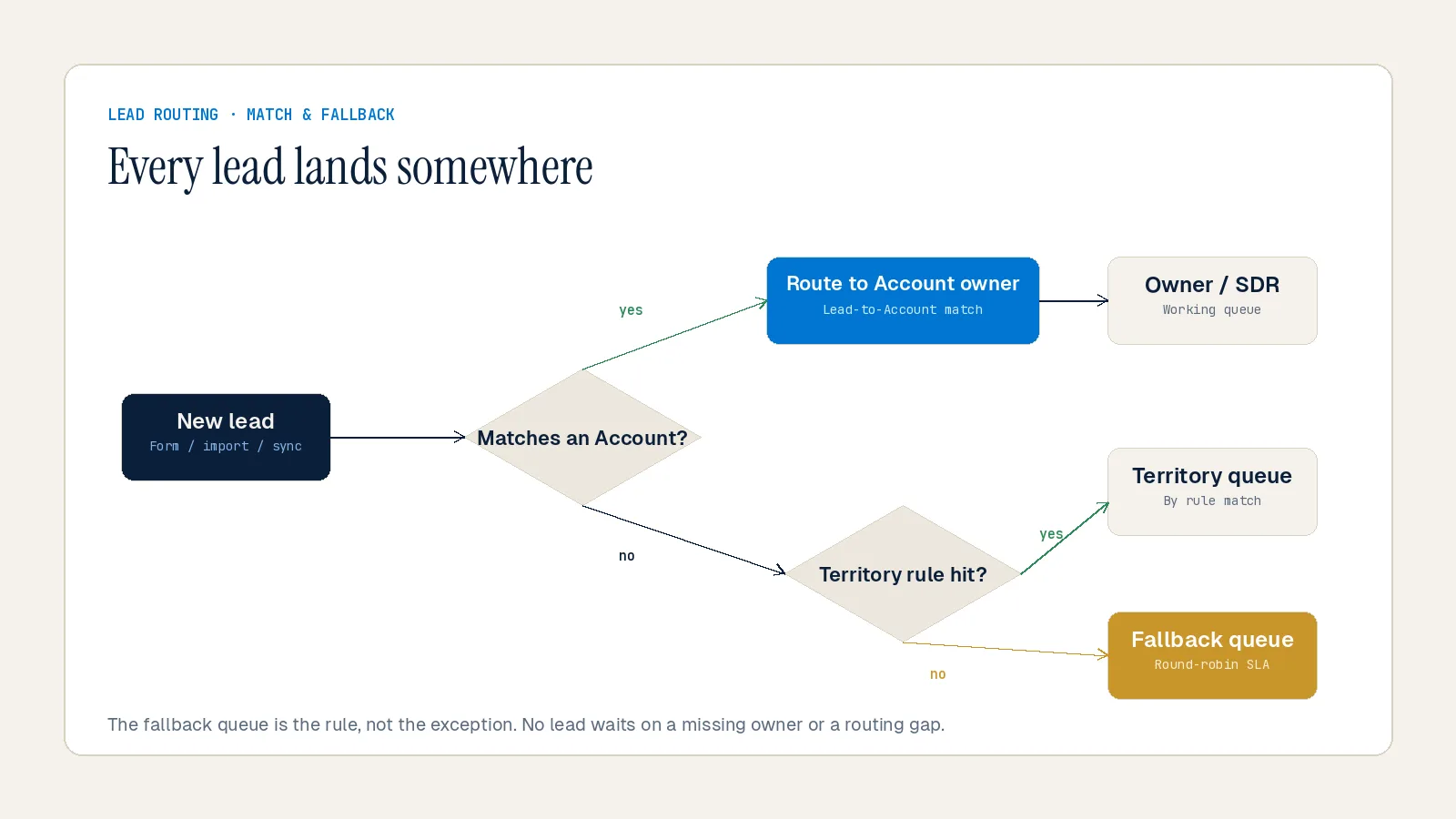
According to the RevOps Report, organizations without lead-to-account matching misroute an estimated 15–25% of leads to the wrong rep or let them fall to a generic queue. This is a structural leak that no amount of individual rep effort can close.
Native Salesforce assignment rules are the most common starting point — and the most common source of routing failure at scale. These rules are static and top-down. They do not account for rep capacity, availability, or existing account relationships. They will happily bury your best rep under 15 incoming leads while a struggling rep sits idle, leading to burnout and missed SLAs.
Routine routing failures are not immediately visible. Leads sit in queue purgatory or get routed incorrectly — with no alerts, no backup logic, and no accountability trail. The leak only surfaces when a pipeline review uncovers stale, never-touched records that were hot MQLs three weeks ago.
The fix has three parts. First, add lead-to-account matching so new leads from existing customers route to the rep who owns the relationship. Second, build fallback queues with real-time alerts — no fallback means lost pipeline. Third, audit routing logic quarterly, and trigger an immediate audit whenever territories change or team structure shifts.
Mistake #5: Ignoring API Governor Limits Until They Break Production
Salesforce's governor limits are not optional — and they will break your integration without warning if you design around them incorrectly.
Salesforce imposes a daily API call limit based on your edition and the number of user licenses. For Enterprise Edition, that is 100,000 calls per day or 1,000 per user. When that allowance is exhausted, integrations simply stop working until the limit resets. In high-volume environments, even a brief outage results in hundreds of failed records.
Automations make this worse. Flows, triggers, and Process Builder rules all contribute to CPU time and transaction limits. Even if your Apex code is optimized, excessive automation layered on top can still cause failures. Flows firing on every record change rack up API usage fast — especially when multiple connected systems are writing back to Salesforce simultaneously.
According to MuleSoft's Connectivity Benchmark Report, 88% of IT leaders say integration challenges slow down digital transformation. The root cause is rarely a single expensive operation — it is the accumulation of unaudited automations, polling integrations, and duplicate callouts that no one has reviewed since the original build.
The practical fix: use Bulk API for large data moves rather than overloading standard REST or SOAP APIs with excessive individual requests. Audit your automation rules and consolidate where possible. Set up alerts using tools like Salesforce Shield, Datadog, or New Relic to warn you when usage approaches the cap — not after it exceeds it.
Mistake #6: No Error Monitoring Until Downstream Damage Is Already Done
Integration errors often go unnoticed until the downstream impact becomes visible: missing leads, incomplete reports, or duplicated records. And in high-volume environments, even a brief outage can result in hundreds of failed records.
Most orgs have no proactive monitoring on their integrations. There is no alert when a sync fails silently. There is no dashboard tracking how many records were created versus how many were expected. The first signal is usually a sales manager asking why their pipeline looks wrong in a Friday review.
At Inforge, we have found that integration monitoring is the most skipped step in Salesforce build projects — and the one that costs the most to ignore. Quarterly integration reviews should be a standard part of your admin cadence. Check for: deprecated API versions your integrations still call, automation rules that fire more frequently than intended, and sync configurations that have drifted from their original design.
Build for failure from day one. Anticipate timeouts, rate limits, and transient errors. Graceful degradation ensures the business process does not grind to a halt on a single point of failure. Centralize error logging for actionable monitoring, and pipe failures to Slack or email with record links so fixes are fast.
Mistake #7: Poor Data Governance Compounding Every Other Mistake
Every mistake above gets worse without data governance. And most orgs treat governance as a document in a shared drive rather than enforced configuration inside Salesforce.
According to Validity's State of CRM Data Management in 2025 report, 37% of teams report losing revenue as a direct consequence of poor data quality. Gartner pegs the average annual cost of bad data at $12.9 million per organization. Nearly a third of CRM users say their company loses over 20% of annual revenue to poor-quality data.
B2B contact data decays at 25–30% per year as people change jobs, companies restructure, and industries shift. That decay is not a background problem — it compounds. The pipeline looks full but nothing is moving. Close dates are stale. Reps do not trust the CRM, so they stopped entering data accurately.
Governance is not a cleanup sprint. It is a set of enforced configurations inside Salesforce that prevent bad data from entering the system in the first place. Define clear rules for how data enters and moves through the CRM — naming conventions, required fields, validation rules, and lifecycle stage progression logic. Assign a data steward. Set a weekly 15-minute check-in. Make duplicate rate a KPI that revenue leaders track alongside pipeline and conversion rates.
The question of "who owns data quality" has traditionally been a barrier — is it marketing because they run the forms, sales ops because they manage the CRM, or IT because they control integrations? The answer is all of them. Ownership should be shared: Salesforce admins and RevOps own rules and controls, business teams own correct entry, and integration owners own mapping and sync behavior.
Summary
The seven integration mistakes covered here — broken field mapping, API-driven duplicates, partial integrations, lead routing failures, governor limit blindness, absent error monitoring, and missing governance — each independently corrupts 10–25% of your pipeline. Combined, they explain why between 50% and 70% of CRM projects fail to meet their objectives.
None of these mistakes require exotic solutions. They require architecture decisions made in the right order, before the integration ships. At Inforge, we deliver full Salesforce implementations through AI agents — which means every integration decision is codified, version-controlled, and auditable from day one, not patched reactively six months later.
If your Salesforce integration is already live and you suspect one of these problems, the fastest starting point is a data quality audit against your active pipeline records.
Frequently Asked Questions
Q: Why do Salesforce integrations fail so often?
A: Between 50% and 70% of CRM projects fail to meet their stated objectives, according to Gartner. Most failures trace back to integration architecture decisions — primarily poor field mapping, missing deduplication logic, and absence of error monitoring — rather than platform limitations.
Q: How do I find out if I have duplicate records from API integrations?
A: Run a deduplication audit against your Lead, Contact, and Account objects. An analysis of 12 billion Salesforce records found that API integrations drive duplicate rates as high as 80% — significantly higher than manually created records. Tools like Plauti and Cloudingo offer robust matching logic for large databases.
Q: What is the fastest way to fix broken Salesforce lead routing?
A: Start with a routing health dashboard that tracks assignment success rate, time-to-assignment, queue aging over 24 hours, and the fallback-route hit rate. If more than 10% of leads land in your catch-all queue, your primary routing rules have coverage gaps. Add lead-to-account matching and build fallback queues with real-time alerts before adjusting routing logic.
Q: How do Salesforce API governor limits affect my integrations?
A: When a governor limit is exceeded, Salesforce stops the execution and rolls back the entire transaction — no partial data is saved. For integrations, hitting the daily API call limit means all syncs stop until the limit resets the following day. Use Bulk API for large data moves, audit your automation rules, and set up monitoring alerts before you hit the cap.
Q: How does bad integration data affect Salesforce AI features like Agentforce?
A: Salesforce's AI stack — Einstein, Agentforce, Data Cloud — all depend on clean, complete, and fresh records. Agentforce agents can autonomously qualify leads and update records, but only if they have access to accurate data across your integrated systems. Garbage in, garbage out: broken integrations do not just hurt today's pipeline, they corrupt every AI-driven action that runs on top of your data.
