Salesforce Org Health Check: 8 Warning Signs Your Implementation Needs an Audit
If your sales reps are keeping their own spreadsheets, your leadership has stopped trusting the pipeline dashboards, and every small change to Salesforce feels like defusing a bomb — your org doesn't need a training session. It needs a health check audit.
A Salesforce org health check is a structured diagnostic of your entire CRM environment: data quality, security settings, automation logic, user adoption, and alignment with your current business processes. Think of it as a medical checkup for your CRM — proactive, diagnostic, and far less painful than waiting for a full-blown crisis.
Quick Answer: A Salesforce org health check is a structured audit of your Salesforce environment covering data quality, security, automation, and user adoption. You need one when you notice warning signs like low login rates, duplicate records, untrusted dashboards, or broken integrations. At Inforge, we run these audits as the first step in every engagement — and we consistently find that the real problems are invisible to leadership until we pull the data.
Key Takeaways:
Between 20% and 70% of CRM implementations fail to deliver value — and poor adoption is the leading cause.
Technical debt in Salesforce grows silently: stale automations, unused fields, and hardcoded logic accumulate until simple changes become risky projects.
A McKinsey survey found that CIOs report 10–20% of their technology budget is diverted to resolving issues caused by technical debt.
Salesforce itself provides native tools — the Security Health Check, Optimizer Report, Setup Audit Trail, and Login History — to give you the first layer of diagnostic data.
If even three or four of the warning signs below are familiar, an audit is overdue.
Why Salesforce Orgs Degrade — and Why It's Hard to See
Salesforce orgs accumulate complexity the same way codebases do. Someone needs a new automation — a Flow gets built. A business process changes — the old Flow gets modified rather than replaced. A new admin joins — they add their own layer on top. Nobody has the full picture, so nobody wants to delete anything in case it breaks something important.
According to elements.cloud, in a recent McKinsey survey, CIOs reported that 10 to 20 percent of the technology budget dedicated to new products is diverted to resolving issues related to tech debt — and CIOs estimated that tech debt amounts to 20 to 40 percent of the value of their entire technology estate before depreciation.
The Salesforce ecosystem moves fast. With three major platform releases per year, orgs that aren't actively maintained fall behind. What starts as a reasonable configuration becomes a liability. Technical debt in Salesforce appears in forms such as Apex and formula fields with hardcoded IDs, unpredictable triggers or flows that aren't bulkified, unutilized or redundant process automation, and managed packages that are installed but never used.
This debt doesn't announce itself. It quietly turns what should be simple updates into risky change management exercises.
The 8 Warning Signs Your Org Needs a Health Check
1. Your Sales Reps Are Using Spreadsheets Instead of Salesforce
This is the loudest signal. When team members start maintaining parallel records outside the CRM, something has gone wrong. Duplicate records, inconsistent field naming, outdated contact information, and missing pipeline data all erode trust over time — and once trust is gone, adoption collapses.
According to DemandSage, between 20% and 70% of CRM projects fail, and poor usage adoption is the leading cause. A sales team where even 40% of reps aren't actively using Salesforce means 40% of pipeline activity, customer interactions, and deal data is missing — making every CRM-derived metric unreliable.
Low adoption is rarely about the people. It's almost always about the system. If reps are avoiding Salesforce, the audit question isn't "how do we make them use it" — it's "what is the system doing to them when they try?"
2. Dashboards Are Ignored at the Leadership Level
If the only person who looks at your Salesforce dashboards is the admin who built them, you have a reporting problem. Dashboards should be the heartbeat of your revenue operation — checked every morning, discussed in team meetings, and used to drive decisions. When they're ignored, it's usually because they're either too generic to be useful or too complex to interpret quickly.
When leadership can't rely on reports, they stop using them. Eventually, Salesforce becomes a glorified contact directory that nobody believes in. Bad CRM hygiene quietly compounds into significant lost revenue — broken lead assignment rules or missed follow-up automation means deals fall through the cracks, and sales leaders make conservative or uninformed decisions.
3. You Have Duplicate Records Everywhere
Duplicate accounts, outdated contact details, missing fields, incorrect opportunity stages — these issues accumulate gradually and go unnoticed until they surface as embarrassing moments: a rep calls a customer who already churned six months ago, or a forecast comes in wildly off because the pipeline is full of zombie deals.
Inaccurate or duplicate records distort forecasts and damage customer trust. Regular audits ensure that the numbers you rely on are trustworthy. A health check should begin with a comprehensive data audit: running deduplication reports to identify and merge duplicate accounts, contacts, and leads, and reviewing field usage to eliminate redundant or confusing fields that cause inconsistent data entry.
4. Automation Is Broken, Conflicting, or Unexplained
Salesforce has officially retired Workflow Rules and Process Builder. If your org still runs on these, they are active time bombs. But the more common problem is a web of Flows that nobody fully understands.
In a real engagement we audited, a mid-market B2B technology company had been on Salesforce for five years with a 41% user adoption rate. The audit surfaced 47 active Flows — half of which were load-bearing in ways nobody could fully explain. Conflicting workflows led to inaccurate data updates, creating sales inefficiencies. Debugging became time-consuming and delayed urgent fixes.
Fifty Flows with poor documentation is not fifty times more powerful than ten well-documented ones. It is fifty times more likely to cause a problem you cannot diagnose quickly. Every Flow is a commitment to maintain it, document it, and understand its interactions with everything else in the org.
5. Simple Changes Feel Risky and Take Too Long
When what should be a simple configuration change requires a three-week change management process and a backup plan — that's technical debt talking. Unchecked technical debt in Salesforce doesn't just slow down your system: it increases costs, heightens security risks, and limits business agility. A poorly optimized Salesforce instance makes even simple updates complex, leading to longer deployment cycles, frustrated users, and costly rework.
If your Salesforce org already has layers of old code and complex workflows, adding new features becomes harder. Teams spend more time firefighting system issues instead of focusing on strategic improvements. The interest on that debt compounds every sprint.
6. Security Settings Haven't Been Reviewed Recently
Even when your Salesforce org appears to be working well, over-broad permissions or unchecked guest access open security holes and slow workflows — and the trick is that nobody notices it until a breach, a failed audit, or a partner expansion.
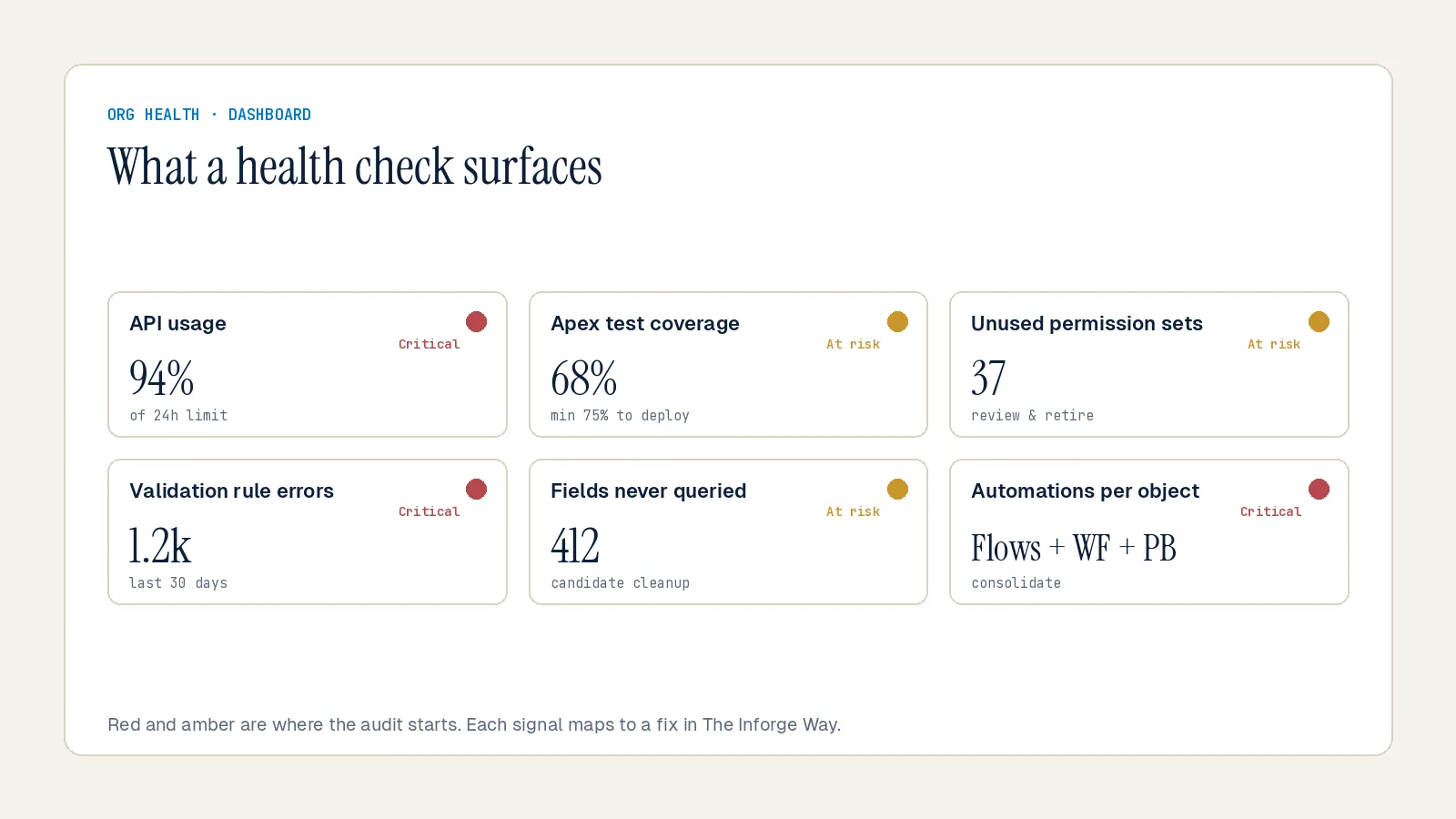
Salesforce's built-in Security Health Check grades your org against Salesforce's recommended baseline, assigning a 0–100% score and grouping settings into four risk categories: High-Risk, Medium-Risk, Low-Risk, and Informational. Anything flagged as high risk should be addressed immediately. A health check should review user profiles and permission sets to ensure they follow the principle of least privilege — every user has access to exactly what they need, and nothing more.
Deactivate accounts for users who have left the organization. Audit sharing rules to confirm that sensitive records are properly restricted. If your security model isn't well understood, problems tend to show up at the worst possible moment — during client audits or partner expansions.
7. You're Paying for Licenses and Features You're Not Using
Unused licenses, redundant apps, or problematic automations inflate your expenses in ways that go unnoticed for months. Many companies leave advanced Salesforce functionality untouched due to a lack of awareness or poor configuration — capabilities that could replace costly third-party solutions remain dormant while the licensing bill stays the same.
A health check audit reveals underused tools, cuts license waste, and identifies where you're overpaying. It also uncovers stale reports and dashboards that haven't been run in over 12 months, unused custom fields that aren't referenced in any Apex code, flows, or formulas, and managed packages that add complexity without delivering value.
8. Your Org Hasn't Been Audited Since the Original Implementation
Your Salesforce org today isn't the same as it was even 6 months ago. New integrations, additional features, and quick fixes have quietly changed its shape. Those changes are necessary — they fuel growth. But they also bring hidden complexity and fresh risks.
A one-time inspection may solve today's problems, but it won't protect you from tomorrow's. Regulatory frameworks shift. Salesforce releases new capabilities three times a year. Industry standards change. Without periodic review, your org risks drifting away from compliance demands and platform best practices. At minimum, run a health check twice a year — once mid-year and once before your annual planning cycle. If your team is growing quickly, adding new products, or changing territories, quarterly check-ins are worth the effort.
What a Proper Salesforce Org Audit Covers
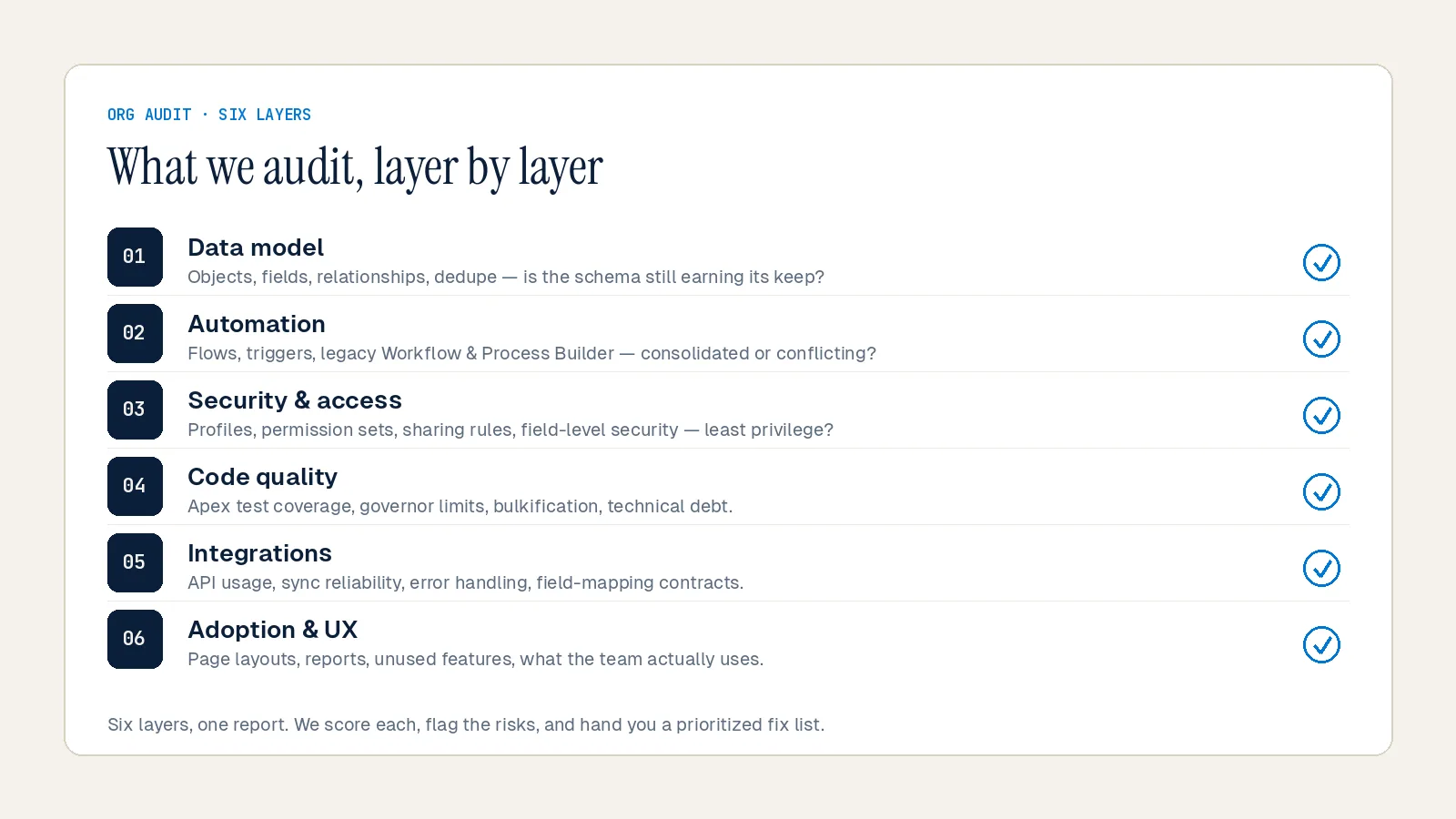
A structured Salesforce audit isn't a quick scan. It's a diagnostic across six layers:
1. Data Quality — Deduplication, field usage, completeness scores, and validation rule coverage across Accounts, Contacts, Leads, and Opportunities.
2. Automation Inventory — A full map of every active Flow, retired Workflow Rule, and Process Builder. Every automation categorized by ownership, purpose, and interaction risk.
3. Security & Permissions — User profiles, permission sets, sharing rules, Security Health Check score, Login History review, and Setup Audit Trail for recent metadata changes.
4. Technical Debt Assessment — Apex classes on outdated API versions, hardcoded IDs in code and formulas, test coverage below 90% on critical classes, and SOQL queries inside loops.
5. License & Feature Utilization — Active users versus licensed users, feature adoption rates, installed packages, and unused AppExchange tools.
6. Adoption & Reporting — Login rates by role and team, dashboard usage, report accuracy, and whether CRM data is actually driving leadership decisions.
The Salesforce Optimizer report (free and built-in) is a solid starting point. Run it, export the findings, and prioritize the three highest-impact items. That single action, done consistently, is how you turn a legacy org into a scalable, AI-ready platform.
What Happens After the Audit
The audit isn't the end — it's the foundation. A structured audit produces a prioritized remediation backlog: quick wins versus long-term initiatives, organized by business impact and effort.
At Inforge, we've found that most mid-market orgs have between 40 and 200 hours of remediation work sitting undiscovered in their Salesforce instance. The orgs with the most debt are usually the ones that have been used the most — that's not failure, it's a sign the platform has been genuinely adopted. The problem is not having debt. The problem is not having a plan to pay it down.
That's exactly what a health check gives you: a plan, not a panic.
Summary
A Salesforce org health check is not a luxury — it's a prerequisite for getting value from your CRM investment. The eight warning signs covered here — from shadow spreadsheets and ignored dashboards to broken automation and stale security settings — each represent a different dimension of organizational risk. Left unaddressed, they compound into the kind of technical debt that turns routine improvements into costly overhauls. At Inforge, we run these audits as the first step in every Salesforce engagement, using a structured methodology that covers data, automation, security, adoption, and licensing in one pass. If you recognize three or more of these warning signs in your org, the audit is overdue.
Ready to find out what's actually happening in your Salesforce org? [INTERNAL LINK: anchor — "Book a Salesforce org health check with Inforge" | topic — Salesforce consultancy services and org audit offerings]
Frequently Asked Questions
Q: What is a Salesforce org health check?
A: A Salesforce org health check is a structured audit of your entire Salesforce environment — covering data quality, security settings, automation logic, user adoption, and alignment with current business processes. It uses both native tools (like the Security Health Check, Optimizer Report, and Login History) and manual analysis to surface risks, inefficiencies, and areas of technical debt.
Q: How often should I run a Salesforce health check?
A: At minimum, twice a year — once mid-year and once before your annual planning cycle. If your team is growing quickly, adding new products, or changing territories, quarterly reviews are worth the effort. Think of it like a car service: the longer you skip it, the more expensive the eventual fix.
Q: What are the most common signs that a Salesforce org needs an audit?
A: The clearest signals are: reps maintaining spreadsheets outside of Salesforce, leadership ignoring CRM dashboards, duplicate records causing forecast errors, automation that nobody can fully explain, and simple changes requiring weeks of change management. If any three of these are familiar, an audit is overdue.
Q: How long does a Salesforce org audit take?
A: It depends on the size and complexity of the org. A small org may require approximately 40 hours for a high-level analysis, while a larger, legacy Salesforce instance can take 150–200 or more hours for a comprehensive review. The output is a prioritized remediation backlog — not just a list of problems, but a plan to fix them.
Q: Can't we just retrain our users instead of doing an audit?
A: Training users on a system with structural problems doesn't fix the problems — it just adds frustration. Low Salesforce user adoption is rarely about the people. It's almost always about the system. Start with an audit to identify and resolve the structural issues, then run training. That order matters.
