Salesforce Flow vs Apex: When to Use Declarative Tools and When to Code
Every Salesforce team hits the same fork: a new requirement lands, and someone has to decide whether to build it in Flow or write Apex. Too often the choice comes down to whoever's more comfortable with one tool. Three months later you're either debugging a Flow that looks like a plate of spaghetti or maintaining an Apex class that could have been a three-node Flow. This isn't a religious debate — it's a tooling decision, and the landscape just shifted.
The biggest change: Workflow Rules and Process Builder reached end of support on December 31, 2025. You can't create new ones, and existing ones are on borrowed time. Salesforce is now unambiguously Flow-first.
Quick Answer: Start declarative. Flow is Salesforce's recommended default and handles roughly 70 to 80 percent of automation requirements. Reach for Apex for the remaining 20 to 30 percent — complex logic, large-volume processing, real integrations, and fine-grained transaction control — which is often the most business-critical work. When most of a requirement is declarative but a piece needs code, use invocable Apex as a bridge so a Flow can call it.
Key Takeaways:
Process Builder and Workflow Rules officially reached end of support on December 31, 2025 — Flow is now the only supported declarative automation tool, and clinging to legacy automation is actively accumulating technical debt.
Salesforce recommends a "Flow-first" approach; roughly 70 percent of automation requirements can be handled declaratively, with the remaining 30 percent requiring Apex for technical reasons.
Flow and Apex run on the same multi-tenant runtime and respect the same governor limits — so bulkification discipline applies to both.
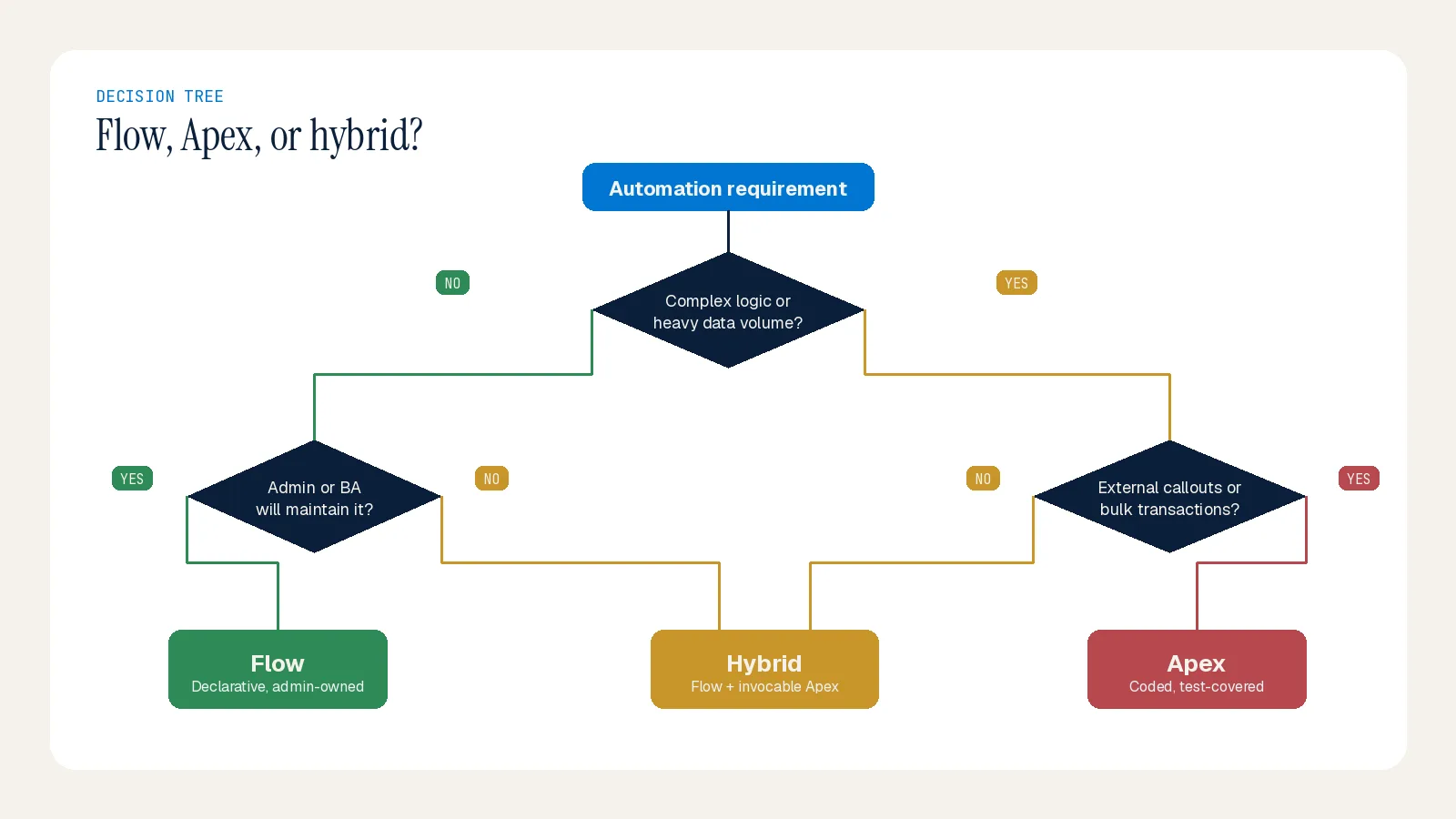
The decision isn't about preference; it's about complexity, scale, who maintains it, and how mission-critical it is. If admins must own the logic, Flow. If developers will, Apex.
For very large datasets the choice becomes a hard constraint, not a preference: Flow is capped around 50,000 query rows, while the new Apex Cursor class (Spring '26) can query up to 50 million records with server-side caching.
When to Use Flow
Flow has become remarkably powerful, and it's the right answer for most "when X happens, do Y" patterns. Use it for:
Standard record-triggered automation — field updates, task creation, email alerts on create/update/delete.
Before-save field updates — for same-record edits like defaults, normalization, and calculated values. Before-save runs about 10x faster than after-save because it skips the second save cycle. The mental rule: same-record edits go before-save; anything else (related records, emails, callouts, approvals) goes after-save.
Screen flows — guided, form-based user interactions.
Simple cross-object updates and quick approvals — when there are no complex loops or heavy logic.
Flow's advantages are speed of delivery, easy maintenance by admins without deployments, and visual logic that business users can follow. Salesforce has invested heavily here — Approval Orchestration, AI Decision elements, and AI-assisted Flow building have all landed across recent releases, and Flow Orchestration became free in February 2026.
When to Use Apex
Apex remains the backbone of custom development — and that 30 percent it handles is often the most critical 30 percent. Use Apex for:
Complex logic and heavy calculations — multi-level parent-child updates with different criteria per level, sophisticated algorithms, complex data transformations across many objects.
Large-volume processing — when datasets exceed Flow's limits. With the new Cursor class, Apex can query up to 50 million records; Flow is capped around 50,000 query rows. For big data this is a hard constraint, not a style choice.
Real integrations — Flow has HTTP callouts now, but they're not production-ready for complex integrations: no retry logic, no mocking in tests, no proper error handling. Apex with
@futureor Queueable gives you real control over the entire lifecycle.Advanced async patterns — Queueable and Batch Apex for fine-grained chunking, error handling, and governor-limit management (e.g., nightly ingestion of millions of CSV rows).
Custom exception handling, retry logic, and transaction control — when you need precision the declarative model can't offer.
Apex's cost is developer dependency: writing and maintaining it requires programming expertise, and the 75 percent test coverage minimum applies (leading teams aim higher, with meaningful assertions rather than coverage theater).
The Hybrid Reality
Most well-run orgs use both: Flow for the 80 percent that's straightforward, Apex for the 20 percent that's complex, and invocable Apex as the bridge. The admin wires up the Flow; the developer owns the hard parts; and notably, Agentforce can trigger either path. A common pattern: a Flow handles user interaction and simple updates while an Apex class handles complex validation or integration behind the scenes.
One important caution — avoid mixing a Flow and an Apex trigger on the same object. It can cause unintended recursion or conflicts and unpredictable execution order. Centralize business logic where multiple entry points (Flows, triggers, REST endpoints) need the same robust behavior.
A Quick Decision Matrix
Is it standard automation (field update, email, task)? → Flow.
Simple parent-child update? → Flow. Three nodes, done.
Three levels deep with different criteria per level? → Apex. Flow works, but you'll get subflow spaghetti nobody wants to touch.
Complex integration with retry and error handling? → Apex. Period.
Preventing a save based on field rules? → Validation rule (not Flow, not Apex). If it requires checking related records or external data, then an Apex before-insert/update trigger.
Will admins maintain it? → Flow. Will developers? → Apex.
Mission-critical or very high volume? → lean Apex.
Don't Skip the Discipline
Whichever you choose, the same hygiene applies because they share the same runtime. Never put a Get/Create/Update/Delete element inside a Flow loop (the number-one cause of production Flow failures) — build collections and operate once. Add a fault path to every DML element, or failures are invisible to users. Avoid hard-coded IDs; use custom metadata types since IDs change between environments. And test with 200 records: a Flow or trigger that works for one record can crash on a Data Loader job. Organizations that treat Flow with Apex-level rigor build automation that scales; those taking shortcuts accumulate compounding technical debt.
Summary
The direction is clear: Flow is the now, not just the future, and it's the default starting point for automation. Apex isn't deprecated — it's the power option for the complex, high-volume, integration-heavy work that Flow can't reliably handle. Start declarative, escalate to code deliberately, bridge with invocable Apex, and keep bulkification discipline on both sides. If you want help establishing a Flow-vs-Apex standard for your org so the choice stops depending on who's available, the Inforge team can help.
Frequently Asked Questions
Q: Are Workflow Rules and Process Builder still usable? A: They reached end of support on December 31, 2025. You can't create new ones, and existing ones still run but are unmaintained — bugs won't be fixed and security issues won't be patched. Flow is now the only supported declarative automation tool, so migrating off legacy automation is a priority.
Q: What percentage of automation should be Flow vs Apex? A: As a rule of thumb, Flow handles about 70 to 80 percent of requirements and Apex the remaining 20 to 30 percent — but that smaller share is often the most business-critical and high-volume work.
Q: When is the Flow vs Apex choice a hard constraint rather than a preference? A: At large data volumes. Flow is capped around 50,000 query rows, while the Apex Cursor class can query up to 50 million records. Real integrations with retry logic and proper error handling also require Apex, since Flow's HTTP callouts aren't production-ready for complex cases.
Q: Can Flow and Apex work together? A: Yes — that's the recommended pattern for the complex 20 percent. Use invocable Apex so a Flow can call code for the hard part while the rest stays declarative. Just avoid running a Flow and an Apex trigger on the same object, which can cause recursion and conflicts.
