Salesforce Flow vs Apex: When to Use Declarative Tools and When to Code
Should you build it in Flow or write it in Apex? It's one of the first questions every Salesforce team faces — and one of the most consequential. Get it right and you ship faster, maintain less, and avoid governor limit disasters. Get it wrong and you're either debugging a 60-node Flow that nobody can read, or maintaining a 500-line Apex class that could have been five nodes and done.
The short answer: start with Flow, move to Apex when you hit a clear technical wall, and use Invocable Apex to bridge the two when both matter. Everything below tells you exactly where those walls are.
Quick Answer: Use Salesforce Flow for straightforward, admin-owned automations — field updates, approvals, guided screens, and simple cross-object logic. Use Apex when you need bulk data processing, complex integrations, asynchronous operations, or fine-grained transaction control. When a single automation needs both simplicity and power, combine them using Invocable Apex.
Key Takeaways:
Flow is Salesforce's only supported declarative automation path — Workflow Rules and Process Builder lost official support on December 31, 2025.
Apex handles what Flow cannot: bulk datasets, external API integrations with retry logic, recursive algorithms, and advanced async patterns.
Invocable Apex is the bridge — write complex logic in Apex, expose it as a Flow action, and let admins orchestrate it without touching code.
Flow is capped at 50,000 query rows per transaction; Apex with the Cursor class can query 50 million records. For large datasets, this is a hard constraint, not a preference.
Most well-run orgs use Flow for roughly 80% of automations and Apex for the remaining 20% that are complex or performance-sensitive.
The Landscape Has Changed: Flow Is Now the Only Declarative Path
Salesforce is unambiguously Flow-first. This is not a positioning statement — it's official policy backed by hard dates.
According to Salesforce's official Help documentation, Salesforce no longer supports Workflow Rules and Process Builder as of December 31, 2025, and recommends migrating all automation to Flow Builder. Existing automations continue to run, but bugs will not be fixed and no support is available.
Flow has also received massive investment across recent releases: Approval Orchestration in Spring '25, AI Decision Elements in Winter '26, and natural-language Flow building in Spring '26 — where you describe what you want and Flow builds it. The platform direction is clear, and it runs straight through Flow Builder.
This matters for the Flow vs Apex decision because any automation you build in a legacy tool today is technical debt. Flow is not just the declarative default — it's the only one with a future.
When to Use Salesforce Flow
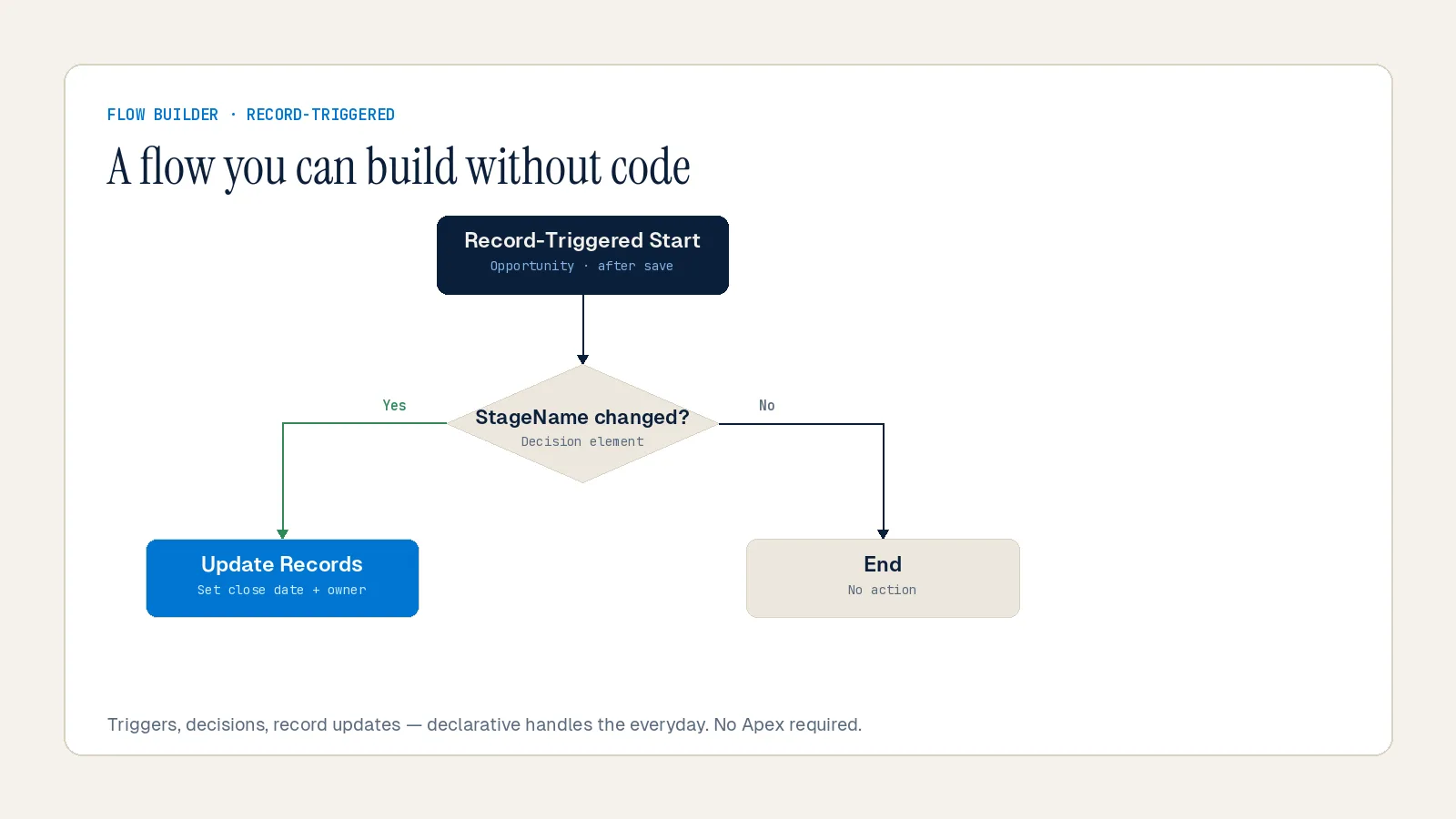
Flow is the right tool when the requirement fits declarative capabilities. The benefits are immediate: faster delivery, easier maintenance by admins, and no deployment overhead for code changes.
According to SFDC Developers, using Flow for the right use cases improves maintainability, reduces risk from governor limits, and speeds delivery. These are the scenarios where Flow wins cleanly:
Record-triggered automation. Standard create, update, and delete scenarios — especially before-save flows, which run faster than after-save flows and don't consume DML limits. Setting a field default on record creation, routing a lead based on territory, closing related tasks when a case is resolved — all Flow.
Screen flows for guided user experiences. Flow can build interactive, multi-step interfaces that Workflow Rules and Process Builder never could. Service onboarding wizards, data entry forms, approval decision screens — these belong in Flow.
Approvals, email alerts, and notifications. Quick approval routing and declarative notifications are Flow's native domain. Building them in Apex adds complexity with no meaningful benefit.
Simple cross-object updates. Parent-child record updates with straightforward criteria — Flow handles these in five nodes. The moment you need three levels deep with different criteria per level, you're looking at subflow spaghetti. That's the signal to move to Apex.
Scheduled automations on moderate data volumes. Scheduled Flows work well for periodic updates on datasets that stay well under the 50,000 query row cap.
One nuance worth naming: Flow requires many of the same concepts that Apex requires — bulkification concerns, governor limit awareness, and structured testing — for anything beyond the simplest scenarios. It's not strictly "no code required to maintain" at scale. Plan for that.
When to Use Apex
Apex is the right choice when requirements exceed what Flow can handle reliably, or when performance, transaction control, or integration complexity demands it.
According to Success Craft, Apex should be chosen when business requirements exceed the capabilities of Flow — it provides low-level control, allowing developers to implement highly complex logic that interacts with multiple Salesforce objects and external systems.
Here's where Apex is not optional:
Bulk data processing at scale. Flow is capped at 50,000 query rows per transaction. Apex with the Cursor class can query 50 million records. When you're processing nightly CSV ingestion of millions of rows, or running a data quality job across a full object dataset, Apex Batch is not a preference — it's a hard requirement.
Asynchronous processing patterns. Future methods, Queueable Apex, and Batch Apex give you fine-grained control over async execution. Flow has no equivalent for operations that need to run outside the main transaction, process in chunks, or handle retry logic.
Complex external integrations. Flow has HTTP callouts now, but they're not production-ready for anything serious. No retry logic, no mocking in tests, no proper error handling. Apex with `@future` or Queueable gives you real control over the entire integration lifecycle — authentication, error handling, response parsing, and retry behavior.
Recursive logic and complex algorithms. Multi-level recursive calculations, custom data transformations across large related datasets, and logic that requires full transaction boundary control — these need Apex. Flow cannot express recursive logic and will generate subflow architectures nobody wants to debug.
Testing requirements in CI/CD pipelines. With Apex, testing is mandatory — you cannot deploy Apex to production without a passing test class. Flow has no equivalent enforcement. If your team operates a proper deployment pipeline, Apex gives you testable, version-controlled logic that Flow cannot match at the same level of rigor.
Custom REST endpoints. If you need to expose business logic to external systems via a REST API, that's Apex. Full stop.
The Hybrid Model: Invocable Apex as the Bridge
The most practical approach in enterprise Salesforce architecture isn't Flow or Apex — it's Flow orchestrating Apex when complexity demands it.
According to SFDC Developers, when Flow cannot satisfy a requirement reliably, Invocable Apex can be used to combine the strengths of both tools. The pattern is straightforward: use Flow to collect inputs, build decision trees, and trigger actions — then add an Apex Action element to call your Apex logic and process the results.
The `@InvocableMethod` annotation is what makes this work. It exposes any static Apex method as a callable action in Flow Builder, surfaced visually as a native element. Admins can orchestrate it without touching a single line of code.
The Salesforce Developers Blog notes that Apex agent actions are invocable actions — and because they may be reused in a Flow, bulkifying your Apex code becomes doubly important. Every invocable method must accept and return a `List` to handle bulk execution correctly. Salesforce doesn't run your Apex 100 times when 100 records trigger a Flow — it runs it once with a list of 100 inputs. If your method isn't built to handle lists, it will fail the moment data is loaded in bulk.
A practical example: a lead scoring automation where the routing and notification logic is handled by Flow, but the scoring calculation — which requires querying multiple related objects and applying weighted criteria — is handled by an Invocable Apex class. Flow provides the when; Apex provides the how. This separation keeps the automation maintainable by admins while giving developers control over the logic that demands it.
According to Salesforce Ben, by combining the declarative power of Flow with the flexibility and robustness of Apex, you can create solutions that are both easy to build and maintain — and the separation of concerns makes the solution more modular.
Key hygiene rules for Invocable Apex:
Always label your `@InvocableMethod` clearly. Six months from now, an admin looking at the Flow should know exactly what that Apex action does without opening VS Code.
Never put SOQL queries or DML statements inside loops.
Flow and Apex share the same transaction and the same governor limit pool. If your Flow has consumed 90 SOQL queries and your Apex tries to run 20 more, the whole transaction rolls back.
Use try-catch blocks and return error messages back to Flow so users see actionable failures, not generic fault screens.
The Decision Framework
Here's the decision logic we apply at Inforge when scoping automations for mid-market Salesforce orgs:
| Scenario | Use |
|---|---|
| Field updates, email alerts, task creation | Flow |
| Simple parent-child record updates | Flow |
| Guided user screens and onboarding wizards | Flow (Screen Flow) |
| Approval routing with standard criteria | Flow |
| Bulk processing 100k+ records | Apex (Batch) |
| External API integration with auth/retry | Apex |
| Complex recursive logic or multi-object transforms | Apex |
| Async background jobs (scheduled processing) | Apex (Queueable / Batch) |
| Custom REST endpoint for external systems | Apex |
| Moderate complexity + admin maintainability | Flow + Invocable Apex |
The most common mistake we see: teams picking the tool they're more comfortable with rather than the tool the requirement calls for. Three months later, they're either debugging a Flow that looks like a plate of spaghetti, or maintaining an Apex class that could have been a three-node Flow.
The principle is simple: prototype with Flow, switch to Apex when you hit a clear technical constraint, and document your hybrid decisions explicitly. If you can't explain the choice in one sentence, you don't have a reason — you have a preference.
Also relevant as Agentforce adoption accelerates: according to the Salesforce Developers Blog, Flows and Apex both now support invoking Agentforce agents directly. Flow can trigger any active Agentforce agent using invocable agent actions. Apex can expose an agent via REST by deploying an annotated Apex method. This means your Flow and Apex decisions today directly shape what your AI agent architecture can do tomorrow. Build for that future.
Common Mistakes That Break Production Orgs
A few patterns consistently take down Salesforce orgs — both Flow-native and Apex-native:
SOQL or DML inside loops in Flow. The number-one Flow killer. Five thousand loop iterations with one SOQL query each equals a dead Flow. Use the Transform element to bulkify collection operations before querying.
God Flows. One Flow that does everything. Break these into subflows with clear, single responsibilities. Subflows share the same 2,000 element limit and 100 SOQL limit as the parent.
Hard-coded IDs in Flow. Record IDs change between environments. Any hard-coded ID in a Flow will behave differently in sandbox versus production. Use Custom Metadata Types instead.
Ignoring fault paths. When a Flow fails without fault connectors, it fails silently. Always add fault connectors — especially on DML operations and external callouts.
Missing test coverage for Invocable Apex. Invocable methods require unit test coverage just like any other Apex class. Skipping this blocks deployment and creates fragile automation.
Summary
Salesforce Flow and Apex are not competing tools — they're complementary layers of the same automation stack. Flow is the right starting point for the vast majority of automations: fast to build, admin-maintainable, and now the only supported declarative path on the platform. Apex is the right choice when logic is complex, data volumes are large, integrations require real control, or async processing is needed. Invocable Apex is the bridge that lets you use both without compromise.
At Inforge, we build entire Salesforce implementations through an AI-agent-first delivery model — and every automation decision we make follows this exact framework. When you architect it correctly from the start, Flow handles the 80%, Apex handles the 20%, and your org stays maintainable at scale. That's not a theory. That's how we operate, every day.
Frequently Asked Questions
Q: Can Salesforce Flow replace Apex entirely?
A: No. Flow handles most standard automation scenarios effectively, but Apex remains necessary for bulk data processing at scale, complex external integrations, custom REST endpoints, recursive logic, and fine-grained transaction control. Salesforce is investing heavily in Flow, but Apex is not being deprecated — it's the power option for scenarios Flow cannot handle.
Q: When should I use a before-save Flow vs. an after-save Flow vs. an Apex trigger?
A: Use a before-save Flow for updating fields on the record being saved — it's the fastest option and doesn't consume DML limits. Use an after-save Flow when you need to create or update related records. Use an Apex trigger when you need complex logic, bulk processing, recursive control, or integration callouts that require full developer control over the transaction.
Q: What is Invocable Apex and when should I use it?
A: Invocable Apex is an Apex method annotated with `@InvocableMethod` that can be called directly from Flow Builder as a native action. Use it when Flow cannot handle the logic on its own — complex calculations, external API calls, or bulk data operations — but you want admins to orchestrate the automation declaratively. It's the standard pattern for hybrid automation in enterprise Salesforce orgs.
Q: Do Flow and Apex share the same governor limits?
A: Yes — and this is critical to understand in hybrid architectures. Flow and Apex share the same SOQL query limit, DML limit, and query row limit within a single transaction. The key difference is that Flow is capped at 50,000 query rows and 2,000 Flow elements per transaction, while async Apex gets 60 seconds of CPU time and can query far larger datasets using Batch Apex or the Cursor class.
Q: Does Agentforce use Flow or Apex?
A: Both. Agentforce agents can invoke Flows directly using invocable agent actions, making Flows executable automation units for AI agents. Apex can also invoke Agentforce agents via the Invocable Action API, and Apex Agentforce actions are themselves invocable — meaning they can be reused in both agent and Flow contexts. Your automation architecture today shapes your AI agent capabilities tomorrow.
