Salesforce Apex Security Model Changes: What Every Admin and Developer Should Update Now
The Salesforce Summer '26 release quietly landed one of the most impactful Apex security overhauls in platform history. API version 67.0 flips execution defaults that developers relied on for years — and if your org runs any custom Apex, untested code is heading to production right now. This is not a future concern. Sandbox enforcement is already live as of June 22, 2026. Production follows immediately after.
At Inforge, we review and build Apex across dozens of Salesforce implementations. This post breaks down every change in plain language — what was, what is, and the exact steps your team needs to take today.
Key Takeaways:
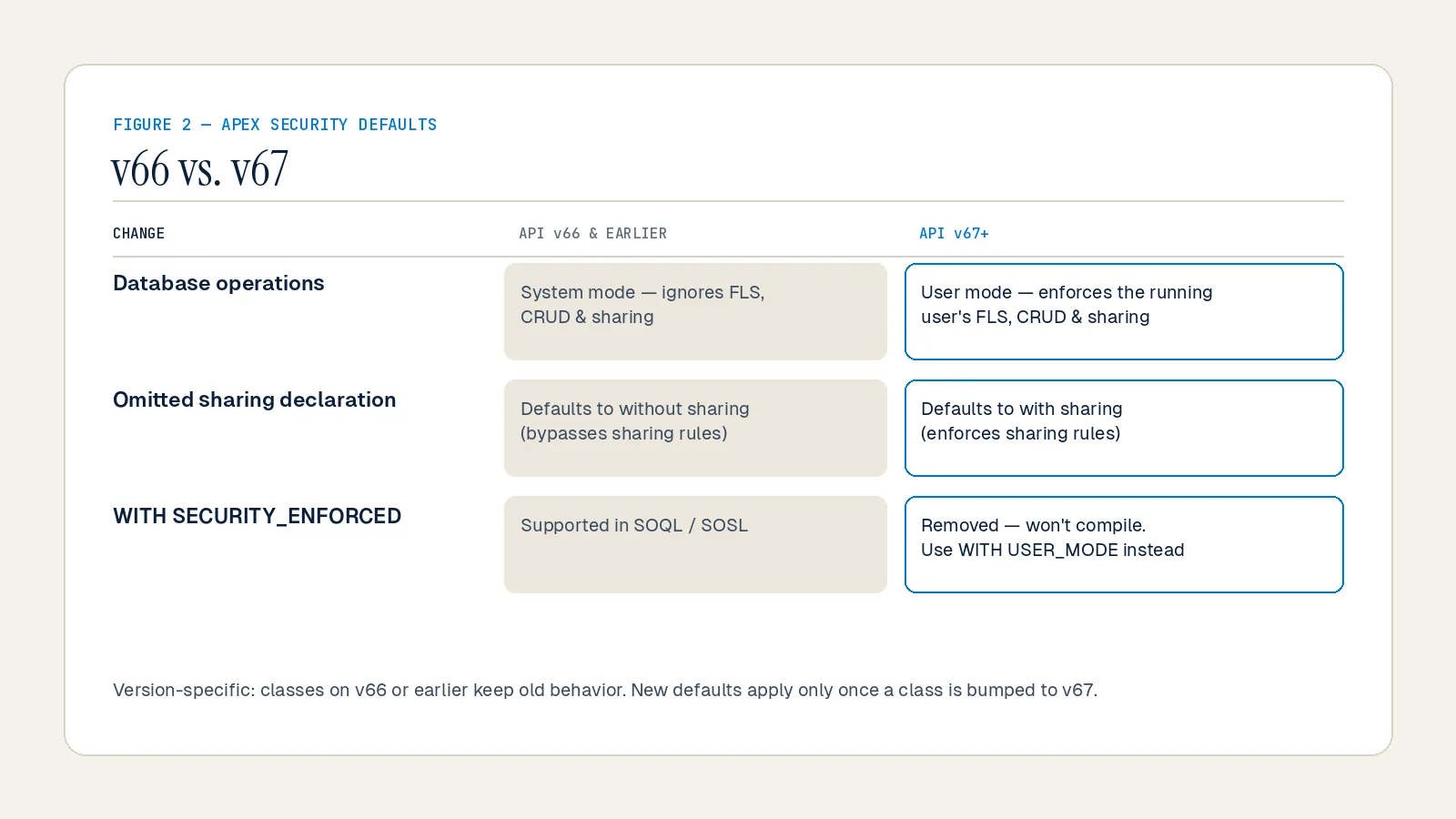
API version 67.0 switches Apex database operations from System Mode to User Mode by default — SOQL, DML, and SOSL now respect the running user's permissions automatically.
Classes with no sharing keyword previously defaulted to `without sharing`; in v67 they now default to `with sharing`.
`WITH SECURITY_ENFORCED` is removed entirely in v67 — any class using it will fail to compile once bumped to the new version.
Apex triggers now always run in system mode across all API versions — this change is not version-gated.
Existing classes on v66 or earlier are unaffected until you explicitly bump their API version.
Phishing-resistant MFA is now mandatory for users with Author Apex permission, effective July 2026 in Production.
Quick Answer: Salesforce Summer '26 (API v67.0) introduces a secure-by-default Apex execution model. Database operations now run in User Mode, undeclared classes default to `with sharing`, and the `WITH SECURITY_ENFORCED` SOQL clause is removed. Any org with custom Apex must audit and test all classes against v67.0 in sandbox before upgrading to production.
Why Salesforce Changed the Apex Security Model Now
Salesforce is responding to a real escalation in platform-targeted attacks. According to Salesforce's security team via their May 2026 platform security webinar, early 2025 brought a surge in social engineering attacks targeting individual users, and by late 2025 attackers had shifted tactics — bypassing MFA entirely by tricking users into approving malicious connected apps. By 2026, AI-assisted attacks are automating target identification and accelerating data exfiltration.
The core problem with the previous Apex model was structural: security was opt-in. Developers had tools like `WITH SECURITY_ENFORCED`, `Security.stripInaccessible()`, and the `AccessLevel` parameter — but every one of them required the developer to remember to use them. As Salesforce's own developer blog noted in June 2026, "the platform no longer assumes that the surface in front of it has already filtered the data; elevated access is now something you opt into explicitly."
The result was a platform where a single forgotten keyword or clause could leave an `@AuraEnabled` method silently exposing data to any user who could invoke it — including Experience Cloud guest users. Opt-in security, at enterprise scale, is not security.
Summer '26 changes the default.
The Four Specific Changes in API Version 67.0
Every change below applies only when a class is compiled at API version 67.0. Existing classes on v66 or earlier keep their current behavior until you explicitly bump them. That boundary is critical — and it also means a single misconfigured deployment that bumps a class to v67 can silently change its behavior in production.
Change 1: Database Operations Now Run in User Mode by Default
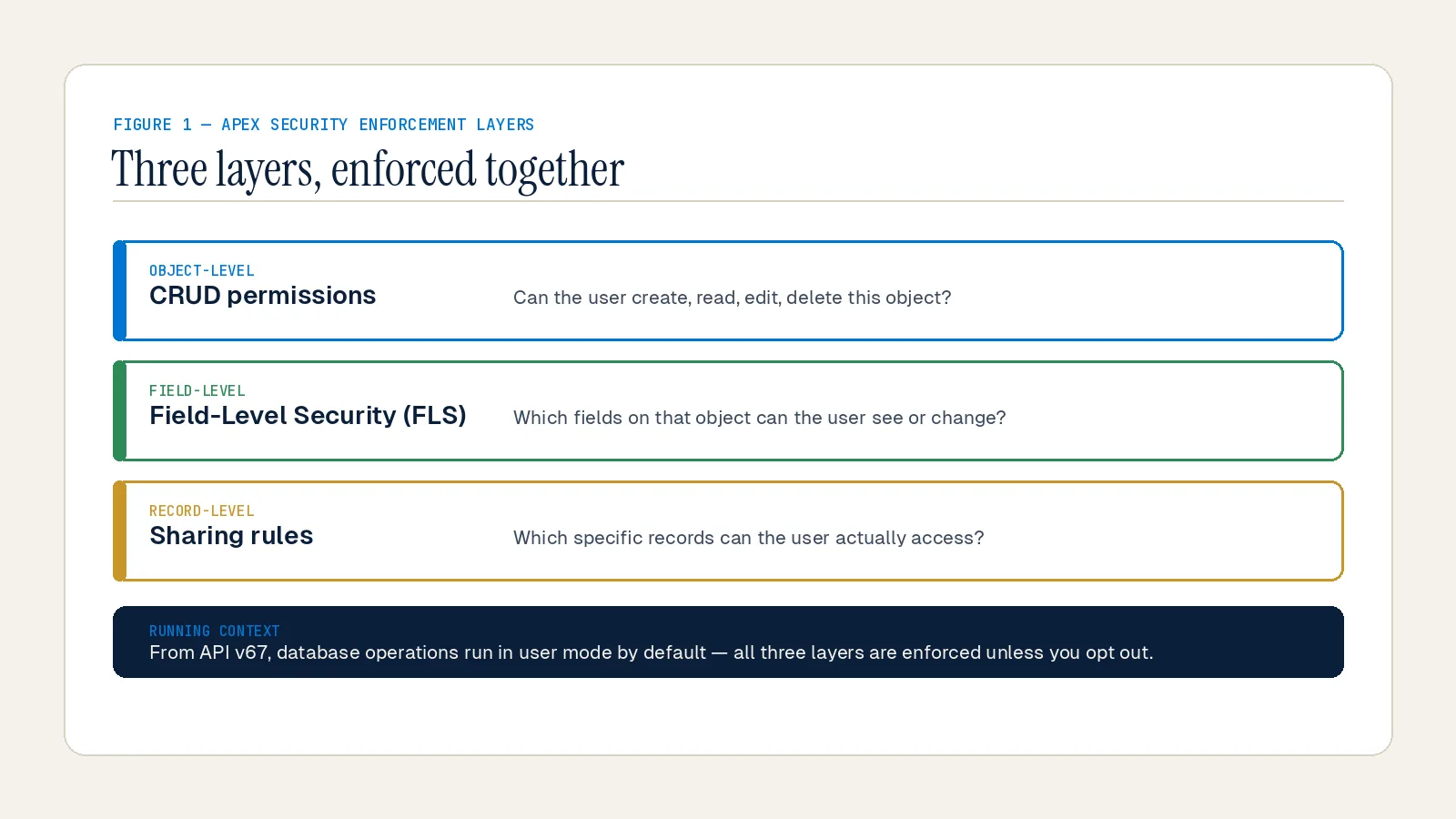
This is the headline change. Previously, Apex ran in System Mode by default, which meant SOQL queries, DML operations, SOSL searches, and `Database` methods ignored the running user's object permissions, field-level security (FLS), and sharing rules unless a developer explicitly added user-mode enforcement.
From API v67.0 onward, the same operations run in User Mode by default. According to the Salesforce Developers Blog (June 2026), every database operation now enforces the running user's object permissions, FLS, and sharing rules without any additional syntax.
In practical terms:
A SOQL query that previously returned 500 records for a system process may now return 40 if the running user only has visibility to a subset.
An `@AuraEnabled` method that queried fields the user couldn't access will now throw a `System.QueryException` or FLS exception.
A batch job running as a low-permission user may start skipping records it previously processed.
None of this is a bug. It is the platform working exactly as designed under the new defaults.
You can still opt into system mode explicitly by appending `WITH SYSTEM_MODE` to a query or by using `AccessLevel.SYSTEM_MODE` in `Database` methods. The key word is *explicitly* — privileged access is now intentional, not accidental.
Change 2: Undeclared Classes Now Default to `with sharing`
Before v67.0, an Apex class with no sharing keyword declaration defaulted to `without sharing` in most execution contexts — meaning it bypassed the running user's record-level security and could return any record it could find.
In API v67.0, any class with no explicit sharing keyword now defaults to `with sharing`. According to Salesforce Ben's Summer '26 developer breakdown, if the class using a query is API v67 and has no sharing declaration, it will now default to `with sharing` instead of `without sharing`.
The classes most at risk from this change are:
`@AuraEnabled` controllers that were built without a sharing keyword, assuming system-level access
`@InvocableMethod` classes exposed in Flow
REST endpoint classes
Batch Apex classes where undeclared sharing previously gave them full record access
If a batch job or integration class needs to see all records regardless of the running user, you must now explicitly declare `without sharing`. That declaration becomes an intentional architectural choice — which is exactly the point.
Change 3: `WITH SECURITY_ENFORCED` is Removed
`WITH SECURITY_ENFORCED` was a SOQL clause introduced to enforce object-level security (OLS) and field-level security (FLS) inline in queries. It was always imperfect. As Reco's security research team documented in April 2026, the clause only applied to `SELECT` and `FROM` clauses — fields referenced in `WHERE` or `ORDER BY` were not checked, creating information leakage paths through filter conditions.
In API version 67.0, `WITH SECURITY_ENFORCED` no longer compiles. Any class bumped to v67 that still contains this clause will throw a hard compilation error. The replacement is `WITH USER_MODE`.
`WITH USER_MODE` covers the full query — including polymorphic fields like `Owner` and `Task.WhatId`, the `WHERE` clause, and `ORDER BY`. According to the Salesforce Developers Blog, it also reports every FLS violation instead of only the first, giving developers complete diagnostic information from the `QueryException`.
For developers who need graceful degradation — returning partial results when a user lacks access to some fields rather than throwing an exception — `Security.stripInaccessible()` remains the right tool. As Salesforce's official LWC developer guide explains, `stripInaccessible()` gives you the opportunity to gracefully degrade instead of failing on an access violation when using `WITH USER_MODE`.
Change 4: Apex Triggers Always Run in System Mode (All Versions)
This change is versionless — it applies to all API versions, not just 67.0.
Previously, there were edge cases where sharing rules were enforced inside trigger context. Going forward, all Apex triggers run in system mode consistently, regardless of the API version of the trigger file. According to SalesforceTrails (June 2026), "if you were unintentionally relying on sharing being enforced in a trigger, that assumption is gone."
For most teams, this change is neutral — triggers were designed to run with elevated access. But any trigger that was relying on incidental sharing enforcement to filter records before processing them needs to be reviewed.
What About the Mandatory MFA Changes for Author Apex Users?
Layered on top of the Apex security model changes is a broader platform security enforcement cycle that directly affects anyone with the Author Apex permission.
According to Salesforce Ben's June 2026 security guide, phishing-resistant Multi-Factor Authentication (MFA) is now required for any user holding the System Administrator profile, Modify All Data, View All Data, Customize Application, or Author Apex permissions. Sandbox enforcement began June 22, 2026. Production enforcement follows July 2026.
Standard MFA methods — push notifications, authenticator app codes, SMS — can be defeated through social engineering. Phishing-resistant MFA cannot be intercepted because it is cryptographically bound to the specific login domain. Salesforce is drawing a hard line: if a user can deploy Apex, they must use hardware-bound or biometric authentication.
Practical implication: any developer or admin who can write or deploy Apex code needs access to a FIDO2-compatible hardware security key or a device that supports biometric passkeys. This is not optional after the enforcement date.
The Action Checklist: What to Do Before You Bump to v67
The v67 security changes are version-specific. Your existing Apex is safe until a class is bumped to API v67 — whether you do it intentionally or a deployment tool does it automatically. Here is the sequence to follow:
Step 1: Inventory your Apex classes by sharing declaration
Pull a list of all Apex classes with no sharing keyword using `ApexClass` metadata. These are the highest-risk classes — they will flip from `without sharing` to `with sharing` behavior on v67. Prioritize `@AuraEnabled` controllers, `@InvocableMethod` classes, batch classes, and REST endpoints.
Step 2: Search for `WITH SECURITY_ENFORCED` across your codebase
Use Salesforce CLI (`sf apex list`) or your IDE to find all instances. Replace each one with `WITH USER_MODE`. If graceful degradation is required for that code path, pair the user-mode query with `Security.stripInaccessible()` for the DML operation.
Step 3: Run user-mode vs. system-mode count tests in sandbox
For every service class or query you plan to migrate, validate the row-count delta between `WITH USER_MODE` and `WITH SYSTEM_MODE`. A significant gap means the running user's sharing rules are restricting access — and you need to decide whether that restriction is intentional or a bug.
Step 4: Review trigger logic for incidental sharing assumptions
Audit any trigger that branches based on record counts or field values that might have been filtered by sharing. Now that all triggers run in system mode consistently, those filters no longer apply.
Step 5: Audit MFA enrollment for all users with Author Apex permission
Generate a permission set and profile report to identify every user who can deploy or write Apex. Verify they are enrolled in a phishing-resistant MFA method ahead of the production enforcement date.
Step 6: Test in sandbox at API v67 before touching production
According to Conemis (April 2026), teams should validate critical integrations and custom Apex against API version 67.0 in sandbox well ahead of production upgrades. Bump a non-critical class to v67 in sandbox first, run your test suite with `System.runAs()` contexts for restricted users, and validate behavior before any production deployment.
The Deeper Pattern: Secure by Default Is the Right Architecture
The old Apex model asked developers to add security. The new model asks developers to remove it intentionally when they need to.
This is the right inversion. At Inforge, we have reviewed production Apex codebases where `@AuraEnabled` methods accessible to low-permission users — sometimes Experience Cloud guest profiles — were running without any sharing declaration. Those methods were returning data they were never supposed to return. The code worked, tests passed, and no one noticed until a security review flagged it.
The problem with opt-in security is that it depends on every developer on every team remembering to use it every time. As one developer wrote in a widely cited Summer '26 technical analysis, "in a large org, that is wishful thinking."
API v67.0 closes that gap at the platform level. The compliance overhead is real — you will need to audit your Apex, update sharing declarations, and replace deprecated clauses. But the alternative is a codebase that is one forgotten keyword away from a data exposure incident.
Orgs that invest in this audit now will carry less security debt into every future Apex change.
Summary
Salesforce Summer '26 (API v67.0) introduces the most meaningful shift to the Apex security model in years: User Mode by default, `with sharing` as the undeclared-class default, removal of `WITH SECURITY_ENFORCED`, and system-mode enforcement on all triggers. These changes are not retroactive — existing classes are safe until bumped — but any deployment process that automatically increments API versions can trigger them silently. Admins also face a new phishing-resistant MFA requirement for anyone holding the Author Apex permission. At Inforge, we deliver full Salesforce implementations and security audits through our AI-agent delivery model — faster timelines, consistent quality, and security baked in from day one.
Frequently Asked Questions
Q: Will my existing Apex break automatically when my org upgrades to Summer '26?
A: No. The v67.0 security changes are version-specific. Classes on API v66 or earlier keep their existing behavior. The new defaults only apply once a class is explicitly compiled at API version 67.0. However, be aware that some deployment tools or CI/CD pipelines automatically bump API versions — audit your deployment process to prevent unintentional upgrades.
Q: What should I replace `WITH SECURITY_ENFORCED` with?
A: Replace it with `WITH USER_MODE` in your SOQL queries. `WITH USER_MODE` is a strict superset — it covers the full query including `WHERE` and `ORDER BY` clauses, handles polymorphic fields, and reports all FLS violations. For code paths that require graceful degradation instead of a hard exception, use `Security.stripInaccessible()` on the result set.
Q: My batch job processes all records in the org. Will it break under the new defaults?
A: If the batch class has no sharing declaration and you bump it to API v67, it will now default to `with sharing` — meaning it will only process records the running user can see. If the batch is designed to operate across all records, explicitly declare it `without sharing`. This makes the elevated access intentional and auditable.
Q: What is the difference between `WITH USER_MODE` and `Security.stripInaccessible()`?
A: `WITH USER_MODE` enforces security strictly — it throws an exception if the running user lacks access to any selected field or object. `Security.stripInaccessible()` provides graceful degradation — it removes inaccessible fields from the result and lets execution continue. Use `WITH USER_MODE` for new code where hard enforcement is acceptable. Use `stripInaccessible()` when the design requires partial results or controlled fallback behavior.
Q: Which users need to upgrade to phishing-resistant MFA?
A: Any user with the System Administrator profile or any of the following permissions: Modify All Data, View All Data, Customize Application, or Author Apex. These users must authenticate using a FIDO2 hardware security key or a biometric passkey. Production enforcement begins in July 2026. Start MFA enrollment audits now — procurement of hardware keys takes time.
*Ready to validate your Apex codebase against API v67.0 before it hits production? Inforge delivers Salesforce security reviews and full implementations through our AI-agent delivery model — faster timelines, consistent quality, and security baked in from day one. [Get in touch with the Inforge team.]*
