Salesforce Agentforce Explained: Use Cases, Pricing, and Setup for Sales Teams
Salesforce Agentforce is the platform's autonomous AI agent layer — a system that reasons, plans, and executes tasks inside your CRM without waiting for a human to click a button. It qualifies leads, monitors pipeline health, drafts outreach, books meetings, updates records, and coaches reps, all natively inside Salesforce. If you are evaluating it for a sales team, this guide covers what it actually does, what it costs today, and how to set it up without turning a pilot into a year-long stall.
Quick Answer: Agentforce is Salesforce's autonomous AI agent platform, available to Enterprise Edition customers and above. Pricing runs across three models — per conversation ($2), Flex Credits ($500 per 100,000 credits / ~$0.10 per action), and per-user licenses (~$125/user/month for sales). Enterprise Edition customers get 200,000 Flex Credits free through Salesforce Foundations. Setup starts with enabling Foundations, activating Agentforce in Setup, and building your first agent in Agent Builder.
Key Takeaways:
Agentforce is not a chatbot. It is an autonomous reasoning engine that executes multi-step tasks inside Salesforce objects, flows, and external systems.
Pricing has three parallel models in 2026: per conversation, Flex Credits (action-based), and per-user licenses. Choosing the wrong model at contract time is expensive to unwind.
Enterprise Edition customers start with 200,000 free Flex Credits via Salesforce Foundations — use this before any commercial conversation.
The highest-ROI sales use cases are lead qualification and routing, pipeline monitoring, pre-call research, and meeting scheduling.
Data quality is the number-one variable in agent performance. Fix your Salesforce data model before configuring agents.
Agentforce ARR crossed $1.2 billion in Q1 FY27, up 205% year-over-year. This is production-scale adoption, not a pilot wave.
What Is Salesforce Agentforce?
Agentforce is Salesforce's AI agent platform, designed to deploy autonomous digital workers across sales, service, and internal operations — all natively inside the Salesforce platform.
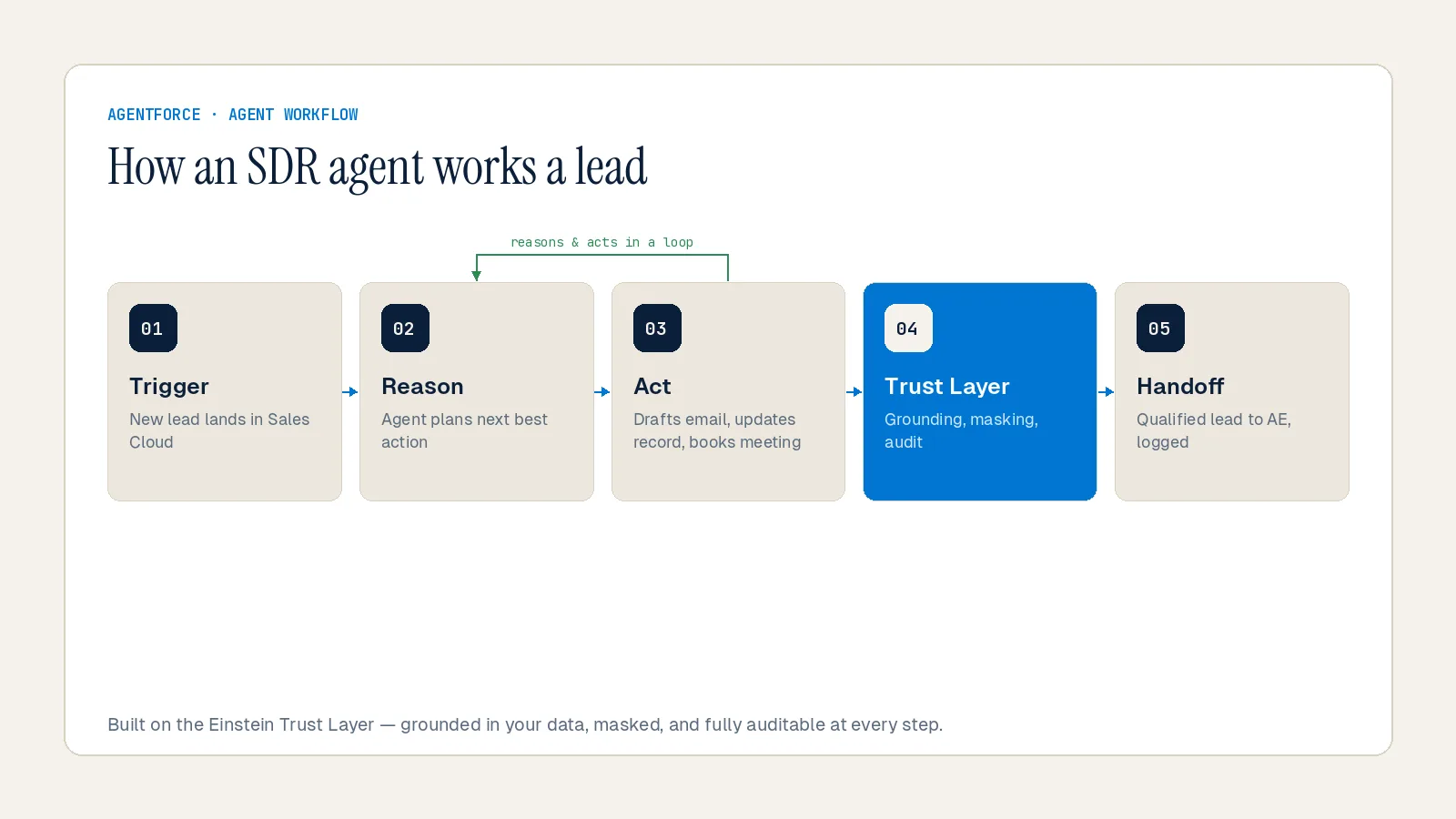
Unlike traditional automation that fires rules when conditions are met, Agentforce agents interpret intent, plan multi-step actions, and adapt responses based on context across your Salesforce data. When complexity exceeds their defined scope, they transfer to a human with full context already prepared. According to Salesforce, Agentforce is used to automate complex workflows like lead qualification, predict business outcomes such as which deals are likely to close, and personalize interactions across marketing, sales, and service channels.
The platform sits on three core components: the Atlas Reasoning Engine (the AI brain that decides what to do next), the Einstein Trust Layer (which enforces PII masking, prompt-defense, and output toxicity checks on every agent action), and Data 360 (which powers retrieval-augmented generation, agent analytics, and usage tracking).
In 2025, Salesforce rebranded its entire product line around Agentforce. Sales Cloud became Agentforce Sales. Service Cloud became Agentforce Service. The rebrand signals a platform-wide shift: AI agents are no longer a feature bolted onto the CRM. They are the product.
Agentforce Adoption: Where Things Stand in 2026
This is not an emerging technology in the evaluation phase. The numbers put it in production territory.
According to Salesforce's Q1 FY2027 earnings release, Agentforce ARR surpassed $1 billion for the first time, reaching $1.2 billion — up 205% year-over-year. Combined with Data 360 and Informatica Cloud, Salesforce's total AI and data ARR reached $3.4 billion. The platform has now closed 29,000 enterprise deals, with deal count rising nearly 50% sequentially in Q4 FY26.
Salesforce's own dogfooding tells the story at the operational level. According to Cyntexa's Agentforce Statistics report, Salesforce customers have created over 4 trillion automations through Flows connected to Agentforce, saving 5.6 billion hours of work. Salesforce itself has handled 4 million customer inquiries autonomously through Agentforce on its own support channels.
For sales teams specifically, the Salesforce State of Sales 2026 report found that nine in ten sales teams either already use AI agents or expect to within two years, and 94% of leaders with deployed agents say they are critical to meeting business demands.
At Inforge, we watch adoption curves closely — and this one matches the early SaaS pattern from the 2010s. The question is no longer whether agent deployment pays off. The scale of adoption is answering that.
Agentforce Use Cases for Sales Teams
Agentforce delivers the most immediate ROI in sales when applied to high-volume, measurable workflows — tasks that consume rep time but don't require human judgment to execute.
Lead Qualification and Routing
This is the highest-impact starting point for most B2B sales teams. Agentforce agents analyze intent signals, engagement history, and firmographic data to automatically qualify leads. Once qualified, the agent routes leads to the right rep, territory, or partner, reducing response times and increasing conversion.
Siemens built a real-world example of this at scale. According to Salesforce's blog on autonomous lead qualification, Siemens partnered with Salesforce to deploy an Agentforce qualification agent using the BANT framework (Budget, Authority, Need, Timeline). The agent drives multi-turn conversations with prospects, clarifies ambiguous replies, and uses Salesforce Flow and Omni-Channel routing to instantly assign qualified leads to the correct rep — all natively inside the platform, with no middleware.
One B2B SaaS company that configured Agentforce for lead qualification across web chat, demo requests, and partner referrals saw a 42% lift in MQL-to-SQL conversion, 3x faster speed-to-lead, and a 25% reduction in leads stalled with no next step — within a single quarter, per Pedowitz Group's Agentforce routing analysis.
Pipeline Monitoring and Opportunity Management
Agentforce agents in Sales Cloud act as a digital sales operations partner. According to Focus on Force's 2026 Agentforce use case analysis, Agentforce can monitor pipeline health, follow up on stalled deals, schedule meetings, update opportunity stage fields, and draft outreach emails — keeping sellers focused on conversations, not admin work.
Lead qualification also now runs on Contacts and Person Accounts, not just the Lead object, which means pipeline hygiene operations extend deeper into the account model.
Pre-Call Research and Meeting Preparation
One of the clearest ROI examples in the market comes from financial services. According to Softweb Solutions' Agentforce use case report, RBC Wealth Management deployed Agentforce for over 4,500 financial advisors. Meeting prep that previously took more than an hour now takes less than a minute.
This pattern generalizes across B2B sales teams. The agent pulls account history, recent activity, open opportunities, and relevant news, then delivers a structured brief before the rep's scheduled call. Zero toggling between tools. No manual research.
Agentforce SDR: Automated Lead Nurturing and Outreach
Agentforce Lead Nurturing (formerly Agentforce SDR) is an autonomous AI agent built to scale top-of-funnel efforts around the clock. According to Concret.io's Agentforce SDR setup guide, it automatically engages new leads, sends personalized outreach emails, responds to prospect replies using company data, detects buying intent, and books meetings — then transfers the qualified lead to a rep with full context.
It operates 24/7, handles opt-outs and off-topic replies, and integrates with Sales Engagement cadences and Einstein Activity Capture. For sales teams with high inbound volume or a long tail of unworked leads, this use case pays for itself fast.
Sales Coaching
Agentforce for Sales includes a Sales Coach agent that provides reps with guided selling support directly inside opportunities. According to Salesforce's pricing page, Agentforce for Sales is available as a per-user add-on at approximately $125 per user per month, which includes sales coaching and guided selling capabilities.
At Inforge, we've seen coaching use cases significantly outperform in orgs where reps already have clean opportunity data and consistent stage definitions. If your pipeline hygiene is weak, coaching agents surface noise, not signal.
Agentforce Pricing in 2026: The Three Models
Agentforce pricing is the most common source of budget surprises. Understanding the three models before signing a contract matters.
Model 1: Per Conversation ($2/conversation)
Each time an AI agent resolves a complete customer interaction — through chat, email, or voice — you pay $2. The conversation is counted from start to resolution, regardless of how many messages are exchanged. This model applies specifically to customer-facing agents under a fixed structure.
According to Estarei's Agentforce pricing guide, this model works best for companies with predictable conversation volumes under 10,000 per month. The math is straightforward: 5,000 conversations per month equals $10,000 per month. However, it was designed for customer-facing service agents, not for the multi-team, employee-facing deployments where most sales teams operate.
Model 2: Flex Credits (~$0.10/action)
Flex Credits are Salesforce's newer consumption-based model, introduced in May 2025. According to Salesforce's pricing page, Flex Credits cost $500 per 100,000 credits, with each action consuming 20 credits — approximately $0.10 per action. Actions include updating a record, summarizing a case, answering a product inquiry, sending an email, or executing a custom flow.
Flex Credits cover every Agentforce use case: customer-facing agents, employee-facing agents, and Agentforce Voice. Three buying structures exist under this model: Pre-purchase (upfront, draws down over the contract term), Pay-as-you-go (billed monthly in arrears, no upfront commitment), and Pre-commit (lock in a baseline, pay monthly).
For most sales teams piloting Agentforce, pay-as-you-go Flex Credits are the right entry point. They let you measure real consumption before committing to volume. According to Ekfrazo's 2026 pricing guide, Flex Credits and per-conversation pricing cannot be used in the same Salesforce org simultaneously — so choose before you start.
Real-world cost example: A support team handling 3 cases per day per agent across 100 users for 20 workdays would consume approximately 360,000 Flex Credits monthly, costing around $1,800. Under the per-conversation model, the same volume would cost $6,000.
Model 3: Per-User Licenses (~$125–$150/user/month)
For teams where every user interacts with AI agents daily, per-user licensing provides cost predictability. According to Estarei's pricing breakdown, Agentforce for Sales is priced at approximately $125 per user per month, covering sales coaching and guided selling. Teams on the Agentforce 1 Edition, which sits above Unlimited Edition, get bundled unmetered agent usage — making it the right model for orgs that want to run agents across every opportunity without watching a credit meter every month.
Requirement note: Agentforce requires Salesforce Enterprise Edition ($165/user/month minimum) or Unlimited Edition ($330/user/month) as a prerequisite. This cost exists before any Agentforce spend.
The Free Entry Point: Salesforce Foundations
Before any commercial conversation, start here. According to Salesforce's Foundations program, Enterprise Edition customers and above get 200,000 Flex Credits at no cost through Salesforce Foundations, along with access to Agent Builder, Prompt Builder, and 250,000 Data 360 credits. This is a permanent tier, not a trial. It is the right place to build, test, and validate your first agent before committing to paid usage.
Total Cost of Ownership: What Budget Often Misses
Platform fees are the visible line item. The hidden costs are where budget surprises happen.
According to Get Generative's 2025 Agentforce pricing guide, enterprise customers consistently encounter three categories of additional cost: implementation (ranging from $50,000 to $150,000 for initial configuration), ongoing consulting (averaging $10,000–$25,000 per month), and training ($2,000–$5,000 per user). Orgs with mature, well-maintained Salesforce environments deploy faster and cheaper. New customers — or orgs with dirty data — face longer ramp times and higher costs.
The most common real-world scenario: a mid-market company with 50 sales users might budget $90,000 annually for Agentforce licenses, but encounter actual Year 1 costs well above that when implementation services and training are included.
At Inforge, we've found that the most reliable predictor of deployment cost isn't the feature set you want — it's the current state of your Salesforce data model. Clean data compresses implementation timelines. Dirty data expands them.
How to Set Up Agentforce for Sales Teams: A Practical Sequence
Agentforce is not plug-and-play. The orgs that deploy it successfully follow a deliberate sequence. The ones that stall launch a pilot and never go live.
Step 1: Define the Use Case Before Touching the Platform
Start with a single, high-volume, measurable workflow. Vague goals produce fragmented results. Per Synebo's Agentforce implementation guide, tie your use case to a specific business outcome — for example, "reduce time for lead qualification from 48 hours to under 2 hours" or "automate pre-call research for all opportunities above $20K." Define what success looks like before configuring anything.
For sales teams, the recommended starting point is either lead nurturing/qualification (if you have high inbound volume) or pipeline monitoring (if deals are stalling silently). Both have measurable KPIs and self-contained enough scope to complete a pilot in 4–6 weeks.
Step 2: Audit Your Data Model
According to Estarei's Agentforce setup guide, if your knowledge base is inconsistent or your core Salesforce objects are poorly maintained, Agentforce will produce poor outputs. This step is non-negotiable. Before configuring agents, audit Lead, Contact, Account, and Opportunity data for completeness and accuracy. Ensure fields your agents will read — industry, company size, engagement history, opportunity stage — are consistently populated.
Data 360 is the underlying data layer Agentforce uses for retrieval-augmented generation. The richer and cleaner your Salesforce data, the more precise your agents' outputs.
Step 3: Enable Salesforce Foundations
According to Focus on Force's developer adoption guide, enable Salesforce Foundations through the Your Account app in your Salesforce org. This unlocks Agent Builder, Prompt Builder, 200,000 Flex Credits, and the Data 360 credits included in the free tier. Complete additional setup steps including enabling Einstein Generative AI in Setup.
Do not enable Agentforce in production before this step is complete and tested in a sandbox. Skipping sandbox testing is how orgs create agent behaviors they cannot easily roll back.
Step 4: Build Your First Agent in Agent Builder
Agent Builder is Salesforce's no-code/low-code interface for configuring agents. According to Salesforce's official Agentforce guide, Agentforce Studio — available through the App Launcher — brings together Agent Builder (for drafting rules in plain language), Agentforce Script (for deterministic business logic), Testing Center (for validating behaviors before deployment), and Agentforce Observability (for monitoring performance post-deployment).
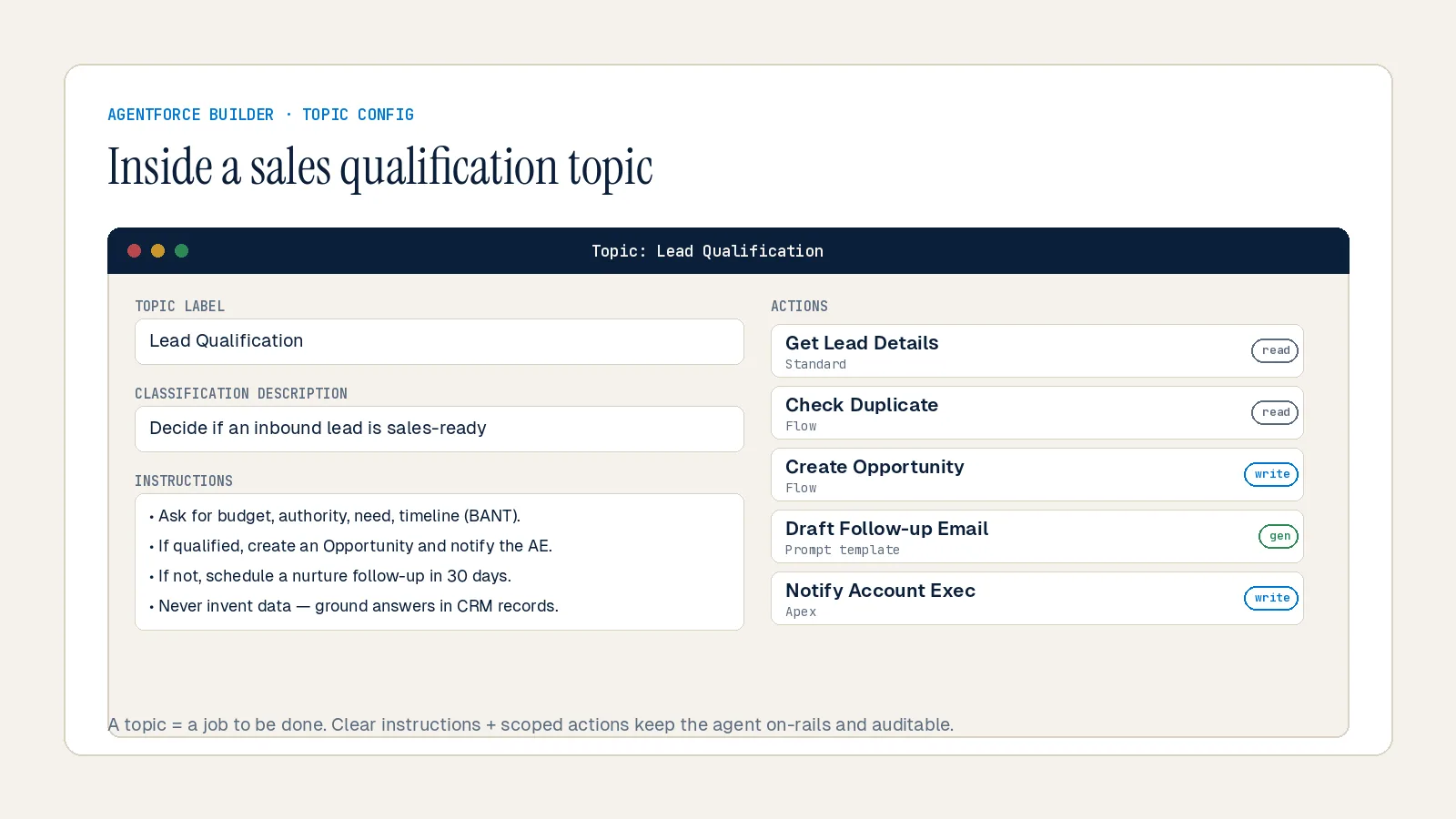
For a sales qualification agent, the setup process involves:
1. Creating a new agent topic in Agent Builder and defining what the agent is responsible for
2. Writing plain-language instructions that define scope, qualifying criteria, and escalation rules
3. Attaching standard and custom actions (including Salesforce Flows for lead routing and assignment)
4. Testing against sample leads in the Testing Center
5. Activating and deploying via the embedded service deployment
According to Salesforce's Trailhead documentation, the new Agentforce Builder became generally available in February 2026 and supports AI-native agent drafting from a plain-language prompt describing what the agent should do.
Step 5: Assign Permissions and Monitor Usage
According to Salesforce Break's admin guide, assign the Agentforce permission set to relevant users through Permission Sets in Setup. Monitor consumption in the Digital Wallet, which provides real-time tracking of Flex Credit usage across all deployed agents. Set overage alerts before launch to avoid unexpected billing.
Post-deployment, use the Agentforce Command Center (within Agentforce Observability) to track agent performance, identify where agents are escalating to humans, and refine logic based on real usage patterns.
Step 6: Expand Based on Pilot Results
Start with one agent, one use case, and measurable KPIs. After 4–6 weeks of production data, you'll have concrete signal on cost-per-action, conversion lift, and time saved. Use that data to build the business case for expanding to additional use cases and additional teams.
According to Get Generative's implementation guide, organizations that implement 3–5 high-value use cases initially see the fastest payback, often expanding adoption once value is proven from the first deployment.
Summary
Salesforce Agentforce is the infrastructure layer for autonomous sales operations inside Salesforce. It qualifies leads, manages pipeline, coaches reps, and runs outreach — continuously, without manual triggers. Pricing has three models: per conversation, Flex Credits, and per-user licenses, with a free entry point through Salesforce Foundations that every Enterprise Edition customer should activate before spending anything. The setup path is defined: audit your data, build in sandbox, start with one high-impact use case, and expand from proof.
At Inforge, we implement Agentforce as part of full Salesforce deployments — fully via AI agents. If you want to see what that looks like in practice, or want to pressure-test your current Agentforce setup plan, that's exactly the kind of conversation we have every day.
Frequently Asked Questions
Q: What is the difference between Agentforce and Einstein AI in Salesforce?
A: Einstein AI is Salesforce's predictive and generative AI layer — it produces recommendations, predictions, and content. Agentforce is an autonomous agent platform built on top of Einstein and the Atlas Reasoning Engine. Where Einstein suggests, Agentforce acts. An Einstein model might predict which lead is likely to convert. An Agentforce agent qualifies that lead, sends outreach, books the meeting, and updates the opportunity — without a rep needing to initiate anything.
Q: Do I need Data Cloud (Data 360) to use Agentforce?
A: Data 360 is not required for every Agentforce deployment, but it significantly enhances agent performance. It powers the retrieval-augmented generation (RAG) layer that lets agents ground responses in your specific business data, as well as agent analytics and Digital Wallet usage tracking. For a basic agent running on standard Salesforce objects, you can start without it. For agents that need to reason across unstructured data, external sources, or large knowledge bases, Data 360 is effectively a prerequisite.
Q: Which Agentforce pricing model is right for a sales team?
A: For a pilot, start with pay-as-you-go Flex Credits — they let you measure real action consumption before committing to volume. If your team intends to run agents on every rep and every opportunity daily, per-user licensing (Agentforce for Sales at ~$125/user/month) provides predictability. The $2/conversation model is designed for external-facing customer service agents, not internal sales workflows. Importantly, Flex Credits and per-conversation pricing cannot coexist in the same Salesforce org, so choose before contract.
Q: How long does it take to set up an Agentforce sales agent?
A: A focused pilot for a single use case — like lead qualification or pre-call research — can go from Foundations activation to a tested agent in 4–6 weeks, assuming your Salesforce data model is reasonably clean. Complex deployments involving custom actions, multi-agent orchestration, or external system integrations typically take 8–16 weeks. The most common delay is data readiness, not the agent configuration itself.
Q: Is Agentforce replacing sales reps?
A: No. Agentforce handles the high-volume, repeatable, administrative work that consumes rep time but doesn't require human judgment — first responses, lead qualification, data entry, pre-call research, meeting scheduling. Strategic selling, relationship management, and complex deal negotiation remain human work. The practical framing: agents cover the work no one wanted to do, so reps can do more of the work that actually closes deals.
