Reducing Salesforce Technical Debt: A Practical Cleanup Roadmap for Admins
Technical debt is the cost of choosing the quick, easy solution today instead of the better long-term one — and in Salesforce it accumulates quietly but significantly. It shows up as hard-coded IDs in Apex and formulas, triggers and Flows that aren't bulkified and break under load, overlapping automations doing the same job, dormant managed packages, and classes stuck on old API versions. None of it announces itself. It just gradually turns easy updates into risky change management.
Here's the reframe every admin should internalize: technical debt isn't a failure. It's a sign your business has grown and changed. The orgs with the most debt are usually the ones that have been used the most. The problem isn't having debt — it's not having a plan to pay it down.
Quick Answer: Pay down Salesforce technical debt in four phases — inventory what you have, prioritize by business impact, remediate safely in a sandbox, then prevent new debt with governance. Start by running Optimizer today, export the findings, and fix the three highest-impact items this sprint. Done consistently, that single habit turns a legacy org into a scalable, AI-ready platform.
Key Takeaways:
2026 has been called "the year of technical debt" in the Salesforce ecosystem, because messy org data and broken automations are the wall companies hit when trying to adopt Agentforce and Einstein AI.
Salesforce debt comes in four main forms: code debt (hard-coded IDs, SOQL in loops, hollow test coverage), automation debt (retired Workflow Rules, overlapping Process Builders and Flows, unpredictable trigger order), data debt (duplicates, unused fields), and configuration bloat (abandoned layouts, stray profiles).
Comprehensive cleanup typically takes 2 to 6 months depending on org complexity — but quick wins can deliver improvements within weeks of starting.
The native Optimizer report is the fastest starting point: it lists unused fields, inactive workflows, and stray profiles and gives you a prioritized list.
For the most severe orgs, remediation can cost more than a rebuild — watch for deployments that take over a week, a 30-minute failing test suite, and the fact that no one understands most of the configuration.
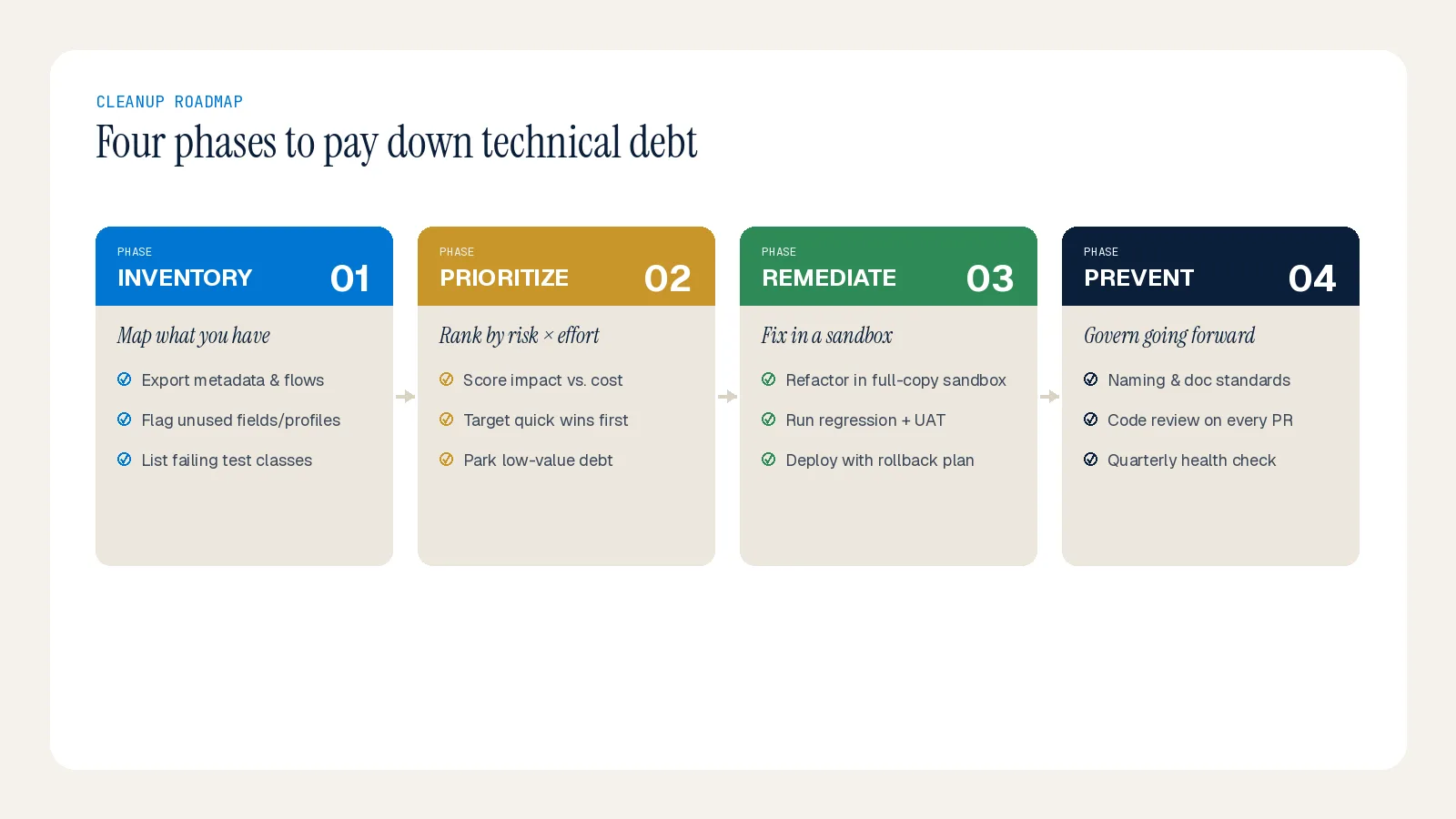
Phase 1: Inventory — Take Stock Before You Touch Anything
Before deleting anything, get a complete picture. Think of it as taking inventory before organizing a garage. Start by collecting whatever documentation exists about your setup. Then run the native tools:
Optimizer to surface unused fields, inactive workflows, and stray profiles — your prioritized cleanup list.
Security Health Check for a security baseline score.
Login History and Event Monitoring to see real adoption and spot API spikes.
Schema Builder to find unused fields and tangled relationships.
Debug logs and exception emails to expose failing code and conflicting automation.
For deeper engineering and security issues the native tools miss, static code analysis on your Apex catches hard-coded IDs, SOQL in loops, and old API versions.
Phase 2: Prioritize — Impact First, Not Whatever's Easy
Insights are useless without prioritization. Categorize every finding by business impact and severity. Fixes that restore customer experience, close security gaps, or prevent outages come first; then items that reduce admin load or prevent data loss. Use quick wins to build momentum — the goal is a phased roadmap, not a big-bang rewrite. The practical starting move: pick the three highest-impact items from your Optimizer export and fix them this sprint.
Tackle the four debt types in roughly this order of leverage:
Data debt first — run deduplication reports, merge duplicate accounts/contacts/leads, eliminate redundant fields, and establish governance (mandatory fields, validation rules, standardized picklists) so clean data enters going forward. Bad data poisons everything downstream.
Automation debt — migrate off retired Workflow Rules and Process Builder (end of support was December 31, 2025), consolidate overlapping automations, and fix unbulkified Flows and triggers.
Configuration bloat — archive unused components, rationalize fields, retire abandoned layouts, and standardize naming.
Code debt — replace hard-coded IDs with custom metadata types, pull SOQL out of loops, and add meaningful test assertions rather than coverage that validates nothing.
Phase 3: Remediate — Safely, in a Sandbox
Cleanup done carelessly creates new problems. Three non-negotiables:
Test in a sandbox first. Every change, every time. Involve actual users in testing to catch usability issues — not just technical ones.
Maintain backups. Before structural changes, make sure you can roll back.
Archive old data regularly. Historical records you rarely access don't need to live in production; archiving them improves query performance significantly.
Work in small, validated increments. Assign an owner and a due date to each fix, and validate against a measurable target before calling it done.
Phase 4: Prevent — Build Habits So Debt Doesn't Come Back
Cleaning up is good; preventing new debt is better. Establish the habits that keep the org clean:
Coding and Flow standards. A style guide makes work easier to maintain and review, and the same bulkification rules apply to both Flow and Apex.
Documentation as a gate. No change goes to production without documentation — reject undocumented work in code review regardless of technical quality.
A release and governance cadence. Enforce release rules, review automations quarterly, and retire stale processes. Unchecked changes breed debt fast.
Regular reviews. A comprehensive audit annually with lighter quarterly check-ins prevents debt from accumulating and catches issues early.
When Cleanup Isn't the Answer
Sometimes the debt is so severe that remediation costs more than rebuilding. The signs: deployments regularly take more than a week due to conflict resolution, your Apex test suite takes over 30 minutes and still fails, no one on the team understands more than a fraction of the existing configuration, and the org is 10+ years old with no documentation. In those cases, a phased migration to a parallel org — moving functionality piece by piece — is often the cleaner, faster path. It's a bigger upfront investment, but the long-term savings are significant.
Summary
Reducing Salesforce technical debt is a discipline, not a one-time project: inventory honestly, prioritize by impact, remediate safely in a sandbox, and govern to prevent recurrence. The single most powerful habit is small and repeatable — run Optimizer, fix the top three items this sprint, repeat. That's how a legacy org becomes a scalable, AI-ready platform. If you'd like an external perspective on untangling a complex org or building the governance to keep it clean, the Inforge team can help.
Frequently Asked Questions
Q: How long does Salesforce technical debt cleanup take? A: Comprehensive cleanup typically runs 2 to 6 months depending on org complexity, but quick wins can deliver visible improvements within weeks. The key is consistent, prioritized progress rather than a single big-bang effort.
Q: Where should an admin start? A: Run the native Optimizer report today, export the findings, and fix the three highest-impact items this sprint. Pair it with the Security Health Check for a security baseline. That habit, repeated, is the entire roadmap in miniature.
Q: Is it safe to clean up technical debt myself? A: Yes, if done carefully — always test in a sandbox first, maintain backups, and involve real users in testing. For complex orgs, an experienced partner brings tooling and patterns that accelerate cleanup while minimizing risk to operations.
Q: When should we rebuild instead of cleaning up? A: When deployments take over a week, the test suite is slow and failing, the org is 10+ years old with no documentation, and most of the configuration is a mystery to the current team. At that point a phased migration to a parallel org is usually cleaner and faster than remediation.
