Reducing Salesforce Technical Debt: A Practical Cleanup Roadmap for Admins
Salesforce technical debt is the accumulation of outdated configurations, unused fields, redundant automations, and undocumented processes that quietly degrade your org over time. Left unaddressed, it slows deployments, frustrates users, and — increasingly — blocks adoption of the AI-driven features your business is counting on. The good news: there's a practical, phased approach to tackling it without grinding delivery to a halt.
Key Takeaways:
Technical debt in Salesforce is now the #1 challenge for admins — more than half of respondents in the 2026 SF Ben Admin Survey cited it as their biggest problem.
Debt shows up as clicks *and* code — unused fields, overlapping automations, tangled permission models, and missing documentation all count.
The 80/20 rule applies: a small share of debt drives the majority of deployment problems and maintenance overhead.
Cleanup without governance just resets the clock — prevention habits are as important as the cleanup itself.
A clean org is now an AI readiness prerequisite: AI agents like Agentforce depend on structured data and conflict-free automation to function reliably.
Quick Answer: Reducing Salesforce technical debt starts with a structured audit of your automation layer, custom fields, and permission model — then prioritizing the 20% of issues causing 80% of problems. Pair cleanup with governance habits (naming conventions, change management, quarterly reviews) to prevent debt from rebuilding.
Why Salesforce Technical Debt Is Getting Worse, Not Better
Technical debt in Salesforce is not a niche developer problem. Everyone using the platform contributes to it — admins, developers, and even the marketing team. According to the SF Ben Admin Survey, technical debt topped the list of challenges for Salesforce admins in both 2025 and 2026, with over 50% of 2026 respondents citing it as their single biggest obstacle.
The root cause is structural. Salesforce's point-and-click flexibility makes it easy to ship fast — and equally easy to create fragile configurations that accumulate over time. As noted by McKinsey, 10–20% of technology budgets for new products are often diverted to resolving technical debt, which can represent 20–40% of an organization's entire technology estate.
In mature Salesforce environments, certain patterns emerge repeatedly: sprawling configuration that confuses users, layers of overlapping automation that produce unpredictable behavior, bloated access models that don't hold up to audit, and trails of abandoned components left behind by years of quick fixes.
What makes this especially urgent in 2026 is the AI dimension. AI-first workflows — including Salesforce Agentforce — depend on structured data and streamlined processes. When automation rules conflict or data models lack consistency, AI agents generate inaccurate recommendations or fail to complete actions. A clean org isn't a cosmetic goal. It's an operational prerequisite.
Phase 1 — Audit Before You Delete Anything
The most common mistake in technical debt cleanup is starting with deletion. The right starting point is visibility.
You cannot prioritize what you cannot see. A full org audit surfaces the actual scope of debt across four domains: automation, fields and objects, permissions, and documentation.
Automation Audit
Start by mapping every active automation: Flows, Process Builders, Workflow Rules, and Apex triggers. Your goal is to identify conflicts (multiple automations firing on the same object), redundancies (logic that duplicates what a newer Flow already handles), and orphans (automations nobody owns or understands).
According to Salesforce Admins, one of the most common problems in older orgs is Apex triggers mixed in with autolaunched Flows or Process Builders mixed with record-triggered Flows — a pattern that causes unpredictable behavior and is extremely difficult to untangle once embedded.
Silent failures are particularly dangerous. A Flow can stop running entirely — say, because a triggering user was deactivated — without surfacing a visible error. By the time someone notices, the business process it was supporting has already had gaps in it for weeks.
Fields and Objects Audit
For each major object, review field population rates. Fields with 0% net populated records are your first cleanup candidates. However, do not assume zero-population means safe to delete — transient fields used by integrations or quarter-end processes may legitimately be empty most of the time.
A cluttered UI filled with unused fields makes it difficult for users to quickly locate and update information, leading to data inconsistencies, delays in business processes, and reduced productivity. User frustration often shows up as low Salesforce adoption — which gets blamed on training when the real cause is 40 fields on a page layout that nobody needs.
Permissions Audit
Between role hierarchies, profiles, permission sets, and sharing rules, access control is one of the fastest-accumulating forms of debt in a Salesforce org. Even small permission changes require lengthy investigations to assess risk, and over time, admins grow hesitant to make updates at all — leaving necessary security improvements delayed or ignored.
Review profiles and permission sets for over-permissioning. Deactivate inactive user accounts. Verify system administrator assignments. Use Salesforce's Setup Audit Trail (which tracks configuration changes over the past 180 days) to understand what has changed and who changed it.
Tools to Support Your Audit
Salesforce Code Analyzer — Runs static analysis across Apex, Flows, Visualforce, and Lightning code to uncover quality, security, and performance issues. Its Flow Scanner component is especially valuable as orgs migrate from Process Builder to Flows.
Org Check (free, AppExchange) — A free tool published by SalesforceLabs that allows admins to drill into objects, fields, automations, and UI components, get answers to key questions, and make educated decisions while planning a change or optimization effort.
Setup Audit Trail — Tracks configuration changes made by admins over the past 180 days; useful for spotting unauthorized changes and identifying trends.
Phase 2 — Prioritize by Impact, Not by Effort
Once your audit is complete, you'll have a long list. Do not try to tackle it all at once — that approach fails every time. Leaders see it as slowing down delivery without clear benefit, and the project loses momentum before it produces results.
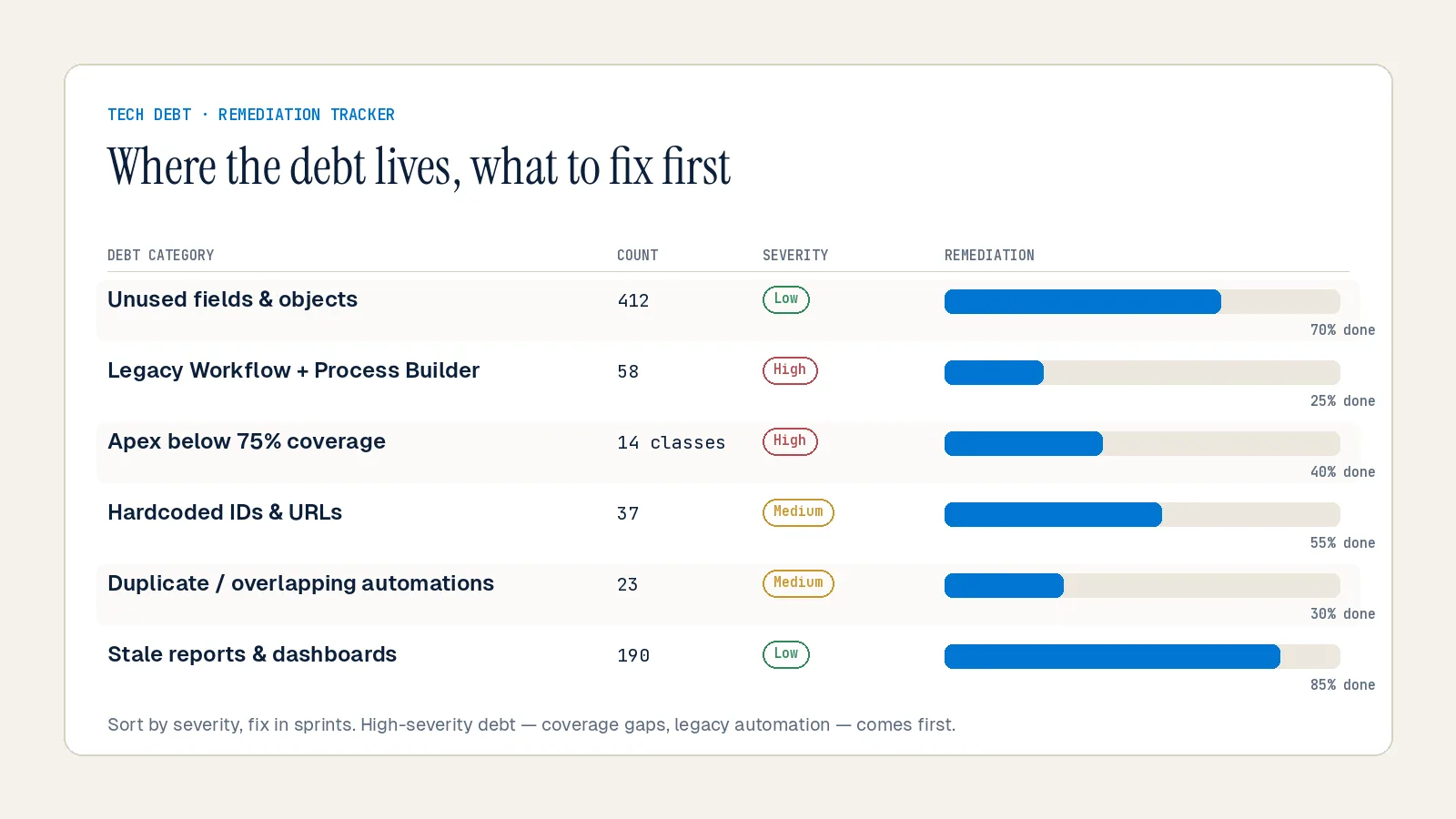
The right framework: score each debt item by business impact (how many users does it affect? does it block revenue processes?) and remediation cost (how many hours to fix?).
A broken automation disrupting lead assignments for 500 sales reps is a bigger deal than a page layout issue that only three admins ever see. Prioritize accordingly.
The Technical Debt Ratio (TDR) is a useful metric to bring into this conversation with leadership. TDR compares the effort spent on maintenance — bug fixes, patching, refactoring — to the effort spent on new features or innovation. A rising TDR shows that maintenance is consuming more capacity; a falling TDR shows you're freeing the team to build new value. This framing converts "cleanup" into a measurable business investment.
According to a 2025 prediction by Anablock AI, companies actively addressing technical debt can release new features 50% faster than those weighed down by legacy issues. That's the number to put in front of leadership when making the case for a cleanup sprint.
Quick wins to tackle in Sprint 1:
Deactivate and delete unused Flows and Process Builder processes (after confirming no dependencies)
Retire fields with 0% population that have no integration or reporting dependency
Deactivate inactive user accounts
Resolve duplicate automation on high-traffic objects (Opportunity, Lead, Case)
Standardize naming conventions going forward
Phase 3 — The Cleanup Execution Playbook
Execution discipline separates successful cleanup projects from those that stall at 30%.
Break it into object-by-object workstreams. Instead of "migrate all Process Builders to Flow," create specific backlog items like "migrate Opportunity assignment automation to Flow." Each item is deliverable, testable, and demonstrably complete. This prevents the project from becoming a sprawling, never-ending initiative.
Always back up before you touch anything. Back up org information before deleting or changing anything — via sandboxes, local copies, or a third-party backup tool. The admin who deletes what turns out to be a critical (but undocumented) field will get an irate call from a VP within the hour. The admin who backed up first can restore and move on in minutes.
Consolidate automation at the object level. The Salesforce best practice is to choose one automation tool per object. Mixed-automation objects — where Apex triggers, Process Builders, and record-triggered Flows all fire on the same record — are the single most common source of unpredictable behavior in mature orgs. Consolidating to Flows where possible simplifies the execution chain, reduces governor limit risk, and makes future changes safer.
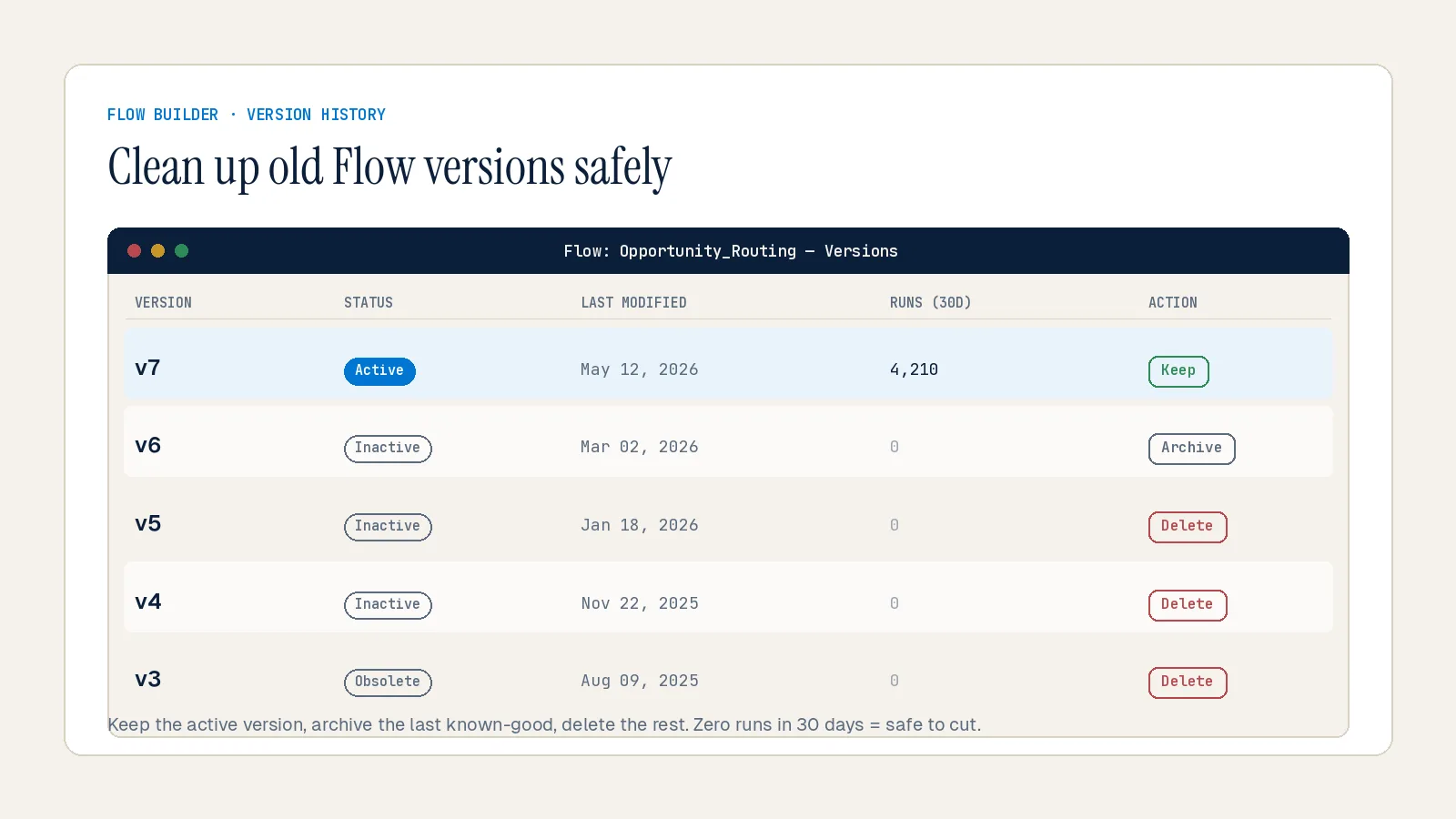
Clean up Flow versions. Every time you save a Flow, Salesforce creates a new version. Only one version can be active at a time, but older versions remain in your org. Without version management, it becomes easy to lose track of which version is live — or to accidentally restore outdated logic during a deployment. Schedule regular reviews to clean up unused versions and archive old automations.
Document as you go. Documentation debt is the form of technical debt that rebuilds fastest after cleanup. When knowledge lives in people's heads instead of systems, every departure resets your org's institutional memory. Fill in Flow description fields — they matter more than ever now that AI systems like Agentforce use them to understand what an automation does. Write a one-line purpose statement for every custom field you keep.
Phase 4 — Build Governance That Prevents Debt From Rebuilding
Cleanup without governance is just a reset. Within 12 months of your biggest cleanup sprint, technical debt will return at the same rate — unless you change how configurations get made in the first place.
Without a structured process for managing updates, enhancements, and new feature deployments, even the most well-architected Salesforce org can degrade into a patchwork of outdated automations, undocumented changes, and short-term fixes. Organizations often assume technical debt is purely a system issue — but in reality, it's a people and process problem just as much as a technology one.
Common symptoms of poor change governance include:
Inconsistent field naming conventions that break reporting logic
Rogue enhancements built outside of official sprint cycles
No clear ownership of key objects, flows, or roles
Multiple disconnected Process Builders automating the same object
Frequent system changes with no communication to users
A sustainable governance model includes:
Monthly quick cleanup (under 2 hours): Review Flow error logs, check for new unused fields, audit recently deactivated users, scan for new automation conflicts on high-traffic objects.
Quarterly full audit: Run Salesforce Code Analyzer, review permission sets for drift, check API version compliance for integrations, and review the Technical Debt Ratio against last quarter.
Never hardcode values. Hardcoded IDs are particularly painful — they go unnoticed until they break, usually during a deployment to production when record type IDs change. Use Custom Metadata, Custom Settings, or Custom Labels instead. This is one of the easiest forms of debt to prevent and one of the most common causes of post-deployment incidents.
One automation tool per object, enforced. Make this a standing architectural decision, not a guideline. When a new automation request comes in, the first question should be: what's already running on this object?
Treat change requests as design problems, not task tickets. The admin who responds to "Can you add a Comments field to Case?" with an immediate build is accumulating debt. The admin who asks "What problem are you trying to solve, and what's already in the org that might address it?" is preventing it. Your job is to design scalable solutions that meet the needs of the business — not to implement requests exactly as they arrive.
Technical Debt and AI Readiness: The Overlooked Connection
In 2026, there's a new and compelling reason to prioritize technical debt reduction that goes beyond cleaner deployments and happier admins.
AI-first workflows — including Agentforce — rely on intelligent tools that can analyze context, recommend next steps, and execute tasks autonomously. But these systems depend on structured data and streamlined processes. If automation rules conflict or data models lack consistency, AI agents may generate inaccurate recommendations or fail to complete actions entirely.
At Inforge, we implement Salesforce entirely through AI agents — and the orgs we work in confirm this directly: debt isn't just a maintenance problem. It's an AI capability ceiling. You cannot delegate reliably to an agent if the underlying org it's operating on is fragile, undocumented, or filled with conflicting logic.
A clean org — consolidated automations, consistent data models, documented field purposes, and governed change processes — is not just good hygiene. It's what makes AI-assisted and AI-autonomous workflows possible at all.
Summary
Reducing Salesforce technical debt is not a one-time project. It's an ongoing practice built on four phases: audit, prioritize, execute, and govern. The admins who make the most progress aren't the ones who schedule a big cleanup — they're the ones who build cleanup habits into every sprint, enforce naming conventions from day one, and treat every change request as a design decision. At Inforge, we've seen this directly: clean orgs don't just run better — they're the only orgs where AI-driven delivery actually works. If your org has been accumulating debt for years, the best time to start reducing it was last quarter. The second-best time is this sprint.
Frequently Asked Questions
Q: What is Salesforce technical debt?
A: Salesforce technical debt is the accumulation of outdated configurations, unused fields, redundant automations, and undocumented changes that make your org harder to maintain, deploy to, and scale. It builds up when short-term solutions are prioritized over sustainable design — and it compounds over time, diverting an increasing share of admin capacity away from new work and into firefighting.
Q: How do I know if my Salesforce org has significant technical debt?
A: Common warning signs include slow page load times, automation errors that are hard to trace, deployment failures, reports that return inconsistent results, users working around Salesforce instead of in it, and admins who spend most of their time fixing issues rather than improving the system. If any four or five of these feel familiar, a structured audit is overdue.
Q: What's the safest way to delete unused fields and automations?
A: Always back up your org first — via sandbox, local export, or a third-party backup tool. Before deleting any field, remove it from all reports, dashboards, Flows, and Apex code. Before deactivating any automation, map its dependencies and confirm no other process relies on it. Test in a sandbox before making changes in production.
Q: How often should I audit my Salesforce org for technical debt?
A: Run a quick cleanup monthly (under 2 hours) and a full technical audit once per quarter. Monthly reviews catch small issues before they compound; quarterly audits give you a complete picture of drift in automations, permissions, and data quality.
Q: Does technical debt affect Salesforce AI features like Agentforce?
A: Yes — directly. AI agents depend on structured data, conflict-free automation, and consistent data models. If your org has overlapping Flows, hardcoded logic, or inconsistent field usage, AI-powered features will produce unreliable outputs or fail to execute tasks correctly. Cleaning up technical debt is now an AI readiness step, not just a maintenance task.
