HubSpot vs Salesforce: When Is It Time to Switch?
It's time to switch when HubSpot stops fitting how your business actually sells, not just when you hit a seat count. HubSpot is fast to launch and easy to use, which is why so many growing companies start there. But once you need complex sales processes, deep customization, multiple business units, heavy integrations, or enterprise-grade reporting and security, the workarounds start costing more than the platform. That's usually the moment Salesforce becomes the better long-term investment.
Quick Answer: Move from HubSpot to Salesforce when your sales process has outgrown standard pipelines and objects, you need complex territory or approval logic, you're integrating multiple core systems like ERP and billing, you're managing multiple brands or business units, or your reporting and security needs have become enterprise-grade. If HubSpot still fits your process and your team uses it well, staying is often the right call.
Key Takeaways:
HubSpot is typically faster to implement and easier to adopt. Salesforce is typically more customizable and scales further for complex organizations.
List prices are closer than many expect at the mid tier: HubSpot Sales Hub Enterprise is $150 per seat per month, while Salesforce Sales Cloud Enterprise is $175 per user per month.
The real cost difference shows up in implementation, customization, and ongoing administration, not just licenses.
The strongest signals to switch are process complexity, integration depth, multiple business units, and reporting limits, not company size alone.
A successful migration depends on cleaning data before the move, redesigning processes (not copying them), and planning for user adoption.
HubSpot vs Salesforce: The Core Difference
Both are excellent CRMs. They're just built around different philosophies.
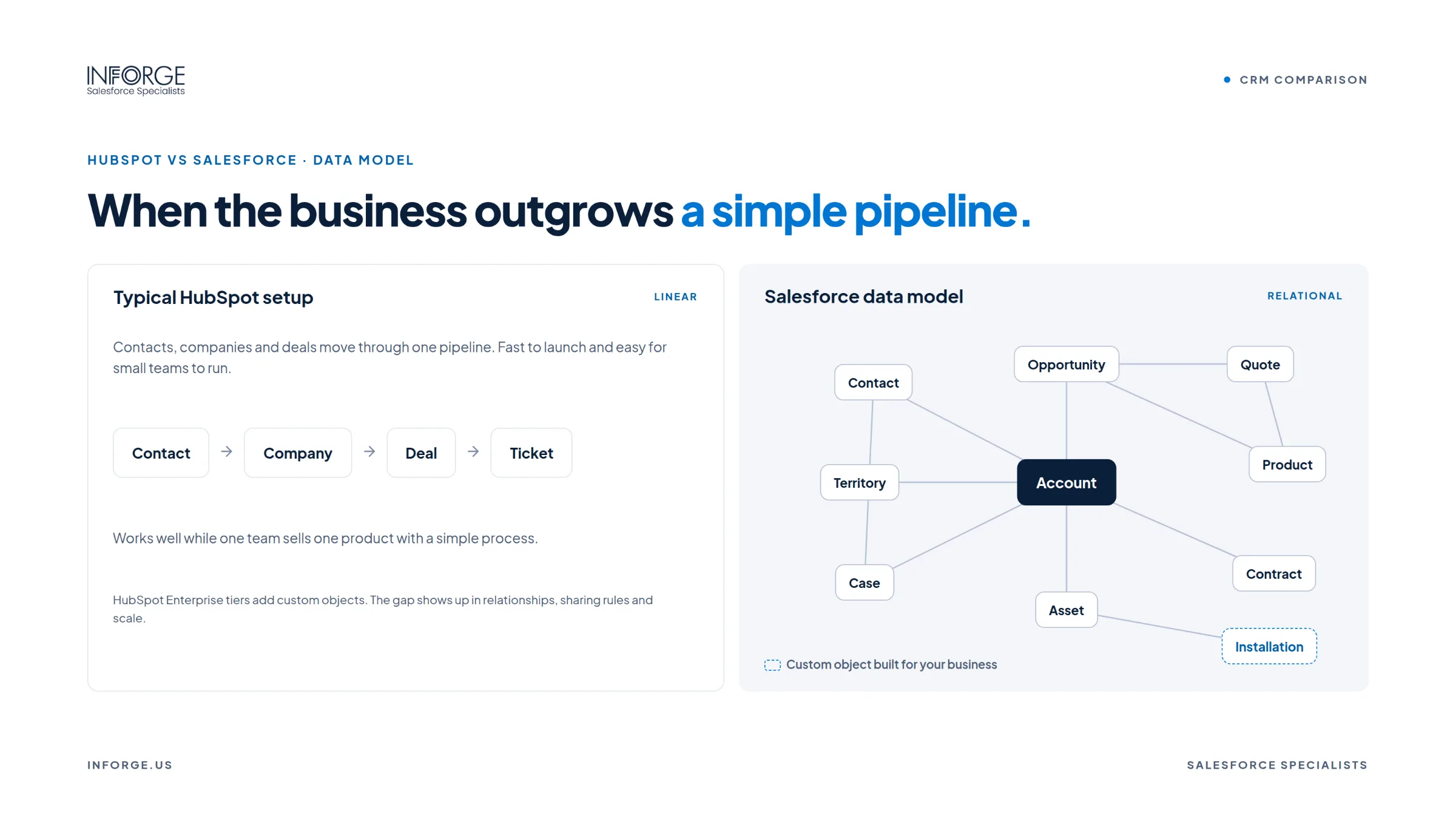
HubSpot is built for ease of use and speed. It combines marketing, sales, and service tools on one platform with a clean interface, fast setup, and strong out-of-the-box functionality. It's especially strong for inbound marketing and for teams without a dedicated CRM administrator.
Salesforce is built for flexibility and scale. Nearly everything can be customized: objects, fields, automation, security, user interfaces, and integrations. It supports complex sales processes, multiple business units, industry-specific clouds, and a massive ecosystem of apps and partners. That flexibility usually requires more planning, configuration, and administration.
The question isn't which is better. It's which fits where your business is going.
What They Cost: List Pricing at a Glance
Entry tier: HubSpot Sales Hub Starter runs from $9 to $15 per seat per month. Salesforce Starter Suite is $25 per user per month.
Mid tier: HubSpot Sales Hub Professional is $90 per seat per month billed annually, plus a $1,500 onboarding fee. Salesforce Pro Suite is $100 per user per month.
Advanced tier: HubSpot Sales Hub Enterprise is $150 per seat per month. Salesforce Sales Cloud Enterprise is $175 per user per month.
Top tier: Enterprise is the top HubSpot Sales Hub tier. Salesforce Unlimited is $350 per user per month, with Agentforce bundles priced above that.
List prices, billed annually, from public pricing as of 2026. Both vendors change pricing and packaging regularly, so confirm current rates before budgeting.
License costs are only part of the picture. Salesforce implementations typically involve more configuration work, more integration work, and ongoing admin support. HubSpot can involve add-on costs too, especially as you add hubs, contacts, and seats. Compare total cost of ownership over three years, not monthly sticker price.
7 Signs It's Time to Switch from HubSpot to Salesforce
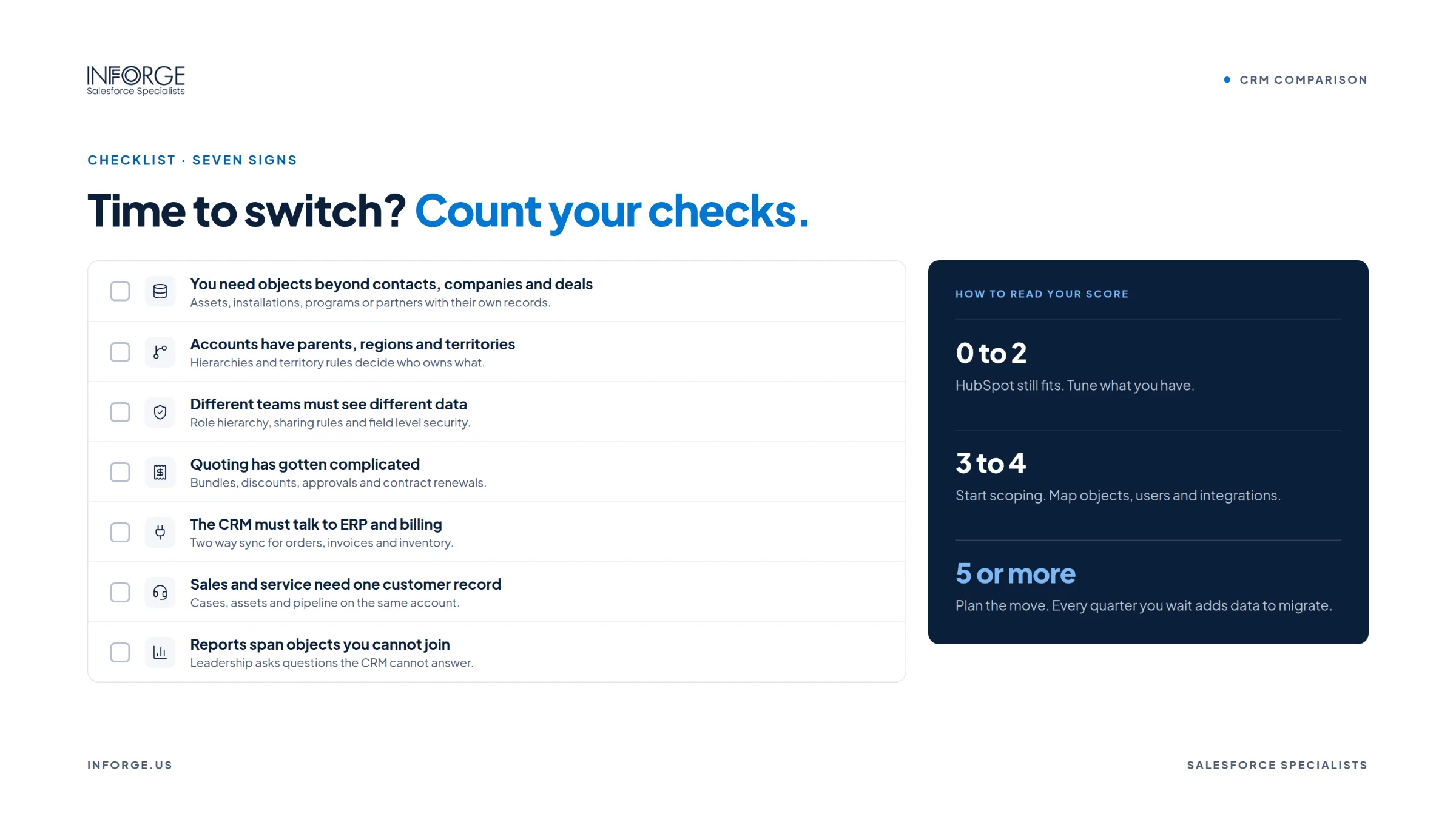
1. Your sales process doesn't fit standard pipelines anymore
If you're managing complex deal structures, multi-stage approvals, partner-sourced deals, renewals, and upsells with different rules, and your team relies on spreadsheets to fill the gaps, you've outgrown the platform's default model.
2. You need a custom data model
Businesses with unique entities (properties, policies, projects, assets, locations, programs) need custom objects with real relationships between them. Salesforce was built for this kind of relational data model.
3. You're integrating multiple core systems
When your CRM needs to talk to an ERP, billing platform, data warehouse, support system, and product database in near real time, integration depth matters. Salesforce's API and integration ecosystem is one of its biggest strengths.
4. You're managing multiple teams, brands, or business units
Different sales motions, different territories, different permissions, and consolidated reporting across all of them. Salesforce's role hierarchy, sharing rules, and territory management handle this natively.
5. Reporting has hit a ceiling
If leadership is asking questions your CRM can't answer without exporting to Excel, and forecasts are built outside the system, reporting has become a bottleneck.
6. Security and compliance requirements have grown
Field-level security, granular sharing rules, audit trails, and industry compliance requirements (healthcare, financial services, government) often push companies toward Salesforce and its industry clouds.
7. You're paying for workarounds
When you're stacking third-party tools, custom middleware, and manual processes to make your CRM do what you need, the cost of those workarounds can exceed the cost of switching.
When You Should Stay on HubSpot
Switching isn't always the answer. HubSpot is likely still the right fit if:
Your sales process is relatively straightforward and fits standard pipelines
Marketing is your primary growth engine and your team relies on HubSpot's marketing tools
You don't have, and don't plan to hire or contract, Salesforce administration support
Your team actually uses HubSpot well and adoption is strong
A well-used HubSpot instance beats a poorly adopted Salesforce org every time.
How to Switch Without Losing Momentum
Companies that migrate successfully treat the switch as a chance to redesign, not just relocate.
Define the future state first. Map the sales process you want, not the one you have. Copying HubSpot's setup into Salesforce wastes the investment.
Clean your data before moving it. Deduplicate contacts and companies, archive dead records, and standardize fields. Migrating dirty data just moves the problem.
Plan integrations early. Decide what connects to Salesforce on day one and what can wait.
Decide what happens to marketing. Some companies keep HubSpot for marketing and sync it with Salesforce. Others consolidate onto Salesforce marketing tools. Both can work.
Run a parallel period. Keep HubSpot accessible in read-only mode for a few weeks so teams can reference history.
Invest in adoption. Role-specific training, simple page layouts, and a clear owner for user feedback make the difference between a new CRM and a used CRM.
At Inforge, we've found that the HubSpot to Salesforce migrations that succeed aren't the ones that move the fastest. They're the ones that clean the data first, redesign the process, and have dedicated Salesforce support from day one.
Summary
HubSpot is a strong platform for growing companies, but as sales processes get more complex, integrations multiply, and reporting and security needs grow, Salesforce often becomes the better long-term fit. At list price, the mid and advanced tiers are closer than many expect, so the real decision comes down to process complexity, customization needs, and total cost of ownership. If you see three or more of the seven signs above, it's time for a serious evaluation. If you switch, clean your data, redesign your process, and plan for adoption from day one.
Inforge helps US companies evaluate, plan, and execute HubSpot to Salesforce migrations with nearshore Salesforce consultants, admins, and developers working in your time zone.
Frequently Asked Questions
Q: Is Salesforce better than HubSpot?
A: Neither is universally better. HubSpot is easier to set up and use, especially for marketing-led teams. Salesforce is more customizable and scales further for complex sales processes, multiple business units, and heavy integration needs.
Q: How much more expensive is Salesforce than HubSpot?
A: At list price, Salesforce Sales Cloud Enterprise is $175 per user per month compared to $150 per seat per month for HubSpot Sales Hub Enterprise. The bigger difference usually comes from implementation, customization, and ongoing administration costs.
Q: How long does a HubSpot to Salesforce migration take?
A: It depends on data volume, integrations, and process complexity. Smaller migrations can be completed in a few weeks, while mid-market migrations with multiple integrations and custom objects typically take two to four months.
Q: Can we keep HubSpot for marketing and use Salesforce for sales?
A: Yes. Many companies run HubSpot Marketing Hub alongside Salesforce Sales Cloud using HubSpot's native Salesforce integration. It's a common setup, but it requires careful field mapping and sync rules to avoid duplicates.
Q: What's the biggest mistake companies make when switching CRMs?
A: Migrating dirty data and copying old processes into the new system. A CRM switch is the best opportunity to clean data and redesign workflows, and skipping that step limits the value of the new platform.