HubSpot-to-Salesforce Migration: A Step-by-Step Data Integration Guide for Growing Teams
A HubSpot-to-Salesforce migration is one of the most consequential operational moves a growing team will make. Done right, it sets your revenue operations up for years of scale. Done wrong, it corrupts your pipeline data, stalls your team, and costs far more than the migration itself. The difference between those two outcomes is almost never the technology — it is the plan behind it.
At Inforge, a Salesforce consultancy that delivers full implementations through AI agents, we have seen both outcomes up close. This guide gives you the structured, decision-first playbook that separates the migrations that succeed from the ones that become cautionary tales.
Key Takeaways:
CRM project failure rates range from 20–70%, with poor user adoption and cross-functional misalignment as the leading causes — planning is the mitigation.
HubSpot and Salesforce use fundamentally different data models; the Lead object, activity history structure, and file attachment logic all require deliberate mapping decisions before a single record moves.
Data hygiene must happen at the source, not mid-migration. Dirty data moved to Salesforce is just dirty data in a more expensive system.
A sandbox pilot migration — testing with a 1% sample before bulk load — is non-negotiable for catching mapping errors early.
Post-migration validation, user training, and a 30-day stabilization sprint determine whether your Salesforce investment pays off or becomes another system users work around.
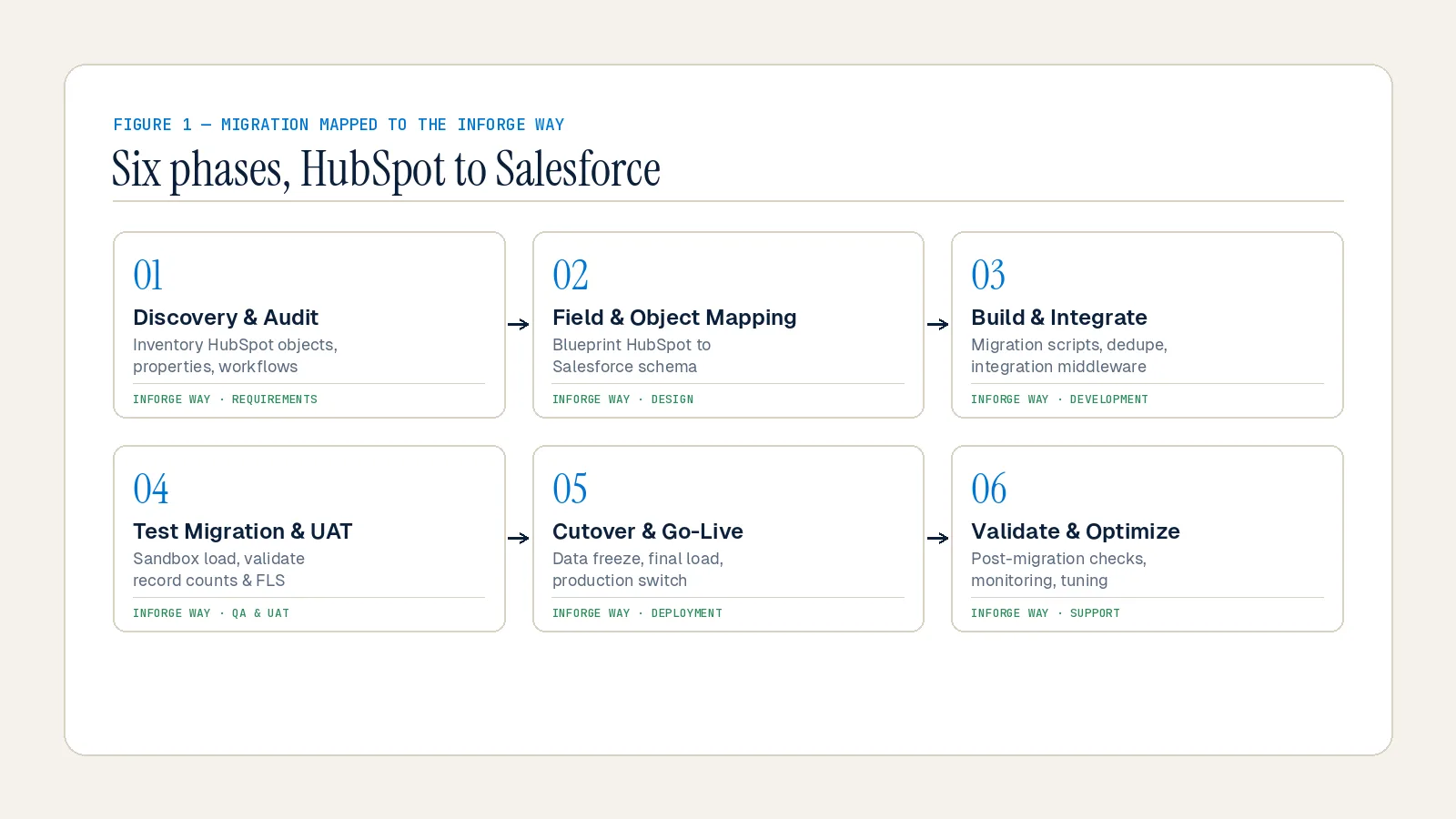
Quick Answer: Migrating from HubSpot to Salesforce requires six sequential phases: discovery and scope, data audit and cleanup, field mapping, sandbox testing, cutover execution, and post-migration validation. The total timeline for a mid-market team typically runs 8–16 weeks depending on data volume, number of custom objects, and integration complexity.
Why Teams Migrate from HubSpot to Salesforce
HubSpot earns its place for early-stage and mid-market companies. It is intuitive, fast to deploy, and purpose-built to get sales teams moving. But there is a growth ceiling.
As organizations scale past a certain threshold, HubSpot's design philosophy — optimized for simplicity — starts working against the complexity the business needs to manage. The cracks show in three specific places:
Process complexity. Unlike HubSpot, Salesforce allows creation of custom fields and objects and modification of the data model to match unique business processes. Its sophisticated workflow automation includes process automation, approval workflows, and conditional logic — capabilities that matter for complex, multi-stage sales cycles.
Integration depth. While HubSpot offers a range of integrations with popular marketing tools, its ecosystem is not as extensive or customizable as Salesforce's AppExchange marketplace and robust APIs, which cater to a broader spectrum of third-party tools and custom integration needs.
Compliance and governance. Industries with strict compliance requirements — financial services, healthcare, legal — find Salesforce's security features, audit trails, and compliance certifications more comprehensive.
Migrating before scaling completes is often the smarter move. Teams that try to migrate mid-hypergrowth are changing the engine mid-flight. Starting the transition before your systems are overwhelmed gives operations the runway to do it properly.
Step 1 — Discovery: Map What You Actually Have
The first step is not moving data. It is understanding what exists and deciding what is worth keeping.
Before you migrate a single record, map out what you are working with today: your workflows, active integrations, custom objects, and the reports your teams rely on daily. Then get the right people in the room. Sales, marketing, operations, and IT all have a stake in how this goes. Aligning on goals early ensures nothing critical gets missed or rebuilt from scratch after go-live.
This discovery phase should produce a concrete inventory:
Every contact, company, deal, and ticket record — with volume counts
Active workflows and automation sequences
Custom properties and objects used in active processes
Third-party integrations connected to HubSpot (ad platforms, marketing tools, enrichment tools)
Reports and dashboards your team uses to make decisions
Activity history: emails, calls, meeting logs, and notes
Not every record needs to make the trip. Decide what goes to Salesforce, what gets archived, and what gets left behind entirely. Tighter scope reduces risk, shortens cutover windows, and keeps the load clean.
Form a cross-functional project team spanning Sales, Marketing, RevOps, and IT. Establish a clear RACI matrix so everyone knows who owns decisions versus who provides input. Set a go-live target date early in a quarter — avoiding peak sales or renewal periods that could compound stress if issues arise.
Step 2 — Data Audit and Cleanup: Fix It Before It Moves
Dirty data migrated is dirty data in Salesforce. Clean it at the source — not during import.
This is the phase most teams underestimate, and it is the phase most responsible for post-migration regret. According to Skuid and multiple CRM failure analyses, 20–70% of CRM projects fail, with poor data handling and inadequate planning ranking as primary contributors.
A practical data audit covers:
Deduplication. Merge duplicate contacts, companies, and deals. Duplicates that survive migration multiply in Salesforce because automation creates new associations from bad source records.
Standardization. Phone numbers, address formats, and picklist values must be normalized before import. HubSpot and Salesforce use different picklist structures — mismatches create silent sync errors that surface weeks after go-live.
Archival. Remove outdated contacts, archive anything incomplete, and exclude irrelevant records from migration scope. Most data migration failures happen because teams migrate everything — even data no longer needed. Less data means a faster CRM and a better user experience on day one.
Activity history preservation. Your contact data is not just names, companies, and phone numbers — it also includes emails sent, calls made, and meeting logs. In Salesforce, emails become Email Message records, calls become Tasks, and meetings become Events. The critical step here is preserving original timestamps so your sales history remains accurate and chronological, not backdated to migration day.
File attachments. Files are often orphaned during migration. HubSpot attaches files directly to the contact card; Salesforce splits them into Content Document and Content Document Link tables. Export your HubSpot file list with parent object IDs before migration begins.
Back everything up before touching a single record. Export your HubSpot data as CSV and store it securely. Non-negotiable.
Step 3 — Field Mapping: Translate the Data Model
Field mapping is where migrations get complicated. It is also where they most frequently break.
HubSpot and Salesforce do not use the same data model. The single most important structural difference to understand:
The Lead object. HubSpot treats everyone as Contacts. Salesforce differentiates between Leads (prospects) and Contacts (customers). This is not just semantics — it changes your entire sales process. Leads in Salesforce act as a holding stage used to validate data during the handoff between Marketing and Sales. They are typically worked by SDR teams who qualify records before converting them to Contacts, Accounts, and Opportunities.
Your first mapping decision: define exactly when a Lead becomes a Contact in your workflow. Map HubSpot lifecycle stages to Salesforce Lead/Contact/Account conversion criteria before migration begins. Unclear conversion logic is the most common cause of pipeline confusion in the first 90 days post-migration.
Deal-to-Opportunity mapping. Salesforce Opportunities are analogous to HubSpot Deals, but can be created at the point of Lead conversion — a workflow decision that varies by team. Decide whether your SDRs create Opportunities at conversion or whether Account Executives create them after a qualified meeting.
Custom field translation. Build a dedicated mapping document — a spreadsheet that matches every HubSpot property to its Salesforce equivalent. Note field types, character limits, and any transformations required. For each property sync, select the sync type: Prefer Salesforce, Always Use Salesforce, or Two-way. Document rules for custom objects and many-to-many relationships separately.
A practical step most teams skip: add a custom text field on each Salesforce object to store the original HubSpot ID. This preserves traceability for troubleshooting and supports cross-system audits post-migration. It is also your rollback anchor if something goes wrong.
Step 4 — Sandbox Testing: Pilot Before You Commit
Run a 1% sandbox migration first. Fix mappings. Then bulk load.
This step is where disciplined teams separate themselves from the ones that end up doing emergency rollbacks. A sandbox pilot using a representative sample of your actual data will surface mapping errors, broken relationships, and picklist mismatches before they hit production.
What to validate in the sandbox:
Record counts match between HubSpot export and Salesforce import
Parent-child relationships are intact (Contact linked to Account, Activity linked to Contact)
Timestamps on historical records are accurate
Custom field values transferred correctly and are readable
Workflow triggers do not fire incorrectly on imported records
Attachment re-parenting is accurate (files associated with correct records)
A critical operational note: pause non-essential automations during bulk data loads, then re-enable them in stages and retest. Salesforce validation rules, auto-assignment rules, and triggers that fire on record creation can cause cascading errors at high import volume. Disable them during load; re-enable them systematically after records stabilize.
For large datasets, execute migrations in controlled batches and validate each batch before proceeding. This minimizes the blast radius of any error and gives you clean rollback points.
Freeze data entry in HubSpot at least 24 hours before final export to prevent last-second data drift that invalidates your sandbox test.
Step 5 — Cutover Execution: The Migration Weekend
Schedule migration over a weekend and have power users on call Monday to catch issues early.
The cutover itself should feel boring if the previous four steps were done correctly. By the time you execute production migration, your mapping document is validated, your automation pauses are staged, and your rollback criteria are defined.
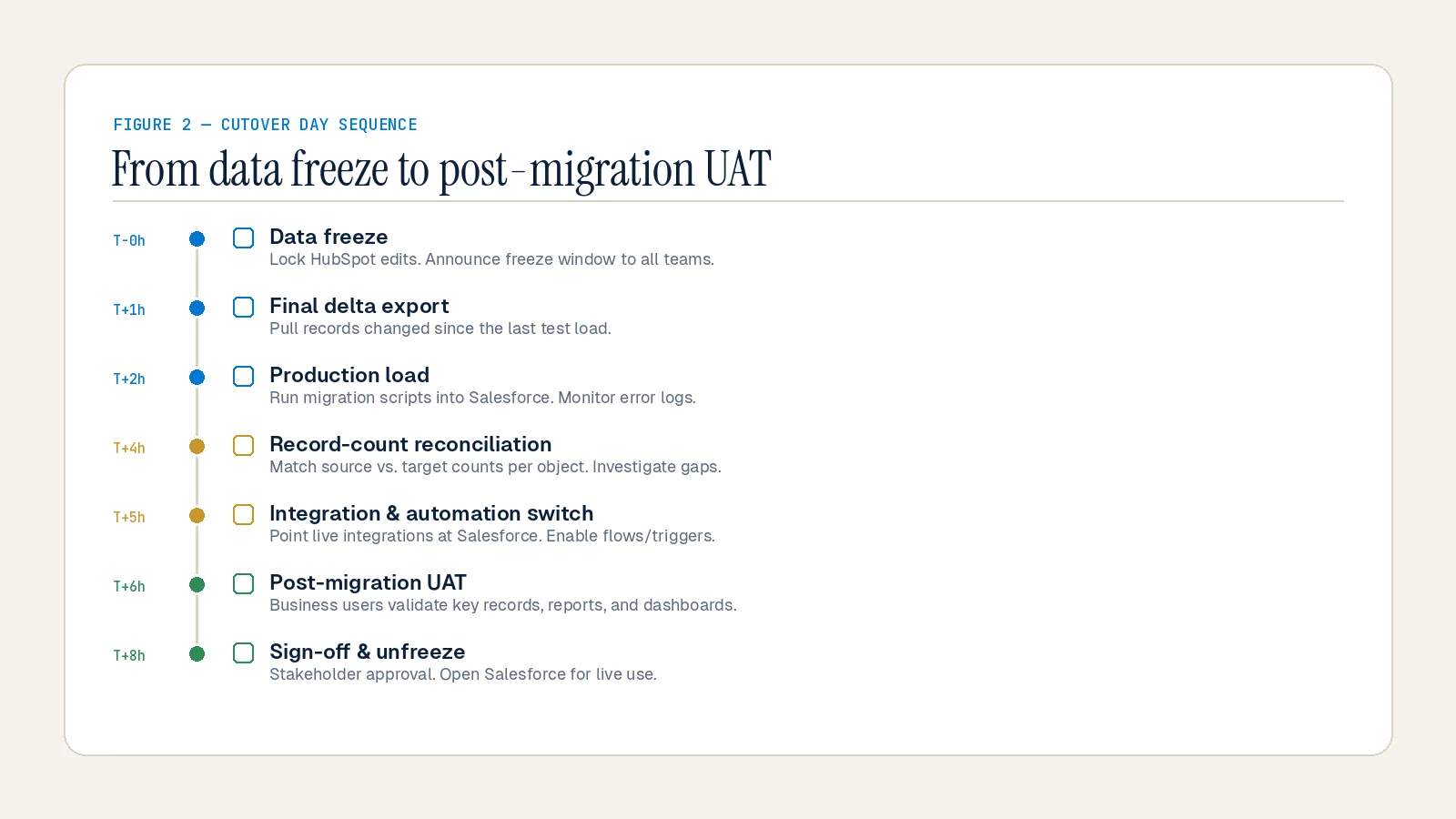
Cutover sequence:
1. Freeze HubSpot data entry for all teams. Communicate this clearly and in advance — no new records, no edits.
2. Run final full export of all HubSpot objects and verify counts against your last sandbox run.
3. Disable Salesforce automation — validation rules, flows, assignment rules — for duration of bulk load.
4. Load data in dependency order: Accounts first, then Contacts, then Opportunities, then Activities, then attachments. Parent records must exist before child records.
5. Re-enable automation incrementally, verifying each automation layer before activating the next.
6. Run reconciliation checks: Compare row counts and key totals between the HubSpot export and Salesforce records. Clear the exception queue before sign-off.
7. User Acceptance Testing (UAT): Ask sales and service users to run their actual daily workflows using migrated data. Capture issues with page layouts, permissions, and reports before final approval.
Run Salesforce and HubSpot in parallel during the first validation week. Keep both systems operational and compare outputs on real workflows before fully decommissioning HubSpot. Many data issues surface during this parallel phase, not during import — particularly around sync dependencies and integration handoffs.
Step 6 — Post-Migration Validation and User Adoption
Migration success is not measured at go-live. It is measured 30 days later by user adoption metrics and data trust.
Migrated data is only useful if your team knows how to interact with it and trusts what they see. Post-migration validation covers two tracks: technical integrity and human adoption.
Technical validation:
System-wide integrity checks — verify all required records are intact
Cross-reference historical data against pre-migration reports
Run automated tests to detect errors before they affect operations
Re-establish integrations: ERP connectors, marketing tools, ad platforms, and enrichment services
Confirm permission mappings, encryption settings, and compliance audit trails
User adoption:
Conduct role-specific Salesforce training — not a generic platform overview, but workflows relevant to each team's actual job
Create a knowledge base with documentation for common processes and troubleshooting
Assign "super-users" or Salesforce Champions within each department who can answer peer questions
Establish feedback loops: collect structured input in the first 30 days and resolve the highest-friction issues fast
Plan a short post-go-live stabilization sprint focused on deduplication, minor fixes, and quick guides
According to CRM.org research, 42% of businesses cite lack of training or CRM expertise as the biggest barrier to successful adoption — ahead of technology and deployment issues. The investment in training is not optional. It is what converts a data migration into a revenue operations upgrade.
Post-migration, establish data governance: ownership rules for records, validation rules, scheduled deduplication jobs, and monitoring dashboards. That keeps quality high and prevents regressions that erode user trust over time.
Common Mistakes That Derail HubSpot-to-Salesforce Migrations
These are the patterns we see most often — and they are almost entirely preventable.
Migrating without scope discipline. Teams migrate every record they have ever created, including contacts from five years ago with no engagement. Every unnecessary record is technical debt in Salesforce. Audit scope before you touch a file.
Skipping the Lead object decision. Teams that migrate without defining Lead conversion logic create a structural mess in Salesforce that takes months to clean up. Make this decision in discovery, document it, and train your SDR team on it before go-live.
Ignoring compliance obligations. When handling personally identifiable information (PII), data migration becomes a compliance exercise as much as a technical one. Moving contacts between systems — especially across jurisdictions — carries obligations under GDPR, CCPA, and similar frameworks. Involve legal and compliance teams in planning. Build encryption, access controls, and audit trails into the migration plan, not as an afterthought.
Treating migration as a one-time task. Post-migration fixes are inevitable. Teams that plan for a 30-day stabilization period consistently have better outcomes than those who treat go-live as the finish line.
Underestimating custom object complexity. Organizations with 10 or more custom objects require careful dependency analysis and staged migration approaches. Custom objects carry hidden dependencies — review workflows, validation rules, and integrations tied to them before they move.
Summary
A HubSpot-to-Salesforce migration is not a technical project. It is a business transformation that touches every team, every process, and every data point in your organization. The teams that succeed are not the ones moving fastest — they are the ones who planned most thoroughly. Discovery, data hygiene, field mapping, sandbox testing, structured cutover, and disciplined post-migration adoption are not steps you can compress without paying for it later.
At Inforge, we deliver full Salesforce implementations — including complex migrations — through AI agents: faster timelines, more consistent quality, and a fraction of the cost of traditional consulting delivery. If your team is evaluating this move, we would rather show you what that looks like in practice than describe it in a brochure.
Frequently Asked Questions
Q: How long does a HubSpot-to-Salesforce migration take?
A: For a mid-market team, expect 8–16 weeks from kickoff to go-live, depending on data volume, custom object count, and integration complexity. Enterprise migrations with extensive customization can run 4–6 months. Teams that compress timelines by skipping discovery or sandbox testing routinely extend their actual timelines through rollbacks and post-migration rework.
Q: What data is hardest to migrate from HubSpot to Salesforce?
A: Activity history (emails, calls, meetings, and notes), file attachments, and custom object associations are consistently the most complex data types to migrate cleanly. Activity timestamps must be preserved from the original records, not reset to migration day. File attachments must be re-parented into Salesforce's Content Document structure rather than simply uploaded.
Q: Do I need to use a third-party migration tool, or can I do this manually with CSV exports?
A: CSV export-import is viable for smaller, simpler datasets but creates significant manual mapping work and lacks support for complex associations. Third-party tools handle relationships between contacts, deals, and companies automatically, even where HubSpot associations are more complex than Salesforce's standard fields support. For enterprise-scale migrations, an iPaaS solution or a certified Salesforce partner is typically the right choice.
Q: What happens to HubSpot workflows when we migrate to Salesforce?
A: HubSpot workflows do not transfer to Salesforce — they must be rebuilt as Salesforce Flows or Process Builder logic. However, this is also an opportunity: rebuild business processes for Salesforce's strengths rather than replicating HubSpot's structure. Legacy workflows often reflect outdated practices and do not translate cleanly. Audit every active workflow in discovery and decide which to rebuild, which to redesign, and which to retire.
Q: What is the biggest reason HubSpot-to-Salesforce migrations fail?
A: According to CRM implementation research, roughly 70% of CRM projects fail to meet their goals — not because of the software, but due to cross-functional misalignment between sales and marketing and poor user adoption post-go-live. The data integrity issues that seem technical almost always trace back to inadequate planning, unclear ownership, and scope decisions made too late.
