How to Build Your First Agentforce Agent (Without Code)
You can build a working Agentforce agent in Salesforce without writing a single line of code. Agentforce Builder is a declarative, point-and-click interface — you describe what you want the agent to do in plain English, and the platform's reasoning engine handles the rest. No Apex. No developer ticket. No waiting.
At Inforge, a Salesforce consultancy that runs its entire delivery model on AI agents, we've configured agents for mid-market companies across service, sales, and operations. This guide mirrors exactly how we approach a first build.
Quick Answer: To build an Agentforce agent without code, enable Einstein and Agentforce in Salesforce Setup, assign the correct permission sets, open Agentforce Builder (now available via Agentforce Studio), define your agent's Topics and Actions in natural language, test in the Testing Center, and deploy to your chosen channel.
Key Takeaways:
Agentforce Builder is a no-code, declarative tool — admins can configure a full agent without developer involvement.
Every agent is built from three layers: the agent itself (persona + instructions), Topics (intent categories), and Actions (what the agent does).
The no-code path covers answering questions and handling standard service tasks — more complex record operations use Salesforce Flow, which is also no-code.
Always build and test in a sandbox first. Testing in production consumes credits and can modify CRM records.
The new Agentforce Builder became generally available in February 2026 and is now the standard build environment.
Step 1: Check Your Org Prerequisites
Before opening Agentforce Builder, your org needs to meet a few requirements. Skipping this checklist is the most common reason first builds stall.
Salesforce edition: Agentforce requires Enterprise, Performance, Unlimited, or Developer Edition. Starter and Professional Edition orgs cannot use Agentforce without a specific add-on — check with your account team if you're on one of those editions.
Licenses: For customer-facing service agents, you need an Agentforce Service Agent license (sold separately from base CRM licenses). For internal, employee-facing agents, there's a separate license model. If you want to practice before committing, the free Agentforce Developer Edition at developer.salesforce.com includes a full environment.
Permissions: Users who will build agents need the `AgentforceServiceAgentBuilder` permission set (primary builder access), `AgentPlatformBuilder` (broader platform access if managing agents org-wide), `AgentforceServiceAgentBase` (required at runtime), and `AgentforceServiceAgentUser` for end users interacting with the deployed agent. The admin's profile also needs the Manage Bots user permission to access Agentforce Builder in Setup.
Step 2: Enable Einstein and Agentforce
In Setup, search for Einstein Setup and toggle Einstein on. This is the platform-level switch that unlocks AI capabilities across all Salesforce products, including Agentforce.
With Einstein enabled, search for Agentforce in Setup. You'll see an Agentforce section where you can enable the feature and, depending on your org, activate a default agent. If Agentforce doesn't appear, your edition or license doesn't include it yet.
For a clean first build, also enable Einstein Bots, Agents, Embedded Service Deployment, and Messaging at this stage. These are the supporting features your deployment channel will rely on.
Step 3: Open Agentforce Studio and Create a New Agent
The new Agentforce Builder lives inside Agentforce Studio, accessible from the App Launcher. Agentforce Studio is your central hub for building, testing, and monitoring AI agents — everything in one place.
From the Agents page, click + New Agent. You'll be prompted to select an agent type. For a first build, Agentforce Service Agent is the right starting point — it ships with a default template, pre-built topics, and out-of-the-box actions for customer-facing service scenarios.
If you're using the conversational setup (available in Spring '26), you can describe what you want the agent to do in plain language and the platform will generate a starting point — topics, instructions, and actions — directly from your description. You can also click Skip Ahead to configure everything manually.
Step 4: Define Your Agent's Topics
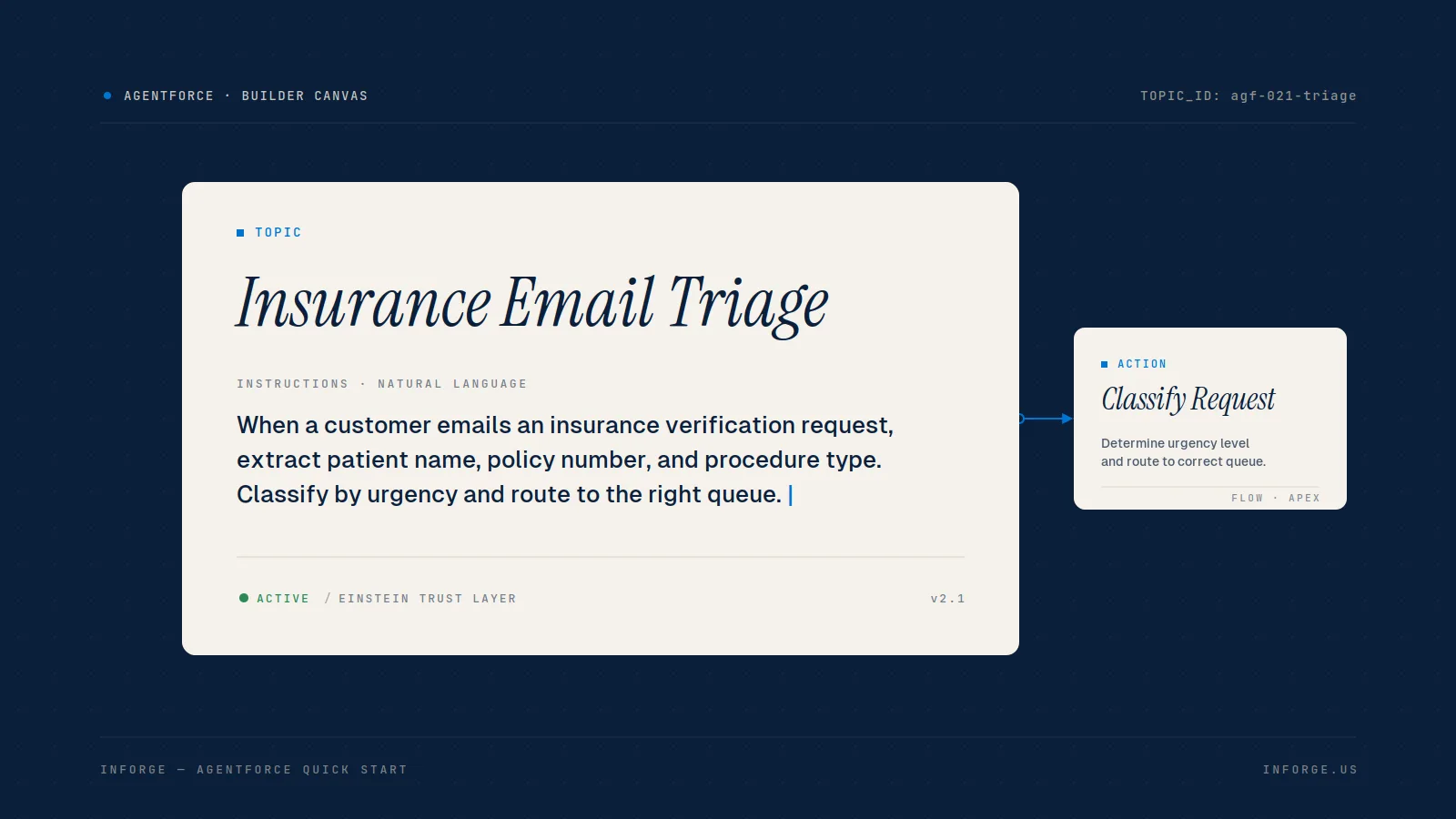
Topics are where most Agentforce implementations succeed or fail. A topic is a category of user intent — it defines the range of conversations your agent can handle.
Think of topics as job descriptions for your agent. A customer service agent might have topics like "Order Status Inquiry," "Billing Questions," or "Product Returns." The agent reads the user's message, classifies it against your defined topics, and routes accordingly.
Topic design rules that matter:
Keep topics specific. If a topic is too broad, the agent struggles to interpret intent accurately.
Don't over-fragment. Too many overlapping topics create a disjointed user experience.
Write topic instructions in plain English — the Canvas view in Agentforce Builder is a document-style editor where you type instructions directly in natural language.
For each topic, write clear instructions that define what the agent should do, what it should not do, and how it should handle edge cases. For example: if a user asks about order status without verification, the agent should re-prompt rather than share information.
Step 5: Add Actions
Topics define what the agent understands. Actions define what it actually does.
Without actions, Agentforce stays conversational. With actions, it becomes operational. Actions are what make the agent useful — they are the mechanism through which the agent interacts with your data and systems.
For a no-code first build, you have two options:
1. Pre-built actions: Agentforce ships with a library of out-of-the-box actions covering common service tasks — no Flow or Apex required.
2. Flow-based actions: For tasks like creating a case record or looking up an order, you'll wire up a Salesforce Flow. Flow Builder is also no-code, so this stays within the declarative toolset.
Actions should be precise, testable, and reusable. Name them clearly — the Atlas Reasoning Engine uses your action labels and descriptions to decide when and how to invoke them.
Step 6: Set Guardrails and Instructions
Once your topics and actions are defined, configure your agent's behavior guardrails. This is where you control the agent's persona, tone, escalation logic, and what it will refuse to do.
For customer-facing agents, activate the Einstein Trust Layer — Salesforce's built-in data security layer that ensures the agent doesn't expose sensitive data or hallucinate records it isn't authorized to access.
Apply the principle of least privilege: the agent should only access fields essential to its role. Avoid SOQL queries in actions that return more data than the user needs.
For sensitive operations — like accessing payment details or modifying reservations — configure a Customer Verification topic. If an unverified user tries to trigger a protected action, the agent automatically launches the verification flow before proceeding.
Step 7: Test Before You Deploy
This step is non-negotiable. Testing an agent in production can modify CRM records, consumes API credits, and — with autonomous agents — means you may not catch errors until a customer does.
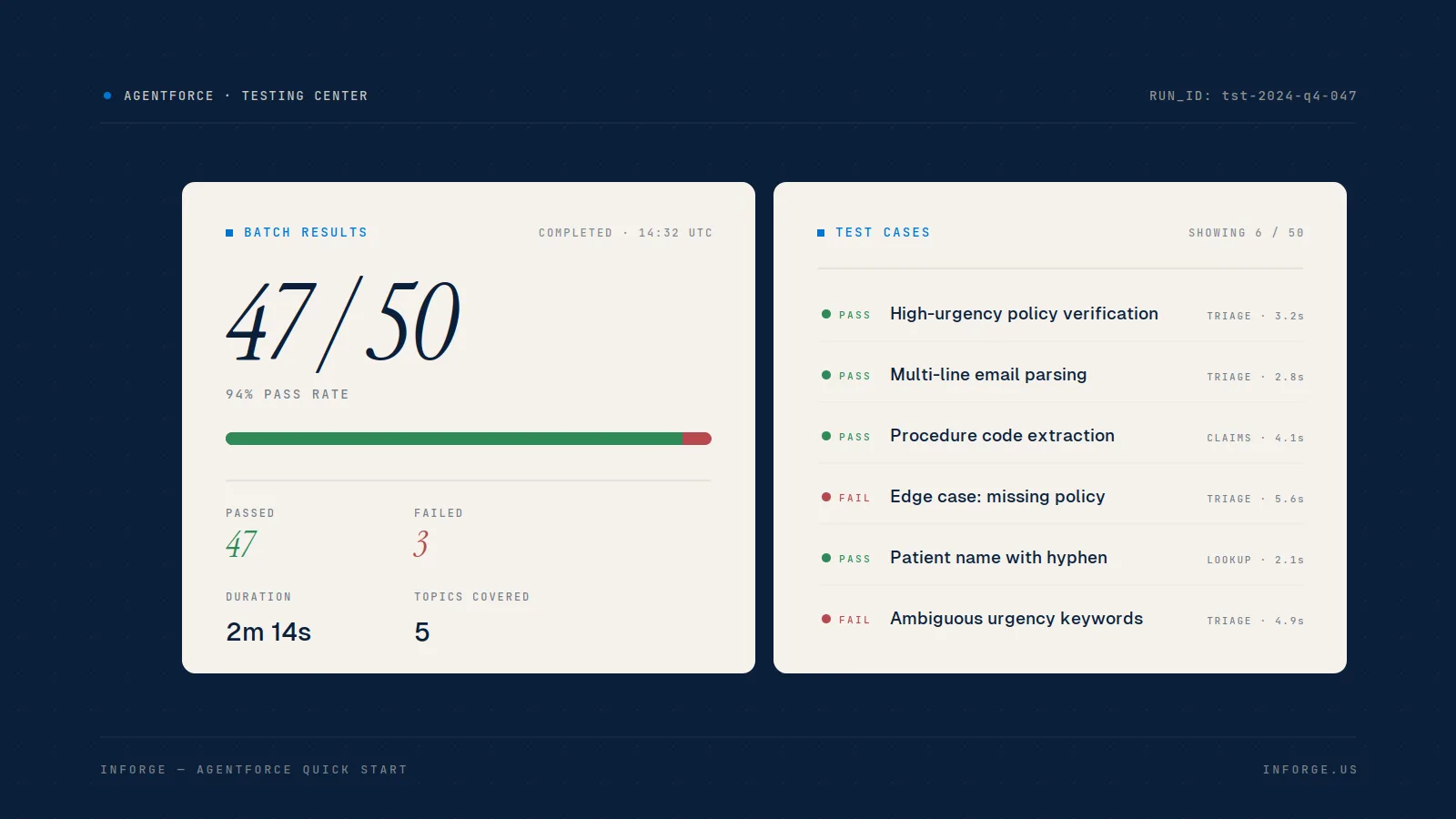
Agentforce includes a built-in Testing Center (accessible from Agentforce Builder via the Batch Test button, or from Setup via Quick Find). The Testing Center lets you:
Upload a CSV of test utterances using a prebuilt template
Generate test scenarios using AI, based on your topics and actions
Include context variables like user profile, location, or channel to simulate different environments
Review results that highlight successes and pinpoint failures
Always run tests in a sandbox environment first. The results will surface where the agent misclassifies intent, invokes the wrong action, or produces responses that don't meet your guardrails. Refine your topic instructions and action descriptions based on what you find — this iteration is where the agent gets reliable.
Step 8: Deploy to a Channel
You don't need a deployment channel to build or test — but you do need one before the agent goes live for real users.
Agentforce supports several deployment surfaces:
Experience Cloud — a customer portal or public-facing site
Messaging for In-App and Web — embedded chat on any website
Slack — for employee-facing agents
Each channel requires its own setup steps outside of Agentforce Builder. Experience Cloud is the most common starting point for service agents. Once the channel is configured, activate the agent in Agentforce Builder and point it to the deployment.
After go-live, use Agentforce Observability to track session data, response accuracy, deflection rates, and escalation patterns. This monitoring layer connects to Data 360 and surfaces the fine-grained conversation moments where the agent underperformed — so you can tune topic instructions and tighten actions without guesswork.
Common Mistakes to Avoid
Topics that are too vague: "General Support" as a single topic will produce inconsistent routing. Break it into specific intent categories.
Skipping sandbox testing: Seemingly solid instructions can cause unexpected behavior in production. The Testing Center exists for exactly this reason.
No verification on sensitive actions: If your agent can access or modify account data, customer verification is not optional.
Over-engineering the first agent: Start with one focused use case — a single service topic with two or three actions. Prove value, then expand. The bottleneck isn't Agentforce's capability. It's orgs that try to automate too much before they've validated the fundamentals.
Summary
Building your first Agentforce agent without code is achievable in a single sprint — if your org prerequisites are in order and you approach Topics and Actions with precision. The new Agentforce Builder (GA since February 2026) removes the last friction points: you write in plain language, test at scale, and deploy to the channel your users already use. At Inforge, we've found that a tightly scoped first agent — one use case, clear topics, verified actions — delivers faster results and higher adoption than any broad automation initiative. If you want to move from configuration to production faster, that's the work we do every day.
Frequently Asked Questions
Q: Do I need a developer to build an Agentforce agent?
A: No. Agentforce Builder is a declarative, no-code tool. Admins can configure topics, actions, and guardrails in plain language without Apex or JavaScript. If you need custom logic that goes beyond Salesforce Flows and pre-built actions, a developer becomes relevant — but that's not where most first agents start.
Q: What Salesforce edition do I need for Agentforce?
A: You need Enterprise, Performance, Unlimited, or Developer Edition. Starter and Professional Edition orgs cannot use Agentforce without a specific add-on. The free Agentforce Developer Edition at developer.salesforce.com is the best place to build and test before committing a production license.
Q: What's the difference between Topics and Actions in Agentforce?
A: Topics define the categories of user intent the agent can understand — they're the routing mechanism. Actions are what the agent actually executes within a topic — the operational steps that interact with your data or trigger workflows. Topics without actions produce a conversational agent. Topics with well-designed actions produce a working one.
Q: How do I test an Agentforce agent before going live?
A: Use the Agentforce Testing Center, accessible from Agentforce Builder or Setup. You can upload test utterances via CSV or generate AI-based test scenarios. Always test in a sandbox — testing in production consumes credits and can modify live CRM records.
Q: Can Agentforce agents access data outside Salesforce?
A: Yes. You can connect Agentforce to external systems via MuleSoft APIs, the Model Context Protocol (MCP), or custom integrations. The new external-object support in Prompt Builder lets agents ground responses in real-time external enterprise data. Architects should account for latency when querying external legacy systems, as this can affect response times.
*Ready to build your first agent — or move an existing pilot to production? [Inforge](https://inforge.io) delivers full Agentforce implementations through our AI-first model. Reach out to talk through your use case.*
