Agentforce Readiness: What Your Salesforce Org Needs Before You Roll Out AI Agents
The bottleneck isn't AI capability. It's that most orgs aren't yet set up to delegate to it.
Agentforce is not a plug-and-play feature. According to Getclientell's 2026 Agentforce Readiness Report, only about 5.3% of Salesforce customers have deployed Agentforce in production — despite roughly 29,000 deals closed. The gap between intent and execution isn't a licensing problem. It's a foundation problem.
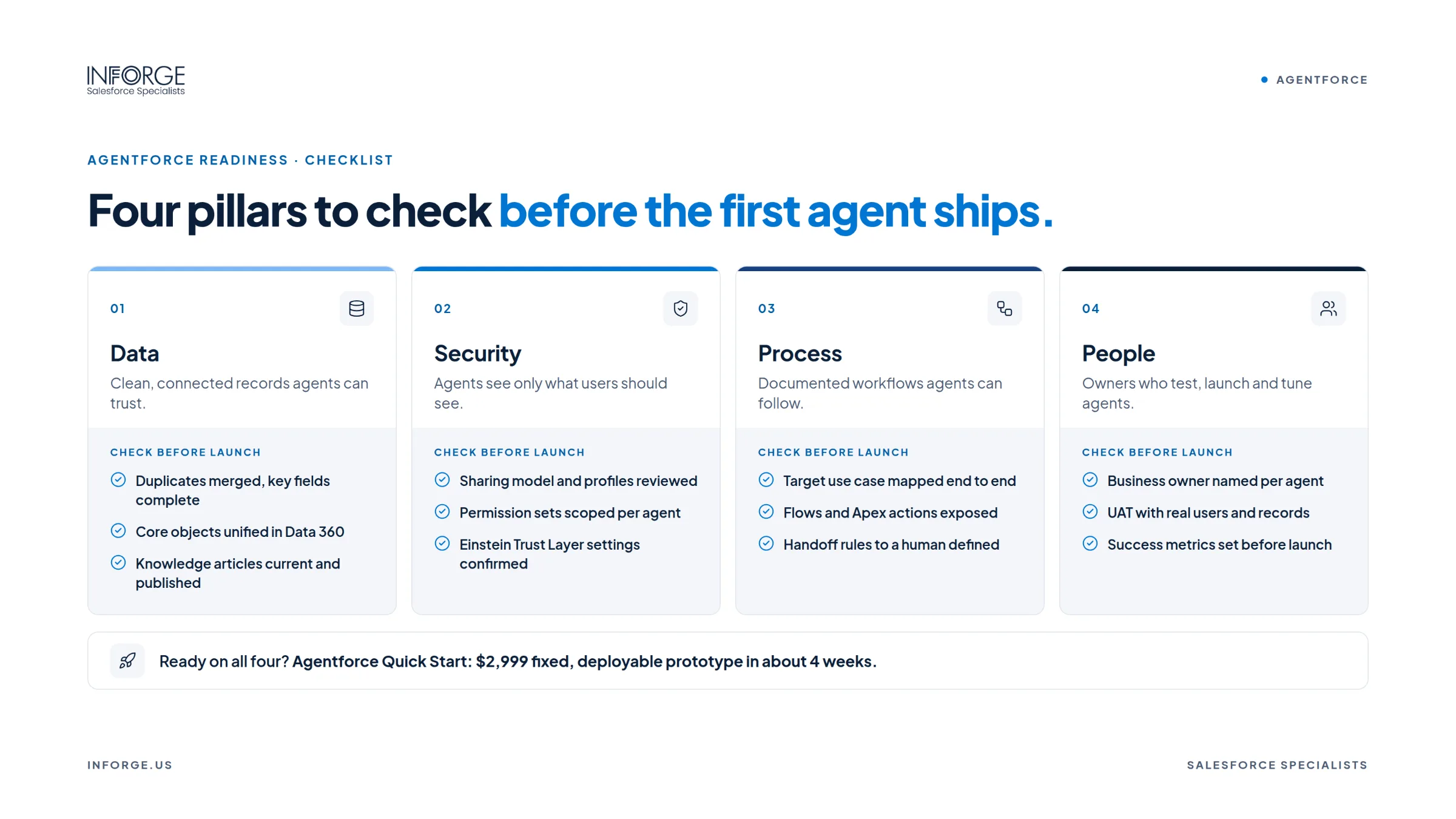
At Inforge, we've run org assessments for mid-market companies preparing for Agentforce rollouts. The pattern is consistent: teams underestimate how much foundational work sits between "we have Agentforce licenses" and "our agents are working in production." This guide covers the four pillars that must be in order before a single agent goes live.
Key Takeaways:
Agentforce requires specific Salesforce licensing (Enterprise Edition or above) and platform prerequisites including Lightning Experience, Einstein Generative AI, and Data 360 provisioning.
Data quality is the single highest-weight readiness factor — incomplete or duplicate records cause agents to produce confident, wrong outputs.
Legacy automation debt (old Workflow Rules, unfinished Process Builder migrations) must be resolved before adding an agent layer on top.
The Einstein Trust Layer is not optional configuration — it governs PII masking, zero data retention, and audit logging for every agent action.
Starting with one tightly scoped use case and a measured baseline is always the right first move.
1. Licensing and Platform Prerequisites: The Non-Negotiables
Before anything else, your org must meet the platform requirements Salesforce has set. These are hard gates — agents won't function without them.
Salesforce's official guidance is explicit: to use Agentforce, Lightning Experience, Einstein Generative AI, Data 360, and Einstein Bots must all be enabled in your org. Agentforce also requires Service Cloud or Sales Cloud Enterprise Edition or higher — orgs on Professional Edition face a real purchase decision before they can even evaluate the technology.
Data 360 provisioning deserves its own clarity. For Enterprise Edition and above, Data 360 can be activated at no additional cost — it's a platform switch, not a new product purchase. What you build on top of that switch depends on what your agent needs to access. If your first agent works only from Salesforce Knowledge articles and CRM records, the provisioning step may be sufficient. If it needs to pull from external warehouses, ERP systems, or multi-system customer profiles, a deeper Data 360 implementation becomes necessary.
[INTERNAL LINK: Inforge Salesforce org assessment services — Agentforce readiness evaluation]
From a permissions standpoint: non-admin users don't receive Agentforce access by default even after enablement. The `Manage AI Agents` permission must be explicitly assigned. And with Salesforce moving to auto-enable Agentforce for all eligible orgs in Winter '27, admins who haven't reviewed their permission architecture will find agents surfacing to users who weren't prepared for them.
Before your org is enabled, run this check:
Confirm Einstein Generative AI is active (required for Agentforce Builder access)
Verify your edition supports Agentforce (Enterprise, Performance, Unlimited, or Developer)
Assign `Manage AI Agents` permission to non-admin users who should have access
Confirm Data 360 is provisioned
Review Connected App and Named Credential setup for any external integrations your agent will need
2. Data Quality: The Largest Readiness Variable
Data quality carries 30% of the weight in most Agentforce readiness frameworks — and it's the most common reason rollouts underperform.
Here's the core problem: AI agents do not independently validate, question, or correct the information they receive. They rely entirely on the data provided to generate responses, trigger workflows, and support decision-making. An agent reading an empty required field doesn't stop and ask a clarifying question — it fills the gap with a confident, plausible, and frequently wrong answer.
This is a fundamentally different risk profile than previous Salesforce AI tools. Einstein Analytics surfaced insights for humans to evaluate. Agentforce acts — it sends responses, escalates cases, updates records, and triggers workflows. Every data quality problem that a dashboard could tolerate becomes a business action when an agent executes it at machine speed.
According to Salesforce's 2026 Data and Analytics Trends report, 26% of organizational data is untrustworthy, and 42% of data leaders lack full confidence in the accuracy and relevance of their AI outputs. The root cause in both cases is disconnected, ungoverned data.
Run these five data quality checks before enabling Agentforce:
Duplicate Density
Target: under 2% duplicate rate on Account and Contact objects. Agents act on the record they find first. If you have two Contact records for the same person with different email addresses, the agent contacts both — or contacts neither, because it can't resolve the match.
Required Field Completeness
Check: Lead.Rating (median orgs have this empty on 55% of records), Account.Industry (blank on 31% of accounts), and Opportunity.NextStep on all open opportunities. Below 70–80% completeness on agent-touched fields, routing and reasoning break down.
Stale and Abandoned Records
Open opportunities with a close date in the past, inactive account owners, and cases with no resolution path — these aren't just hygiene issues. They're inputs the agent will treat as current fact.
Knowledge Article Freshness
For service-facing agents especially, Knowledge articles are the grounding source. Agentforce struggles when Knowledge articles are vague or misaligned with customer needs — the agent retrieves what's there and presents it confidently regardless of accuracy. Nothing older than 12 months should be unreviewed. Broken policies, outdated product names, or retired processes embedded in articles become wrong answers at scale.
Picklist and Stage Hygiene
"NZ", "New Zealand", and "nz" are three distinct values to an agent. Inconsistent picklist values in region, industry, or stage fields create classification errors that cascade through every downstream action the agent takes.
3. Automation Architecture: Resolving the Debt Before Adding a Layer
Most Salesforce orgs that have been live for more than two years carry automation debt they don't fully understand: old Workflow Rules, Process Builder automations that duplicate what a Flow already does, and Apex triggers that interact in unexpected ways.
This matters for Agentforce specifically because agents trigger actions through your existing Flows and Apex. If those automations conflict, the agent inherits the conflict. It doesn't arbitrate between two competing rules — it fires whatever executes first, and the results compound across records before anyone notices.
Salesforce retired Workflow Rules and Process Builder on December 31, 2025. Flow Builder is now the only supported declarative automation tool. If your org still has half-finished migrations — Process Builder automations running alongside equivalent Flows — you have duplicate, overlapping automation firing on the same triggers. That's a bug waiting for the right record and the wrong agent action to expose it.
What the automation audit should cover:
Map every automation on the objects your first agent will touch
Identify any Workflow Rules or Process Builder automations still active (these are now running without support)
Find and resolve duplicate automations — two automations firing on the same trigger doing subtly different things
Flag human-dependent flows (flows that rely on manual approval steps) — agents can't navigate these without redesign
Test automation loops: rapid writes triggered by agent actions can create recursive cycles on high-volume objects
Outdated Apex code or redundant, overlapping Flows can create significant interference with the Einstein Trust Layer's ability to mask data and log activities correctly. A clean, streamlined automation architecture is a prerequisite for accurate AI reasoning — not just a best practice.
Salesforce's own guidance has been unambiguous: migrate off Process Builder before layering AI on top. The window to do that cleanly has now closed for teams that waited.
4. Security, Compliance, and the Einstein Trust Layer
The Einstein Trust Layer is not optional configuration. It is the governance framework that keeps your Agentforce deployment safe, auditable, and compliant — and it must be configured before any agent touches live customer data.
What the Trust Layer does:
Zero data retention: Data sent to the underlying LLM provider is not retained after the response is generated
PII masking: Sensitive fields are masked before prompts leave the Salesforce environment
Audit logging: Every agent action is logged — what it read, what it decided, what it executed
Toxicity and bias filtering: Outputs are screened before they reach the end user
Importantly, Salesforce no longer uses traditional data masking with Agentforce — masked records don't contain enough information for AI agents to complete lookups. Access control now depends on your field-level security, sharing rules, and zero-retention agreements with model providers. If your org-wide defaults, role hierarchies, or sharing rules haven't been reviewed recently, that review needs to happen before an agent with broad data access goes live.
For regulated industries, the stakes are higher. Healthcare orgs handling PHI need their Data Cloud configuration and permission model reviewed for HIPAA compliance before agents interact with patient data. Financial services orgs need to document agent decision trails for audit purposes. The Trust Layer creates the audit infrastructure — but your org's security architecture determines what data the agent can even reach.
Security checklist before go-live:
Review Salesforce Shield or field-level security controls for sensitive fields
Confirm compliance requirements (GDPR, HIPAA, SOC 2) are met for agent data access
Ensure org-wide defaults and sharing rules align with the data access you intend the agent to have
Define explicitly what data Agentforce should not access or expose
Configure Einstein Trust Layer guardrails and escalation topics before activating in production
5. Scoping Your First Use Case: Narrow Wins the Rollout
Readiness isn't just technical. The most common rollout failure isn't a broken integration — it's an agent scoped too broadly to succeed at anything measurable.
The right starting point is one workflow, chosen carefully:
High volume: The agent handles enough interactions to generate meaningful performance data quickly
Low risk: Errors are catchable and correctable without significant customer impact
Clear success threshold: You've agreed, before launch, what "working" looks like and who reviews accuracy weekly
Start with case deflection, FAQ handling, or a single routing workflow. Measure a baseline before the agent goes live. Assign a named owner to accuracy review. Expand only after the first agent has demonstrated consistent, accurate output over at least four to six weeks in production.
Common first-use cases that work:
Service agents answering tier-1 questions grounded in a clean Knowledge base
Lead routing agents (provided Account.Industry and Lead.Rating completeness are resolved first)
Internal HR or IT helpdesk agents on low-sensitivity internal data
Common first-use cases that fail:
Agents with access to the entire org's data before sharing rules are reviewed
Agents grounded in Knowledge articles that haven't been audited
Agents deployed on objects with high automation debt
Summary
Agentforce works. The platform is capable, the underlying reasoning engine is powerful, and the business case for autonomous agents in Salesforce is real. What consistently separates successful rollouts from expensive disappointments is the state of the org underneath the agent. Clean data, resolved automation debt, proper licensing, and a configured Trust Layer aren't prerequisites you complete once and forget — they're the ongoing foundation that determines what your agents can actually do.
At Inforge, our full Salesforce implementation and AI readiness work starts with the org, not the agent. We assess what's there, resolve what's blocking, and build from a foundation that can actually support autonomous AI. If your team is evaluating Agentforce and wants an honest picture of where your org stands, that's the conversation we're built for.
Frequently Asked Questions
Q: Does Agentforce require Data Cloud?
A: Data 360 (Salesforce's current name for Data Cloud) must be provisioned and enabled in your org before Agentforce runs — it's listed as a platform prerequisite. For Enterprise Edition and above, this provisioning is available at no additional cost. How deeply you implement Data Cloud beyond that depends on what data sources your agent needs to access.
Q: Can I roll out Agentforce on a Professional Edition org?
A: No. Agentforce requires Enterprise Edition or higher (Service Cloud or Sales Cloud). Professional Edition orgs need to upgrade before Agentforce is available — that's a licensing and budget decision, not just a configuration one.
Q: What happens if my data quality is poor when I roll out Agentforce?
A: Agents produce confident, fluent, wrong answers. Unlike dashboards where a human reviews an insight before acting, Agentforce executes directly — sending responses, updating records, triggering workflows. Poor data quality doesn't just reduce accuracy; it creates incorrect business actions at machine speed across potentially thousands of records.
Q: Do I need to migrate off Process Builder before deploying Agentforce?
A: Yes. Salesforce retired Workflow Rules and Process Builder on December 31, 2025. Running legacy automations alongside Agentforce creates conflicts the agent can't resolve — it executes whatever fires first. Incomplete migrations leave duplicate automations running simultaneously, which agents will trigger without distinguishing between them.
Q: How long does Agentforce readiness preparation typically take?
A: It depends on the state of your org. A well-maintained org with clean data, consolidated automations, and a clear use case can be ready in four to eight weeks. An org with significant technical debt, data quality gaps, and complex automation history can take three to six months of foundation work before the first agent should go live. The assessment tells you which scenario you're in.